The best tablet stands in 2027 lift your screen to eye level, hold it steady while you type or draw, and fold away when you need the desk back. A good stand turns a tablet from a handheld screen into a second monitor, a recipe reader, a video-call camera, or a note-taking station, and the difference between a solid stand and a flimsy one shows up the first time you tap the screen and the whole setup wobbles.
We looked at weight capacity, viewing angles, build material, footprint, and how well each stand handles tablets from compact 8-inch models up to 13-inch iPad Pro and Galaxy Tab devices. The stands below are all widely available in 2026 and 2027, with approximate starting prices. Prices change often, so check current pricing before you buy.
The shortlist covers every use case: a sturdy desk stand for home offices, a folding stand for travel, a low-profile option for drawing, and a budget pick that still holds a large tablet without sliding. Lamicall takes the overall pick for its balance of stability, price, and adjustability, while UGREEN and Twelve South lead for travellers who need something that packs flat.
Key takeaways
- Lamicall Tablet Stand is the best overall pick, starting at about $29, with a wide stable base and smooth angle adjustment.
- UGREEN is the best adjustable option for shared desks, with a taller hinge range and a foldable frame.
- Twelve South Compass Pro is the best premium folding stand, starting at about $59, and it packs flat for travel.
- Check weight capacity before buying: a stand rated for 8-inch tablets will struggle with a 13-inch iPad Pro in a heavy case.
- Avoid ultra-cheap plastic stands with no rubber grips, as they slide on smooth desks and scratch tablet edges over time.
At a glance: the shortlist
| Product | Best for | Starting price | Standout limit |
|---|---|---|---|
| Lamicall Tablet Stand | Overall use | About $29 | Heaviest tablets need the wide base |
| UGREEN Tablet Stand | Adjustable angles | About $25 | Folded size is slightly bulky |
| Twelve South Compass Pro | Travel | About $59 | Premium price |
| Satechi Aluminum Tablet Stand | iPad Pro | About $44 | Fixed low angle |
| MOFT Snap Tablet Stand | Portability | About $39 | Adds thickness to the tablet |
| Rain Design mStand Tablet | Desk setups | About $49 | Not foldable |
| Anker Foldable Tablet Stand | Budget buyers | About $19 | Basic angle range |
| OMOTON Tablet Stand | Heavy tablets | About $22 | Plain design |
Lamicall Tablet Stand — Best overall
The Lamicall stand is the safest first choice because it does the basics well: a heavy aluminium base, rubber pads that grip the desk, and a hinge that holds its angle when you tap, swipe, or write on the screen. It fits tablets from about 4 to 13 inches, including iPad, iPad Air, iPad Pro, Galaxy Tab, and Fire tablets, with or without a slim case.
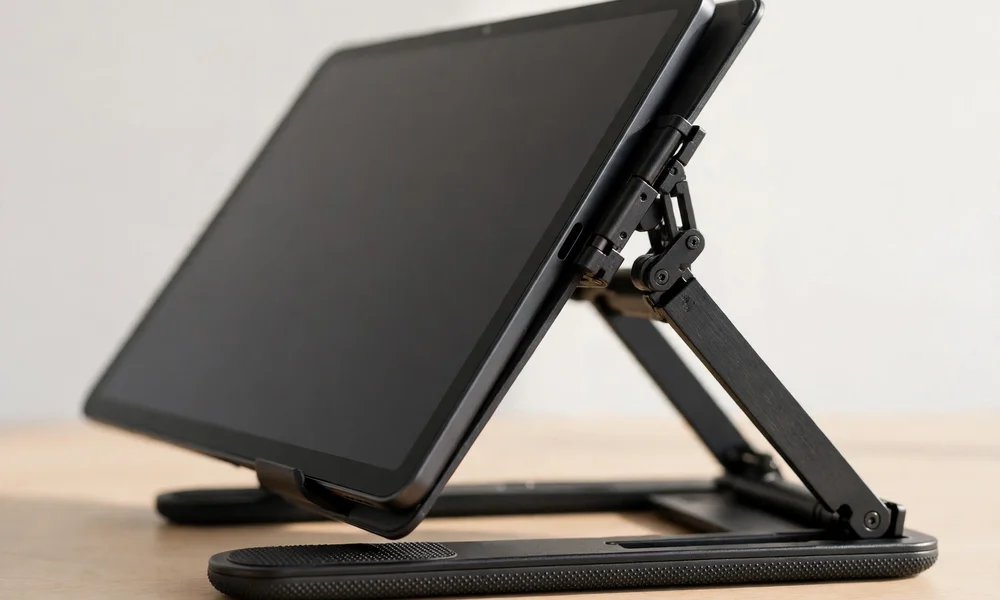
Adjustment is simple, with a tilt range that works for typing, watching video, and reading, and the low front lip keeps the tablet in place without covering the screen. Readers choosing a tablet to pair with a stand can compare current models in our guide to the best tablets for students.
Pros: Stable base, wide tablet compatibility, smooth hinge, cable space at the back.
Cons: Heavier than folding stands, limited colour choices.
UGREEN Tablet Stand — Best adjustable
UGREEN focuses on flexibility, with a taller support arm and a wider tilt range than most stands at this price. That makes it a strong pick for shared desks, where one person wants a near-vertical screen for video calls and another wants a low angle for drawing or reading. The folding frame collapses flat enough to slip into a laptop bag.
Rubber pads stop the tablet sliding, and the aluminium frame feels solid. It handles 13-inch tablets well, although very heavy tablets in thick rugged cases sit more securely on a fixed desk stand.
Pros: Wide tilt range, folds flat, strong grip pads, good value.
Cons: Slightly bulky when folded, hinge stiffens over time.
Twelve South Compass Pro — Best premium folding stand
Compass Pro is the stand for people who travel with a tablet and want a premium feel. It folds into a flat shape that fits in a bag pocket, then opens into a stable easel with two height settings. The metal build and precise hinge feel more refined than most folding stands, and it works in both portrait and landscape.
It suits iPad users who carry a keyboard and want a proper typing setup in a hotel room or cafe. It costs more than a basic desk stand and is less stable for firm stylus work, but for portability and design it leads this list.
Pros: Folds completely flat, premium build, portrait and landscape modes.
Cons: Expensive, less stable for heavy drawing pressure.
Satechi Aluminum Tablet Stand — Best for iPad Pro
Satechi builds its stand from aluminium that matches Apple hardware, and the design suits a clean desk where the tablet acts as a second screen. The low, fixed angle is comfortable for reading and video, and the weighted base keeps a 12.9-inch iPad Pro steady during normal use.
The trade-off is adjustability: you get one good angle rather than a full range, so it suits people who mainly watch, read, or join calls. A cable cutout keeps charging tidy, and the rubber lining protects the tablet edges.
Pros: Clean aluminium design, stable for large iPads, cable management.
Cons: Fixed angle, not suitable for travel.
MOFT Snap Tablet Stand — Best portable
MOFT takes a different approach: a thin magnetic stand that sticks to the back of the tablet or its case, so the stand is always with the device. It opens into several viewing angles and folds flat when not in use, adding only a few millimetres of thickness. For commuters and students, that convenience matters more than a heavy desk base.
It works best with tablets that support its magnetic attachment or a compatible case, so check compatibility first. It will not match a metal desk stand for firm stylus work, but for reading, video, and calls on the move, it is the most portable option here.
Pros: Always attached, very thin, multiple angles, no extra item to carry.
Cons: Needs a compatible case or magnetic surface, less stable for drawing.
Rain Design mStand Tablet — Best for desk setups
Rain Design is known for laptop stands, and its tablet version brings the same idea to smaller screens: a single piece of aluminium that raises the tablet, tilts it slightly, and leaves space underneath for a keyboard or notebook. The result is a tidy desk with fewer cables in view.
This is a fixed desk stand for a permanent setup where the tablet stays in one place. It holds large tablets confidently and looks at home next to a monitor, and the build quality justifies its price for a main workspace. A matching desk upgrade is covered in our guide to the best standing desks in 2027.
Pros: Solid one-piece build, raises screen height, tidy desk look.
Cons: Not adjustable, not portable.
Anker Foldable Tablet Stand — Best budget
Anker keeps the price low without making the stand feel disposable. The folding aluminium frame opens quickly, adjusts to a useful range of angles, and folds flat for a bag. It is a practical spare stand for a second room, a classroom, or a travel kit where you do not want to risk a premium model.
It handles most 8 to 11-inch tablets easily and larger tablets for video and reading, though heavy stylus work is better on a heavier base. Rubber feet stop it sliding, and the compact folded size is a genuine advantage at this price.
Pros: Low price, folds flat, light to carry, decent stability.
Cons: Basic angle range, less suited to heavy 13-inch tablets.
OMOTON Tablet Stand — Best for heavy tablets
OMOTON targets larger tablets with a wide base, thick aluminium arms, and a deep cradle that holds a tablet in a heavy case. If your tablet lives in a rugged case or you use a 13-inch model daily, this is the stand that is least likely to tip when you tap the top of the screen.
The design is plain and the stand is heavier than folding rivals, but it earns its place on stability alone. The tilt adjusts smoothly, the rubber pads protect the tablet, and the price stays close to budget level.
Pros: Very stable, fits thick cases, low price, wide base.
Cons: Plain looks, heavier than travel stands.
How to choose
Start with your tablet size and weight, including its case. A stand rated for 13 inches should still be checked against the actual weight, because a rugged case can add several hundred grams. Next, decide where the stand will live: a heavy fixed stand suits a permanent desk, while a folding or snap-on stand suits travel and shared spaces.
Angle range matters more than most buyers expect: a stand that only tilts a little works for video, but drawing and typing need a lower angle. Check for rubber grips, a cable gap at the back, and a front lip low enough not to cover screen controls. Prices here are approximate starting prices, so check current pricing before you buy. If the stand will sit next to a laptop, our guide to the best laptops for students can help you plan the full setup.
Checklist: before you buy
- Confirm the stand fits your tablet size and weight, including its case.
- Check the tilt range suits your main use: video, typing, drawing, or reading.
- Look for rubber grips on the base, cradle, and front lip.
- Make sure the front lip does not cover buttons or screen controls.
- Check for a cable gap so you can charge while the tablet is docked.
- Compare the folded size and weight if you plan to travel with it.
Frequently asked questions
What size tablet stand do I need?
Match the stand to your tablet diagonal and weight, not just the brand. Most stands here fit 8 to 13 inches, but heavy tablets in thick cases need a wide, heavy base.
Are tablet stands good for drawing?
Yes, if the stand holds a low, stable angle and does not wobble under stylus pressure. Fixed desk stands and heavy adjustable stands work best for drawing.
Can I use a tablet stand with a case on?
Usually yes, if the case is slim. Thick rugged cases need a deeper cradle, so check the cradle depth and weight limit before buying.
Do tablet stands work in portrait mode?
Many do, especially folding stands and those with a wide cradle. Fixed low stands are often landscape only, so check the product details if portrait matters to you.
Is aluminium better than plastic for a tablet stand?
Aluminium is generally more stable, durable, and better at holding heavy tablets. Plastic stands can work for light tablets, but they flex more and wear faster.
How much should I spend on a tablet stand?
About $20 to $30 buys a solid adjustable stand for most people. Spend $40 to $60 only if you need premium materials, a folding design, or a stand for a large tablet.
The bottom line
For most people, the Lamicall Tablet Stand is the right buy: stable, adjustable, well priced at about $29, and compatible with nearly every tablet. Travellers should pick the Twelve South Compass Pro or the MOFT Snap stand, while anyone with a large tablet in a heavy case should choose the OMOTON for its wider, heavier base.
Buy for your actual use, not the thinnest design. A stand that holds your tablet steady at the right angle will get used every day, while a pretty stand that wobbles will end up in a drawer.