
A literature review, a data question, and a draft revision are different jobs, so they rarely call for the same AI tool. Students and professionals often lose time switching between searching, reading, organizing, and writing. The right support depends on the task and how closely you need to check its evidence.
AI can reduce repetitive work, such as sorting papers or making a first-pass summary. It cannot decide whether a study fits your question or whether a claim is sound. Those choices still belong to you, the researcher. This guide offers a practical way to choose support without handing over your judgment.
Key Takeaways
- Match each tool to a clear research job.
- Use scholarly search to build a reading list.
- Keep maps and summaries tied to original papers.
- Use a reference manager to organize citations.
- Check AI outputs before relying on them in your work.
- Start with one real task, not a long list of apps.
Start by identifying the task that is consuming the most time, then choose support for that task.
How to Choose the Best AI Research Tools for Students and Professionals
A useful starting set pairs a discovery tool with a source organizer, then adds specialist tools only when the project needs them. Researchers commonly combine three to five AI tools for a project, rather than asking one platform to handle every research task.
A 2026 comparison groups research tools into six jobs: literature discovery, literature mapping, paper understanding, citation analysis, academic writing, and qualitative analysis. For a practical list of AI tools for research, judge each by source traceability, reliability, task fit, workflow value, verification burden, and cost. Traceability matters because you need to find the paper behind a claim.

Choose a tool for one clear task, then judge its work against the source you can inspect.
The table offers a top 5 AI tools for research as a task-based shortlist, not a claim that one platform wins every job. These picks also cover common searches for the best academic AI tools, from discovery to references.
| Research job | Strong starting pick | Best fit | Check before relying |
|---|---|---|---|
| Focused evidence questions | Consensus | Quick answers grounded in studies | Inspect the cited papers |
| Broad paper discovery | Semantic Scholar | Build a starting reading list | Check paper relevance |
| Cross-study extraction | Elicit | Compare study details | Verify extracted fields |
| Literature mapping | ResearchRabbit | Follow connected work | Check map coverage |
| References and bibliographies | Zotero | Organize and cite sources | Confirm the required style |
Match the tool to the research job
Start with the work in front of you, not a feature list. A focused question may need a search tool that brings studies together. A large reading set may call for comparison or mapping features instead.
For each pick, ask whether it shows where its claims came from and whether it fits your method. A task-based AI app comparison can help you weigh workflow fit, output checks, privacy, and cost. A tool that saves time but hides its evidence may add more checking than it removes.
Keep the working stack small
Every extra workspace brings another set of records, notes, and settings to manage. Keep a small core, then add a specialist tool only when it solves a repeated problem your current setup cannot handle.
Try a tool on one real task before moving more of a project into its workspace.
Which AI Tools Find Academic Papers?
For a focused question about what studies report, Consensus pairs scholarly search with a visual signal of how the evidence is distributed. Use Consensus for a claim-level question, Elicit to find and compare studies, and Semantic Scholar or Google Scholar to build a starting corpus.
Consensus searches across more than 200 million papers and includes a Consensus Meter that shows agreement across studies. That signal can help you see whether results point in one direction or vary. It is a starting signal, not a final reading of the evidence.

Consensus for focused evidence questions
Use Consensus when you need a quick view of research on a clear claim. A question such as whether a specific teaching method improves recall is easier to search than a broad topic such as education. Check the papers behind the answer before using it in your work.
Its visual summary can help you spot agreement, but it cannot show every detail that shapes a finding. Study design, sample, and outcome all matter. Keep the question narrow enough that the papers address the same issue.
Elicit for paper discovery and comparison
Elicit searches a database of more than 138 million papers. It can help you find relevant work and compare details across studies, especially when you need a first pass through a growing reading set.
Use its comparisons to spot papers that deserve closer reading. Check each study’s methods and results in its full text, since a short answer can miss limits or differences between studies.
Semantic Scholar for a starting reading list
Semantic Scholar provides access to more than 200 million papers and adds AI-generated TLDR summaries. These short summaries can help you sort a search result list before opening papers. Google Scholar is another place to build an initial set of academic papers.
Use this four-step routine to turn discovery into a reading set:
- Define the question and key terms.
- Search a scholarly index.
- Open and check relevant papers.
- Save useful records to a reference library.
The common mistake is treating a search summary as a substitute for reading the source paper. Summaries can help you choose what to read, but the paper holds the study’s full details.
Save the paper’s full citation as soon as you decide it belongs in your reading set.
How Do Literature Mapping Tools Reveal a Field?
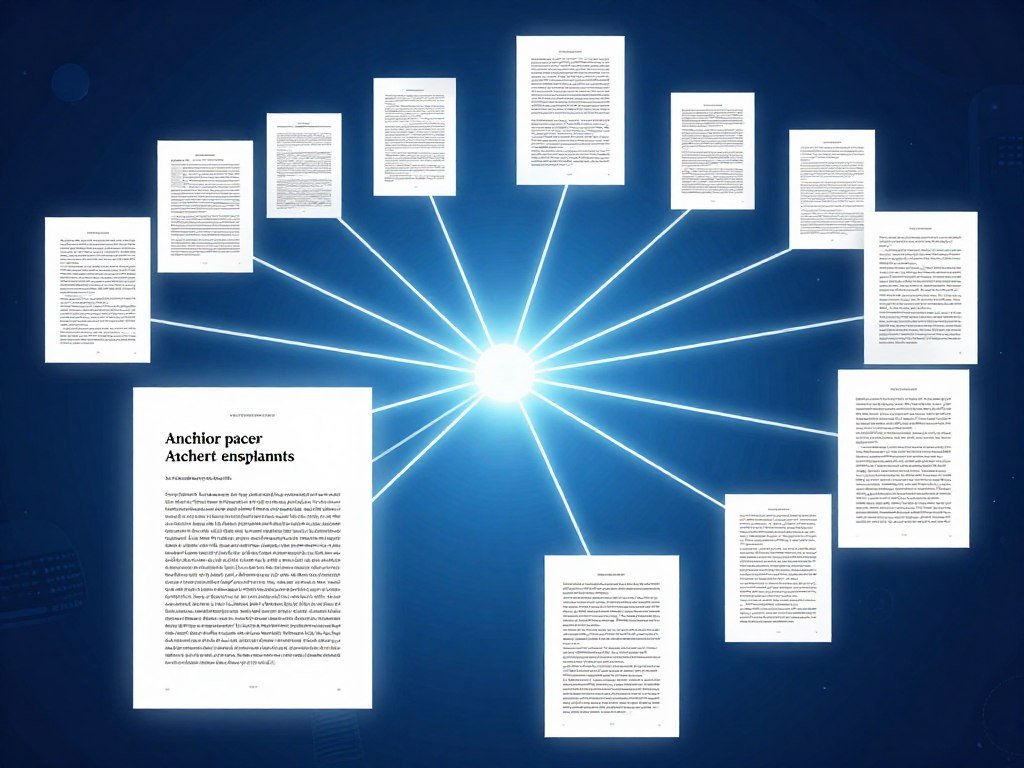
One well-chosen anchor paper can reveal both the earlier studies it builds on and the later papers that cite it. Citation snowballing means finding relevant papers by following an anchor paper’s backward references and forward citations. Backward citations can point to foundational work; forward citations can reveal newer studies.
ResearchRabbit, Connected Papers, and Litmaps turn these links into a citation network, a visual view of connections among papers. Start with an anchor paper that closely fits your research question, then follow clusters that lead to useful sources.
| Tool | Useful mapping job | Free-tier limit |
|---|---|---|
| ResearchRabbit | Expand from a collection | 50 seed articles |
| Connected Papers | Create a graph from a seed paper | 5 graphs per month |
| Litmaps | Maintain article maps | 2 maps, up to 100 articles per map |
Start with an anchor paper
ResearchRabbit maps connections across more than 310 million articles. Its free tier caps users at 50 seed articles, so choose seeds that represent the main parts of your topic. A collection with varied terms and methods may reveal more than one paper alone.
Connected Papers creates a graph from a seed paper, while Litmaps lets you maintain article maps. Connected Papers’ free tier allows up to five graphs per month. Litmaps’ free tier allows two maps, with up to 100 articles per map.
Read the network as a discovery aid
A network can make a field easier to scan, but its shape is not a measure of research quality. A tightly connected cluster may reflect shared references, not agreement on a finding. Read paper titles and abstracts to decide which paths matter.
A map can miss relevant work when the anchor paper or search vocabulary is narrow. A newer paper may use different terms, or a useful branch may cite a different starting study.
Check an important cluster against a conventional database search so that a visually clear map does not become your entire literature search.
Which AI Tools Explain and Synthesize Papers?
If you already have a defined set of papers, a source-grounded notebook can help you ask questions across that set without treating it as a replacement for the papers. NotebookLM works from documents you provide, while SciSpace focuses on explaining dense academic papers. The source set defines what a research notebook can answer.
NotebookLM’s free plan includes 100 notebooks, up to 50 sources per notebook, and capacity for up to 500,000 words per source. Use a defined collection when you want answers tied to your own notes and papers. The tool cannot cover work you did not add.

NotebookLM for user-provided sources
A research notebook can help you compare themes across articles, find where a topic appears, or ask what a set of papers says about a method. NotebookLM grounds answers in supplied materials, which makes it useful for a bounded reading set.
For a closer look at tools for learning from uploaded sources, see this comparison of AI apps for study and work. The documents you add still shape the answer. A missing paper or a poorly framed question can leave a gap in the response.
SciSpace for dense academic papers
SciSpace is designed to explain dense academic papers. Use it when a paper’s wording, methods, or technical terms slow your reading. Ask about a passage or term, then return to the paper to see how that explanation fits its argument.
That kind of help differs from asking questions across a collection. An explanation of one paper may clarify a hard passage, while a notebook can help you compare details across documents.
Claude and Gemini Notebook for long documents
Gemini Notebook can answer questions grounded in materials you upload. Claude’s context window can hold 1 million tokens, which can help with long-document tasks. Both approaches work best when you know which documents belong in the conversation.
Scholarcy makes summary cards from papers you upload or link. It is a summary option, not a search engine, so use it after you have found the papers you want to review.
Source-grounded answers can only reflect the documents provided and how well you frame the question. Keep a page or note linking each useful synthesis point to the original document and passage.
Can AI Speed Up a Systematic Literature Review?
AI can accelerate parts of a systematic review by helping organize screening and extraction, while the review question and eligibility rules still need to be explicit. A larger screening capacity does not remove the need to set and apply review criteria consistently.
Elicit’s systematic-review workflow supports screening up to 5,000 papers on Pro and 40,000 on Enterprise. Its literature-review reports can synthesize up to 500 sources in Comprehensive mode. These limits support large projects, but they do not decide which studies meet your criteria.
Screen records in a structured workflow
Start by defining the review question and eligibility rules. Specify which populations, methods, dates, or outcomes qualify. Then apply those rules to records during screening, keeping decisions consistent across the full set.
AI can help sort records and flag possible matches for review. A record that looks relevant from its title may fail a full-text criterion. Keep human review tied to the stated rules, especially when a paper sits near an eligibility boundary.
Extract comparable study details
Use structured columns for methods, variables, and outcomes. Add clear definitions for each field so extracted details mean the same thing from paper to paper. This can make comparisons easier and help you spot missing information.
An extracted table is not the finished review. Check each field against the included studies, since a wrong value can change the pattern in your synthesis. Elicit’s screening limits can help you judge whether its workflow fits the size of your review.
Record the inclusion rule beside the screening decisions so later changes do not silently alter the review.
Which Tools Check How Studies Cite One Another?
A high citation count alone cannot tell you whether later studies support a paper’s central finding. Scite helps you inspect whether later citation statements support, contradict, or simply mention a cited work. Treat a citation label as a lead for reading context, not a verdict on the study.
Scite classifies more than 1.2 billion citation statements. Its labels can help you see how later papers refer to a work, but one paper may be cited for its method or background rather than its conclusion. The reason for the citation matters.
Separate supporting from contrasting citations
A supporting citation may report a result that agrees with the cited work. A contrasting citation may describe a different result or challenge its claim. A mentioning citation may refer to the paper without testing its main finding.
These labels help you choose which papers and passages to read. They do not tell you whether the citing study used a sound method or whether its result applies to your question.
Read citation context in the original paper
Open the surrounding passage and note what claim the citing paper makes. A citation beside a method description has a different role from one used to compare results. That distinction can change how you describe a paper’s influence.
Open the surrounding passage and the citing paper before using a citation label to characterize the evidence.
How Can AI Help Analyze Research Data?
For an exploratory question about a spreadsheet, a natural-language analysis tool can help surface patterns and produce a first chart. Julius AI supports spreadsheet questions and chart generation. Exploratory output is not a substitute for formal statistical reporting.
NotebookLM can help synthesize notes or qualitative material from sources you provide. These tools support different kinds of analysis: one can explore structured data, while another can help organize themes in text. Neither decides what a result means.
Explore structured datasets with Julius AI
Ask a plain-language question about a spreadsheet to get a first look at trends, gaps, or possible outliers. A chart can make a pattern easier to see before you choose a formal method. Use the early result to guide further analysis, not to settle the research question.
For another view of uploaded-file analysis and chart tools, consider this comparison of ChatGPT apps for file work. Tool features vary, so match the app to the data task you need to do.
Organize qualitative material with source-grounded tools
For notes, interview text, or other written material, NotebookLM can help you ask questions across a defined source set. It may help group ideas or locate passages for closer review. You still need to decide whether those themes fit your study and its method.
Strong-sounding answers also need scrutiny. Humanity’s Last Exam contains 2,500 expert-level questions across more than 100 subjects. Nearly 1,000 subject experts from more than 500 institutions across 50 countries developed it. About 14% of its questions require both text and image understanding, and 24% are multiple-choice.
Keep interpretation and validation human-led
Frontier models scored poorly on the benchmark, and most models had root mean square calibration errors above 70%. That result is a reminder that confident answers can still be wrong, even on tasks built by subject experts.
Before you report a pattern, work through these checks:
- Inspect the input data.
- Check calculations and chart labels.
- Compare outputs with an appropriate analysis method.
- Write the interpretation in your own disciplinary context.
Before reporting a pattern, check that it survives the method and assumptions your research question requires.
Which AI Tools Help With Academic Writing and References?
A writing assistant is most useful when it helps improve a draft without taking over the claim the writer is making. Paperguide is positioned for research-connected drafting, while Paperpal and Writefull focus on academic language support. The best AI for academic writing with references is a specialist writing assistant paired with a real reference manager.
Jenni AI supports assisted drafting. Your job remains to preserve the argument and check any reference before use. Keep the claim yours, especially when a tool suggests new wording or a broader conclusion.
Choose support for the draft you already have
Paperguide’s AI Paper Writer is described as grounded in a corpus of more than 200 million peer-reviewed papers and supports more than 1,000 citation styles. Paperpal and Writefull can help refine academic language. Jenni AI can help you draft with autocomplete support.
These tools serve different stages of writing. Use a language assistant to revise a paragraph, or a drafting assistant to develop text from your own outline. Do not let smooth wording turn an uncertain result into a firm claim.
Compare specialist writing assistants
A 2026 academic-writing comparison lists Paperpal’s annual plan at $11.58 per month. Jenni AI’s free option allows 10 autocompletes per day, and its annual plan is listed at $12 per month. Writefull offers a free quota, with an annual plan listed at $150.
These prices and limits can help you compare costs with the writing tasks you do often. A free allowance may be enough for occasional edits, while frequent drafting may call for a different plan.
Use generated titles as a style aid, not a template
A 2026 study compared 300 human-authored medical research-article titles with 300 ChatGPT-generated titles based on the same abstracts. The generated titles closely matched human titles in length, multi-unit forms, and nominal constructions. They showed more formulaicity and less stylistic flexibility.
Use a suggested title to test tone or length, not as a template to copy. Compare each edit with the evidence around it and keep it only if it preserves the intended meaning.
Paperguide’s writing features can be part of a drafting setup, but your references still belong in a reference manager. Compare a suggested edit with the surrounding evidence and keep it only if it preserves the intended meaning.
What Should a Reference Manager Handle?
A reference manager makes it easier to keep source records, in-text citations, and bibliographies connected as a project grows. Zotero can organize a library, share it with collaborators, and insert citations into writing apps. Formatting a citation does not confirm that the source exists or supports your claim.
Zotero is open-source software developed by an independent nonprofit organization. It supports more than 9,000 citation styles and creates references and bibliographies in Word, LibreOffice, and Google Docs. One organized library can keep reading records and writing citations tied together.
Organize the library and shared project
Store bibliographic records as you collect papers, then sort them into folders or collections that match your project. Zotero lets you share a library with any number of collaborators at no cost, which can help a team work from the same set of records.
Zotero’s free cloud file storage includes 300 MB. Paid storage starts at $20 per year for 2 GB. Those limits affect attached files, not the value of keeping bibliographic records organized. You can still maintain useful records while storing large files elsewhere.
Insert citations in the writing app
Zotero can add in-text citations and build a bibliography in common writing apps. Choose the style your department, journal, or client requires, then use the manager to keep citations connected as you revise.
A formatted record can still have a wrong author, date, or title. Check the source record itself when details matter, and make sure the cited work supports the sentence where it appears.
Check the final bibliography against the style required by your department, journal, or client.
Which AI Tools Support Studying and Long-Form Work?
A general assistant can make a difficult concept easier to discuss, while a study tool can help turn reading into questions you must answer yourself. ChatGPT or Claude can help unpack a concept, brainstorm questions, or outline a study session. The best generative AI for research depends on whether your job is discovery, synthesis, writing, or study practice.
General assistants can explain ideas, but they are not scholarly indexes. Use academic tools to find research papers, then use a broad assistant for tasks such as planning or plain-language explanations. Keep the job clear so you know what kind of answer to expect.
Use general assistants for explanation and planning
ChatGPT and Claude can help you talk through a hard idea or draft a study outline. Their answers need review, especially when they make claims about a paper or field. University library guidance on AI tools and research limits warns that chat assistants can produce plausible but inaccurate information.
For a broad view of assistants by task, see this comparison of ChatGPT alternatives. Gemini, NotebookLM, Consensus, Elicit, Semantic Scholar, ResearchRabbit, Scite, and Zotero each serve other parts of research or study work.
A practical top-10 GenAI tool landscape includes ChatGPT, Claude, Gemini, NotebookLM, Consensus, Elicit, Semantic Scholar, ResearchRabbit, Scite, and Zotero. These are grouped by use, not ranked: general help, source-based synthesis, discovery, mapping, citation context, and reference management.
Turn reading into active recall
RemNote can turn research papers and PDFs into flashcards. Flashcards support active recall, which means trying to retrieve an answer from memory. Spaced review brings missed ideas back later instead of keeping every question in one study session.
A systematic review of spaced learning and retrieval practice in radiology education found statistically significant differences in at least one exam for five of eight eligible studies. It also noted that evidence in radiology education remains limited.
Try this four-step study routine:
- Make questions from your notes.
- Answer from memory.
- Check against the source.
- Revisit missed material later.
Use AI explanations to identify what to review, then test your understanding without the answer on screen.
What Can You Do With Free AI Research Tools?
A free plan can be enough to test a workflow, but each tool’s free allowance covers a different part of the work. Free plans can form a working stack, while recurring high-volume tasks are the clearest reason to consider a paid tier.
Compare the task you repeat with the exact limit that blocks it. Pay for a bottleneck, not a feature that looks useful but sits unused. Prices below show the stated monthly rate and billing term.
| Tool | Free access | Paid option | Relevant limit or condition |
|---|---|---|---|
| Elicit | Unlimited search and summaries, limited agent and reports | Academic Plus $11 monthly, billed annually, or $19 monthly | Free tier limits agent and report use |
| Consensus | 10 Pro messages and up to 3 Deep reviews monthly | Pro $12 and Deep $45 monthly, billed annually | Free tier has monthly caps |
| Scite | Connect tier | Basic $20 monthly, billed yearly, 7-day trial | Connect excludes Assistant and search |
| ResearchRabbit | Unlimited searches and collections, up to 50 seed articles | $10 monthly, billed annually, or $12.50 monthly | Seed-article cap |
| Paperguide | Monthly AI credits | Plus $12 monthly, billed annually | Free credits are monthly |
Start with usable free tiers
Elicit’s Basic plan is free and includes unlimited search and summaries, with limited use of its Research Agent and reports. Consensus includes 10 Pro messages and up to three Deep reviews each month. Those limits can suit early trials or projects with modest needs.
ResearchRabbit’s free plan includes unlimited searches and collections, up to 50 seed articles. Paperguide’s free plan includes monthly AI credits. Scite’s free Connect tier does not include Assistant or search, so check whether its free features match your task.
Upgrade only for a recurring bottleneck
Elicit Academic Plus costs $11 per month when billed annually or $19 per month when billed monthly. Consensus Pro costs $12 per month and Deep costs $45 per month when billed annually. Scite Basic costs $20 per month when billed yearly and includes a 7-day trial.
ResearchRabbit+ costs $10 per month on an annual plan or $12.50 per month when billed monthly. Paperguide Plus costs $12 per month when billed annually. Before subscribing, identify the exact limit you keep reaching and whether the upgrade removes it.
How to Build a Verifiable Research Workflow
A reliable workflow keeps each AI-assisted step connected to a paper, dataset, or note that the researcher can inspect. General assistants can fabricate citations, so independently verify every source against the original publication. Keep your question, evidence, and interpretation connected throughout the project.
Use a five-step process to keep research decisions visible. Each step should leave a record you can revisit, rather than a set of answers that only exists in an AI chat. Traceable work makes it easier to explain how you reached a claim.
Before sharing or submitting the work, open every cited source and confirm that it supports the claim beside it.
Follow this sequence:
- Search a scholarly index with a defined question.
- Map from an anchor paper when terminology may miss relevant work.
- Screen and extract evidence into a structured comparison.
- Keep sources and citations in Zotero or another reference manager.
- Verify each source and write the interpretation in your own argument.
ChatGPT, Claude, and other general assistants can produce plausible but false references. Check each source’s title, authors, and publication details against the original record. Then read enough of the paper to confirm that it supports the claim you plan to make.
A student guide recommends checking that research-tool citations are real and verifiable, and that writing support preserves the student’s own argument. Keep those checks in your process, even when an AI answer sounds confident.
Before sharing or submitting the work, open every cited source and confirm that it supports the claim beside it.
Conclusion
The best setup is the smallest set of tools that reliably supports the work you actually do. A few task-matched options can save time without filling your project with extra platforms. Keep evidence checks close to each step, and keep the final argument in your hands.
Choose one current project, test one tool on a bounded task, and keep it only if it saves effort without weakening your evidence checks.
FAQ
How many AI tools should I use for one research project?
Three to five tools are a common working stack for one research project. Choose each for a distinct task, such as finding papers, mapping related work, or organizing references. A small stack is easier to manage than several tools with overlapping features. Start with the work that takes the most time, then add another tool only when it solves a real gap.
Can AI-generated citations be trusted?
No, AI-generated citations should not be trusted until you check each source yourself. Open the paper and confirm its title, authors, publication details, and relevance to your claim. General assistants can produce references that look real but do not match a published work. A reference manager can format a record, but formatting alone does not prove the source is real or supports your point.
What is the difference between Consensus and Elicit?
Consensus suits focused questions about what studies report, while Elicit helps find and compare papers. Consensus can give you a quick view of evidence around a clear claim. Elicit can help you build a set of relevant studies and compare details across them. For either tool, use the paper itself to judge methods, limits, and results before drawing a conclusion.
Is NotebookLM useful for academic research?
Yes, NotebookLM can help with academic research when you provide a defined set of source documents. You can ask questions across your papers or notes and use its answers to find material for closer reading. It cannot cover sources you did not add, and a question that is too broad may produce an unhelpful answer. Check useful points against the documents and passages they refer to.
Should I use ChatGPT or Claude to write a literature review?
Use ChatGPT or Claude for brainstorming or organizing ideas, not as the authority for sources or the owner of your argument. Either assistant can help you outline themes or make a difficult concept easier to discuss. You still need to find and read the papers, decide how they fit together, and shape the review’s claim. Check every source against its publication record and full text.
Can free AI tools support a systematic review?
Yes, free AI tools can help with parts of discovery and organization, but they cannot take responsibility for review criteria. You can use free access to test searches or sort early records, depending on each tool’s limits. Define eligibility rules before screening and apply them consistently. Check extracted details against the included studies so the final review reflects the papers, not an unchecked table.



