Sinhala is spoken by around 16 million people, most of them in Sri Lanka, and it is one of the most rewarding languages a traveller, heritage learner, or business professional can pick up. It is also one of the hardest to learn with apps alone. Sinhala uses its own rounded script, its spoken and written forms differ more than in most languages, and far fewer courses exist for it than for Spanish, French, or Japanese. That combination makes choosing the right tool matter more, not less.
AI has changed what is possible for learners of lower-resource languages. A good AI tutor can explain a Sinhala sentence word by word, correct your pronunciation, and generate endless practice dialogues. A bad one will confidently invent Sinhala words or teach you a formal written form nobody speaks at the market. The difference is usually the tool you pick and how you use it.
This guide compares eight AI tools that can help you learn Sinhala in 2027, from conversational AI assistants to dedicated language apps with Sinhala content. We looked at Sinhala script support, speaking practice, grammar explanations, pricing, and how honest each tool is about its limits.
Key takeaways
- ChatGPT is the best overall choice for Sinhala, because it handles the script, explains grammar in plain English, and creates unlimited custom practice.
- Google Gemini is the best free starting point, with strong Sinhala comprehension and useful translation and explanation features at no cost.
- Ling is the best dedicated Sinhala course app, with structured lessons, audio from native speakers, and a clear path from alphabet to conversation.
- Drops is the best tool for learning Sinhala vocabulary quickly, using short visual sessions that suit busy learners.
- No single app covers spoken Sinhala fully, so pair a course app with an AI conversation partner and real listening practice for the best results.
At a glance: the shortlist
| Product | Best for | Starting price | Standout limit |
|---|---|---|---|
| ChatGPT | Overall learning and conversation | Free; Plus from $20 per month | Occasional errors in Sinhala; verify important phrases |
| Google Gemini | Free explanations and translation | Free; Advanced from $19.99 per month | Less structured than a course app |
| Ling | Structured Sinhala lessons | Free trial; from around $8.99 per month | Speaking practice is more limited than conversation AI |
| Drops | Fast vocabulary building | Free with limits; Premium from $9.99 per month | Five-minute daily limit on the free plan |
| Mondly | Guided daily lessons | Free trial; from around $9.99 per month | Sinhala content is thinner than major languages |
| Memrise | Memorising words and phrases | Free with limits; Pro from around $8.99 per month | Less Sinhala depth than its big languages |
| TalkPal | AI speaking practice | Free with limits; Premium from around $9.99 per month | Needs a base vocabulary to be useful |
| Google Translate | Quick lookups and reading help | Free | Not a learning course; translations can be stiff |
ChatGPT — Best overall
ChatGPT is the most capable single tool for learning Sinhala, and the reason is flexibility. You can ask it to explain a Sinhala sentence in English, break a verb into its parts, write a dialogue for ordering food in Colombo, quiz you on vocabulary you learned yesterday, or role-play a conversation with a tuk-tuk driver. No dedicated course app offers that range, and for a language with limited course material, that range matters enormously. It reads and writes the Sinhala script fluently, and it can switch between Sinhala and English inside one conversation without losing the thread.
Voice mode is where the tool earns its place at the top of this list. You can speak Sinhala to it, hear a spoken reply, and ask it to slow down or repeat a word. The pronunciation is not perfect, and it sometimes produces a formal or slightly unnatural phrasing, but as a practice partner that is always available, it is far better than silence. Paid Plus subscribers get the stronger models and longer conversations; the free tier is enough to test whether the approach suits you. If you are learning another less common language too, the same method transfers well, and the approach used in our guide to the best AI tools for learning Kazakh shows how a conversation-first routine works for a low-resource language.
Pros: Unlimited custom lessons, dialogues, and quizzes; strong Sinhala script support; voice conversation for speaking practice; explains grammar in plain English.
Cons: Sometimes invents or mistranslates Sinhala words; no structured curriculum unless you build one; quality varies between free and paid models.
Google Gemini — Best free option
Gemini is the best free way to start learning Sinhala, and for many learners it is all they need for the first few months. It understands Sinhala well, answers grammar questions clearly, and can translate between Sinhala and English with useful explanations rather than a bare word swap. Ask it why a sentence uses one verb form and not another, and you will usually get a clear answer with examples. That explanatory skill is exactly what beginners need most, and it costs nothing.
Gemini also works well as a reading companion. Paste in a Sinhala news paragraph, a song lyric, or a message from a friend, and ask for a line-by-line breakdown with vocabulary notes. That turns real Sinhala text into study material, which is far more motivating than drilling isolated words. Its voice features let you practise listening and speaking, though the conversational flow is less natural than a dedicated tutor session. The Advanced paid tier adds the stronger model and longer context, which helps when you want it to remember your level and track your progress across sessions, but the free version is genuinely useful rather than a teaser.
Pros: Free tier is genuinely useful; clear grammar explanations; strong translation with context; good for breaking down real Sinhala text.
Cons: No built-in curriculum or progress tracking; conversation feels less like a tutor than ChatGPT; Advanced tier needed for the best model.
Ling — Best dedicated Sinhala course
Ling is the best dedicated course app for Sinhala, and it is the closest thing to a proper textbook in this list. Its Sinhala course is organised into structured lessons that start with the alphabet and basic greetings, then move through everyday topics such as food, travel, family, and numbers. Each lesson mixes listening, reading, writing, and speaking exercises, and the audio comes from native speakers, which matters for a language where pronunciation is hard to guess from spelling.
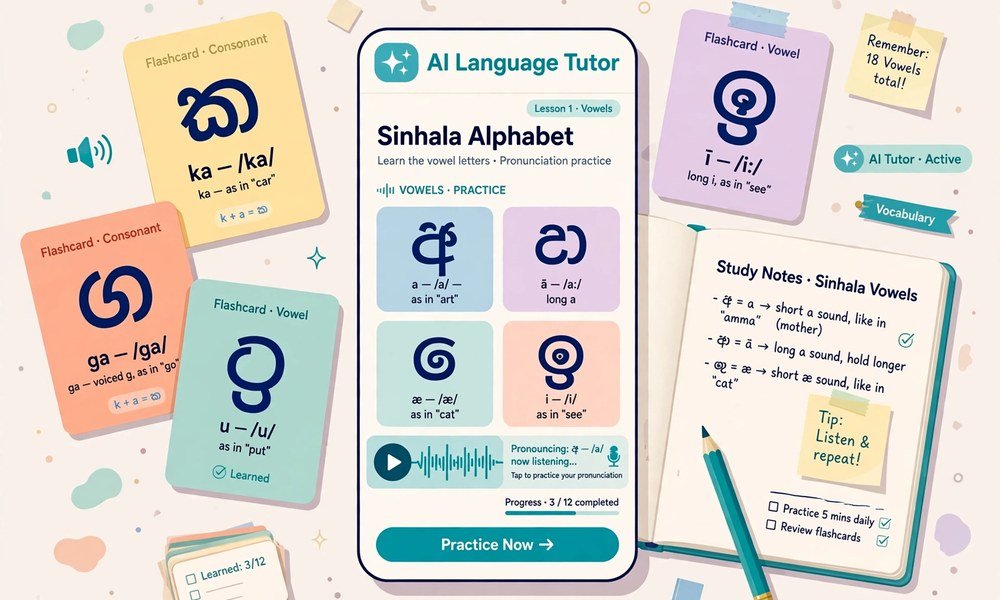
The alphabet section deserves special mention. Sinhala script looks intimidating at first, with its loops and curves, but Ling breaks it into small groups of letters with audio and writing practice, so you can learn to recognise the characters before you are expected to read whole words. That foundation pays off quickly: once you can sound out the script, every other tool on this list becomes more useful, because you can read the Sinhala they show you instead of relying on transliteration.
Pros: Real structured Sinhala course with native audio; good alphabet and script teaching; chatbot for guided conversation; clear progression from beginner upwards.
Cons: Speaking practice is scripted rather than open-ended; subscription needed for the full course; fewer advanced lessons than for major languages.
Drops — Best for vocabulary
Drops takes a different approach from every other tool here: it does almost nothing except vocabulary, and it does that one thing very well. Each session is a five-minute burst of fast, visual word-matching games built around illustrations rather than translations. You see a picture, hear the Sinhala word, and match it to the right image. The pace is quick, the format is genuinely fun, and the five-minute limit turns out to be a feature, because it makes daily practice easy to keep up for months.
For Sinhala learners, Drops is most useful as a vocabulary engine alongside a course or tutor. Learn your words in Drops, then use them in sentences with ChatGPT or Gemini, and they stick far better than words you only ever saw in a list. The app covers practical topics such as food, travel, numbers, and everyday objects, and the Sinhala audio is clear and well recorded. It also teaches the script alongside the words, so you are reading Sinhala characters from the start rather than depending on romanised spelling.
Pros: Fast, visual, and genuinely enjoyable; clear native audio; teaches the script from the start; five free minutes a day is enough to build a habit.
Cons: Vocabulary only, no grammar or conversation; free plan is time-limited; word lists are not customisable on the free tier.
Mondly — Best for guided daily lessons
Mondly is a good choice if you like the feeling of a lesson that tells you exactly what to do. Its Sinhala course follows a daily lesson format with short conversations, vocabulary drills, and speech recognition that listens to your pronunciation and scores it. The lessons are built around realistic situations, such as introducing yourself, ordering a meal, or asking for directions, which keeps the language practical from the first week.
The speech recognition is the feature that sets Mondly apart for Sinhala learners. Many people can read Sinhala words long before they can say them confidently, and having an app listen and tell you whether you were understood is a useful bridge. It is not as forgiving or as clever as a human listener, and it sometimes accepts a rough pronunciation that a native speaker would struggle with, but as a daily confidence builder it works. The app also includes a chatbot and augmented-reality features on some devices, though the core daily lessons are where the value sits.
Pros: Clear daily lesson structure; speech recognition for pronunciation; realistic situational dialogues; chatbot for extra practice.
Cons: Sinhala course is smaller than its major-language courses; monthly pricing is high for a single language; advanced material is limited.
Memrise — Best for memorising phrases
Memrise is built around one idea: that you remember language better when you learn it in memorable chunks and revise it at the right time. Its spaced-repetition system schedules reviews just before you would forget a word, and its Sinhala content focuses on useful phrases rather than isolated vocabulary. You learn how to say things, not just what words mean, which makes it easier to speak in real situations.
The app’s video clips of native speakers are its best feature. Hearing real people say a phrase, with their natural speed and intonation, teaches you far more than a robotic voice reading a word list. Memrise has also added AI conversation practice for rehearsing dialogues, though it is less developed than the dedicated AI tutors here. The free version covers a useful amount of content; Pro unlocks the full course, offline mode, and the AI features.
Memrise works best as a second app rather than your only one. Use it for fifteen minutes a day to lock in phrases, and use Ling or an AI tutor for the explanations and conversations that Memrise does not provide. Learners who have used the same memorisation method for other languages will find the approach familiar, and the technique behind it is the same one recommended in our guide to the best AI tools for learning Armenian, another language where phrase-level practice beats word lists alone.
Pros: Spaced repetition that actually works; native-speaker video; phrase-based learning that transfers to real conversation; useful free tier.
Cons: Sinhala content is less deep than for major languages; AI conversation features are still developing; explanations of grammar are thin.
TalkPal — Best for AI speaking practice
TalkPal is an AI language tutor built specifically for conversation practice, and it fills the gap that course apps leave open. You choose a topic, pick a mode such as role-play, debate, or casual chat, and talk with an AI partner that corrects your mistakes and suggests more natural phrasing. For Sinhala learners, that matters, because the jump from understanding words to actually speaking sentences is where most people stall.
The app supports a large number of languages, and Sinhala is among them, though the depth of correction and the naturalness of the AI’s Sinhala are not as strong as for widely spoken languages. You will get the most from it once you already know a few hundred words and some basic sentence patterns; complete beginners may find open conversation frustrating, because they spend most of the session asking the AI to explain words rather than practising speech. Used at the right level, though, it is an excellent way to build fluency, and the role-play scenarios, such as a job interview or a market negotiation, are more realistic than the scripted dialogues in most course apps.
Pros: Real open conversation practice with corrections; role-play scenarios for realistic situations; personalised feedback on repeated errors; good for building speaking confidence.
Cons: Needs a basic vocabulary first; Sinhala support is less polished than major languages; free tier is message-limited.
Google Translate — Best free helper
Google Translate is not a course, and it would be a mistake to treat it as one, but it is still one of the most useful free tools a Sinhala learner can have. It translates between Sinhala and English in both directions, reads Sinhala text aloud, translates text in photos through the camera, and lets you save phrases for later. For a learner, those features solve everyday problems: reading a sign, understanding a message, or checking how a word is spelled in the script.
Its Sinhala support has improved steadily, and for short, simple sentences it is usually accurate. Longer sentences can come out stiff or formal, and it sometimes chooses the written form of a word where a speaker would use a different spoken form, so never copy a translation into a message to a native speaker without checking it. Used as a lookup tool and a reading aid, though, it is excellent. The camera translation is especially handy in Sri Lanka, where menus, signs, and labels are often in Sinhala script, and being able to point your phone at them and get an instant reading is a genuine learning aid.
Pros: Completely free; camera translation for signs and menus; good for quick lookups; offline mode with the downloaded language pack.
Cons: Not a learning course; translations of longer sentences can be stiff or overly formal; no progress tracking or lessons.
How to choose
Start with your goal, not with the app store. If you want to speak with family in Sri Lanka, prioritise conversation tools such as ChatGPT and TalkPal, and spend your time on spoken phrases rather than formal written grammar. If you are travelling, prioritise Drops for vocabulary, Google Translate for reading signs, and Ling for the polite phrases that make a trip smoother. If you want to read Sinhala books or news, prioritise the script and grammar explanations from Ling and Gemini. The right stack is the one that matches the Sinhala you actually want to use.
Budget matters less than consistency. A free combination of Gemini, Google Translate, and the free tiers of Drops and Ling will take a motivated learner a long way, and you should only pay for a subscription once you have practised daily for a month and know which tool you open first. When you do pay, pay for one tool at a time and use it every day for a month before adding another; three half-used subscriptions teach less than one tool used properly. Learners working through a similar low-resource language face the same choices, and the decision framework in our guide to the best AI tools for learning Azerbaijani applies here too: pick one course, one conversation partner, and one vocabulary tool, then stick with them.
Checklist: before you pay
- Try the free tier daily for at least two weeks before subscribing to any Sinhala tool.
- Check that the app actually supports Sinhala script and audio, not just transliterated text.
- Compare the monthly price with the annual or lifetime price before committing.
- Confirm you can cancel easily and that the subscription does not auto-renew silently.
- Test the speaking and listening features, not just the reading lessons, before you pay.
- Make sure you can export or at least review your learned vocabulary outside the app.
Frequently asked questions
Can I learn Sinhala with AI alone?
You can make real progress with AI alone, especially in reading, vocabulary, and basic conversation, but you will learn faster if you also speak with native speakers. AI is excellent for explanations and correcting written sentences. It is weaker at judging pronunciation and teaching the spoken form of Sinhala, which differs from the written form. Use AI daily, and add a weekly conversation with a real person if you can.
Which AI tool is best for learning the Sinhala alphabet?
Ling is the best tool in this list for the alphabet, because it teaches the script in small groups with native audio and writing practice. Drops is a good second choice, since it shows you the script alongside every word. ChatGPT and Gemini can also generate alphabet quizzes, but they work best after Ling has given you the foundation.
Does Duolingo have a Sinhala course?
Duolingo does not offer a Sinhala course, which is one reason this list focuses on other tools. If you like Duolingo’s style, Ling and Drops are the closest alternatives, and both cover the alphabet and everyday vocabulary. You can also ask ChatGPT to build matching and translation drills for any Sinhala topic.
How long does it take to learn Sinhala with these tools?
With thirty minutes of daily practice, most learners can handle greetings, introductions, and simple everyday conversations within three to six months. Reading the script comfortably and holding longer conversations usually takes a year or more. Sinhala is classed as a difficult language for English speakers, so progress is slower than with a European language, but daily practice keeps you moving.
Are the free versions of these tools enough?
Yes, for the first few months. Gemini and Google Translate are free, and the free tiers of ChatGPT, Ling, Drops, and Memrise cover the core features. Pay when you hit a limit that actually blocks you, such as running out of daily speaking practice, rather than paying on day one. One well-used paid tool beats three subscriptions you forget to open.
Which tool should I start with today?
Start with Ling for structure and the alphabet, and ChatGPT or Gemini for conversation and explanations. Spend fifteen minutes in Ling, then fifteen minutes talking with your AI tutor about what you just learned. Add Drops after two weeks for vocabulary, and TalkPal once you can hold a short conversation. That stack costs nothing to start.
The bottom line
ChatGPT is the best overall AI tool for learning Sinhala in 2027, because it adapts to your level, explains grammar clearly, and gives you unlimited conversation practice in a language where good courses are scarce. Pair it with Ling for structured lessons and the alphabet, and Drops for vocabulary, and you have a complete learning system that costs little or nothing to start. Gemini is the best free alternative if you want strong explanations without a subscription, and TalkPal is the best addition once speaking becomes your priority.
Whichever tools you choose, the method matters more than the app: practise a little every day, speak out loud even when you are alone, and check your Sinhala with a native speaker once a week. Do that for six months, and you will be surprised how far a few good AI tools can take you.
Note: Prices and plans change. Check the product’s current plan details before buying — no link is provided here by design, all links in this article go to other occcy.com guides.