The best earbuds for podcasting do two jobs at once: they let you hear your own voice clearly while you record, and they capture clean audio when you are the guest on someone else’s show. A great music earbud is not automatically a great podcasting earbud: the microphone, the fit, and how it handles your own voice matter far more than bass.
Microphone quality is the first filter: listeners forgive a lot, but not a muffled or windy voice, so these earbuds were chosen for clear voice pickup and good wind handling. Comfort is the second filter — recording sessions run long, and an earbud that aches after 45 minutes cuts your best takes short.
This guide compares seven earbuds that work for podcast hosts and guests, from the AirPods Pro 3 to strong budget options, with honest starting prices and the limits that matter in the studio. Prices are approximate starting prices — check current pricing before buying.
Key takeaways
- Best overall: the Apple AirPods Pro 3, for its clear microphones, strong noise cancelling, and easy recording workflow.
- Best noise cancelling: the Sony WF-1000XM5, for quiet monitoring in noisy rooms.
- Best for Android podcasters: the Samsung Galaxy Buds 3 Pro, with strong mics and seamless Galaxy pairing.
- Budget pick: the Soundcore Liberty 4 Pro, with clear calls and long battery from around $129.
- For final audio quality, record with a dedicated microphone when you can — earbuds are best for monitoring and remote guest calls.
At a glance: the shortlist
| Product | Best for | Starting price | Standout limit |
|---|---|---|---|
| Apple AirPods Pro 3 | Best overall | From $249 | Best features need an iPhone |
| Sony WF-1000XM5 | Best noise cancelling | From $299 | 8-hour battery per charge |
| Samsung Galaxy Buds 3 Pro | Best for Android | From $249 | Some features are Galaxy-only |
| Bose QuietComfort Ultra Earbuds | Best comfort | From $299 | Call quality is good, not class-leading |
| Jabra Elite 10 Gen 2 | Best for calls | From $249 | Fewer app extras than rivals |
| Sennheiser Momentum True Wireless 4 | Best sound quality | From $299 | No wireless charging case in the box |
| Soundcore Liberty 4 Pro | Best value | From $129 | Noise cancelling is weaker than premium rivals |
Apple AirPods Pro 3 — Best overall
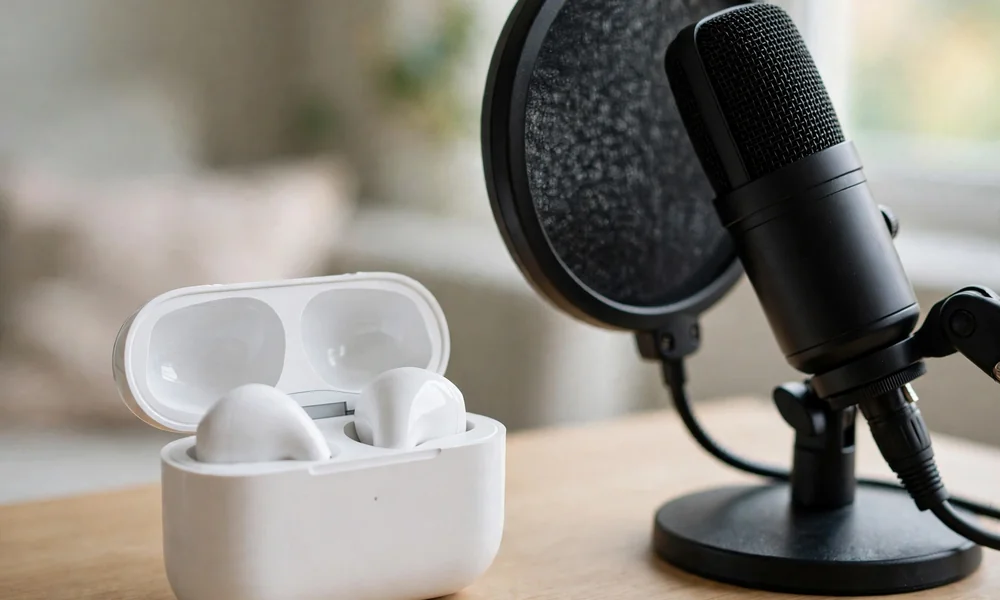
The AirPods Pro 3 are the easiest recommendation for podcasters on iPhone. The microphones pick up voices clearly with little background hiss, noise cancelling keeps room noise out of your monitoring, and pairing with a Mac or iPhone is instant, with seamless switching mid-session.
The fit is secure for long sessions, and the ear tips seal well without pressure. Battery life is 8 hours per charge, plus 24 in the case. The main limit is the ecosystem: Android users lose several features.
If you take a lot of remote calls as a podcast guest, microphone performance is the deciding factor — our guide to the best earbuds for calls compares the clearest options in detail.
Pros: Clear microphones, strong noise cancelling, seamless Apple workflow, comfortable secure fit.
Cons: Best features need an iPhone, and the price is premium.
Sony WF-1000XM5 — Best noise cancelling
The Sony WF-1000XM5 is the best choice for podcasters who record in noisy spaces. Its noise cancelling is the strongest in this guide, so you hear your own voice and your guest clearly even with traffic or a busy household in the background. The microphones use bone conduction sensors and AI processing to keep your voice clear.
Sound is rich and detailed, with a warm bass that makes long sessions pleasant. The 8-hour battery is solid, and the foam tips seal well. The app offers deep sound tuning, though it takes time to learn, and the earbuds are slightly larger than the AirPods Pro.
Pros: Class-leading noise cancelling, clear AI-assisted mics, rich sound, deep app controls.
Cons: Slightly bulky fit, and the app has a learning curve.
Samsung Galaxy Buds 3 Pro — Best for Android
The Samsung Galaxy Buds 3 Pro are the natural pick for Android podcasters, especially on a Galaxy phone. The microphones handle voice clearly, the adaptive noise cancelling adjusts to your surroundings, and the blade-style design with LED strips is easy to grab and adjust mid-recording. Pairing with Galaxy devices is instant, and the Samsung Wearable app gives you full control over sound and mic settings.
Battery life is 6 hours with noise cancelling on, the shortest here, though the case adds 20 hours. Sound is bright and detailed, and the fit is secure. Some features, including the best AI controls, only work on Samsung phones.
Pros: Clear mics, strong Android integration, bright detailed sound, easy-to-grip design.
Cons: 6-hour battery is the shortest here, and some features are Galaxy-only.
Bose QuietComfort Ultra Earbuds — Best comfort for long sessions
The Bose QuietComfort Ultra Earbuds are the comfort pick for podcasters who record for hours. Soft ear tips and stability bands distribute pressure evenly, so they stay comfortable through long interviews and editing sessions. Noise cancelling is excellent, and the sound is warm and balanced.
Microphone quality is good for remote guest calls, though a step behind the AirPods Pro and Sony in wind. Battery life is 6 hours per charge, with 18 in the case. The case is larger than rivals, but the comfort is worth it for all-day wear.
Pros: Outstanding long-session comfort, excellent noise cancelling, warm balanced sound.
Cons: Call quality trails the leaders in wind, and the case is bulky.
Jabra Elite 10 Gen 2 — Best for calls
The Jabra Elite 10 Gen 2 is built around call quality, which is exactly what podcast guests need. Six microphones with wind protection keep your voice clear on remote recordings, and the earbuds handle noisy environments well. The semi-open design is comfortable for long calls, and the smart case doubles as a Bluetooth transmitter for laptops and in-flight systems.
Sound is clear and natural, with Dolby Atmos support. Battery life is 6 hours with noise cancelling, plus 27 in the case. The app is simpler than Sony’s, which some podcasters prefer, though it offers fewer tuning options.
Pros: Excellent call microphones, wind protection, smart case with Bluetooth transmitter, comfortable fit.
Cons: Fewer app extras than rivals, and noise cancelling is good rather than best-in-class.
Sennheiser Momentum True Wireless 4 — Best sound quality
The Sennheiser Momentum True Wireless 4 is the audiophile pick for podcasters who care about how their show sounds in their ears. The sound is detailed and neutral, with clear voices and no muddiness, which helps you catch mouth clicks, plosives, and room noise while monitoring. The microphones are clear for guest calls, and the 7.5-hour battery is solid.
The fit is secure and comfortable, with a range of ear tip sizes. The app offers a sound personalisation test that tunes the earbuds to your hearing, useful for long editing sessions. The case has no wireless charging, and the price is premium.
Pros: Superb detailed sound, clear mics, personalised sound tuning, secure fit.
Cons: No wireless charging, and the price is premium.
Soundcore Liberty 4 Pro — Best value
The Soundcore Liberty 4 Pro is the budget pick that does not feel like a compromise for podcasting. The microphones are clear for remote guest calls, the noise cancelling handles everyday room noise well, and the 10-hour battery per charge is the longest here. A small display on the charging case shows battery and settings at a glance, which is a handy touch.
Sound is lively and well balanced for the price, with a bass boost in the app. Noise cancelling is weaker than premium rivals, so it suits home studios better than noisy cafes. For the money, it is the best way to start podcasting with good audio.
Pros: 10-hour battery, clear calls, useful case display, strong value.
Cons: Noise cancelling trails premium rivals, and the case is chunkier than most.
How to choose
Start with the microphone, not the sound. A podcast earbud is a recording tool first, so check voice pickup, wind, and background noise before bass or brand. Read real-world call tests, not just the spec sheet, and favour earbuds with multiple microphones and wind protection.
Then check comfort and fit for long sessions. Podcasting means wearing earbuds for an hour or more at a time, so the seal should be secure without pressure, and the ear tips should come in several sizes. A poor fit lets room noise in and makes monitoring unreliable, which leads to bad takes.
Finally, match the earbud to your phone. Apple users get the most from AirPods, Galaxy users from Samsung buds, and everyone else from platform-neutral picks like Sony or Sennheiser. If you record with a dedicated microphone, the earbud’s job is monitoring, so comfort and noise cancelling matter more than its own microphone.
Android podcasters should check platform fit carefully, since some features only work on certain phones — our guide to the best earbuds for Samsung covers the Galaxy-only features worth knowing about.
Checklist: before you buy
- Test the microphone on a real call before your first recording.
- Check the fit stays comfortable for a full hour-long session.
- Confirm noise cancelling is strong enough for your recording room.
- Match the earbud to your phone for the best features.
- Check battery life covers your longest recording plus editing.
- Keep a dedicated microphone for final audio when quality matters most.
Frequently asked questions
Can I record a podcast with earbuds?
Yes, and many remote guests do. Modern earbuds have clear microphones that work well for remote calls. For a host recording a final show, a dedicated microphone still sounds better — use earbuds for monitoring and guest calls, and a proper mic for your main recording.
Are AirPods good enough for podcasting?
Yes — with clear microphones, strong noise cancelling, and a seamless workflow on iPhone and Mac. They work best inside the Apple ecosystem, so Android users should look at Sony or Samsung instead.
Do I need noise cancelling for podcasting?
It helps a lot. Noise cancelling keeps room noise out of your monitoring, so you hear your voice and your guest clearly and catch hums and echoes before they ruin a take. In a quiet, treated room it matters less, but most home studios benefit.
Quiet monitoring matters as much as the microphone, especially in a noisy room — our guide to the best headphones for meditation covers calm, focused listening that translates well to editing sessions.
How do I stop earbuds hurting during long recordings?
Choose earbuds with soft tips in several sizes until the seal is secure without pressure. Take a short break every hour, and consider a comfort-focused model like the Bose QuietComfort Ultra Earbuds if you record for hours.
Can earbuds reduce background noise on my recordings?
The earbuds cannot remove noise from your recorded audio — that depends on your recording app and microphone. They can keep noise out of your monitoring, so you hear problems early, and their microphones filter some background sound on live calls.
What is the best budget earbud for podcasting?
The Soundcore Liberty 4 Pro, from around $129, is the best budget pick here, with clear call microphones, a 10-hour battery, and decent noise cancelling for home studios. It cannot match premium models in noisy rooms, but for the price it is hard to beat.
The bottom line
For most podcasters, the Apple AirPods Pro 3 are the right pick: clear microphones, strong noise cancelling, and a workflow that gets out of the way. Android users should take the Samsung Galaxy Buds 3 Pro, while the Sony WF-1000XM5 is best for noisy rooms and the Sennheiser Momentum True Wireless 4 for the best sound. The Soundcore Liberty 4 Pro is the smart budget choice.
Whatever you choose, test the microphone on a real call before your first episode, and keep a dedicated microphone for final recordings when quality matters most. Good earbuds make podcasting easier — they do not replace good recording habits.