
Remote teams do not fail because people work from home. They fail because nobody knows who is doing what, decisions disappear into chat threads, and a task that looked done was never actually finished. A project management tool built for remote teams fixes that by making work visible: every task has an owner, a due date, and a status that anyone can check without asking.
The difference between a general project tool and one that works for remote teams is async. A remote team cannot rely on a quick question across the desk, so the tool has to carry the context: comments on the task, files attached to the work, and a history of who changed what and when. Timezones make it harder — a handoff from one side of the world to the other needs to be clear enough to pick up without a meeting.
We picked seven tools that fit distributed work: clear task ownership, async comments, timeline and workload views, and integrations with the chat and video tools remote teams already use. Asana leads for all-round remote project work, Monday.com is the best visual option, and ClickUp is the best all-in-one value. The rest cover docs, simplicity, client work, and flat pricing.
Key takeaways
- Asana is the best overall project management tool for remote teams, with the clearest task ownership and timeline views.
- Monday.com is the best visual option, with boards and dashboards that make team workload obvious at a glance.
- ClickUp is the best all-in-one value, with docs, tasks, goals, and time tracking from about $7 per user a month.
- Expect to pay roughly $7 to $15 per user a month for a solid remote team plan, or a flat $99 a month with Basecamp.
- Do not buy a tool your team will not open — the best remote PM tool is the one the whole team actually uses every day.
At a glance: the shortlist
| Product | Best for | Starting price | Standout limit |
|---|---|---|---|
| Asana | Best overall | Free tier, paid from about $11 per user a month | Advanced features need higher plans |
| Monday.com | Best visual boards | From about $9 per user a month | No free plan for teams |
| ClickUp | Best all-in-one value | Free tier, paid from about $7 per user a month | Can feel overwhelming at first |
| Notion | Best for docs and tasks | Free tier, paid from about $10 per user a month | Weaker timeline and workload views |
| Trello | Best simple boards | Free tier, paid from about $5 per user a month | Too simple for complex projects |
| Teamwork | Best for client work | Free tier, paid from about $10 per user a month | Less well known, fewer integrations |
| Basecamp | Best flat pricing | About $99 a month, unlimited users | Fewer views and automations |
Asana — Best overall
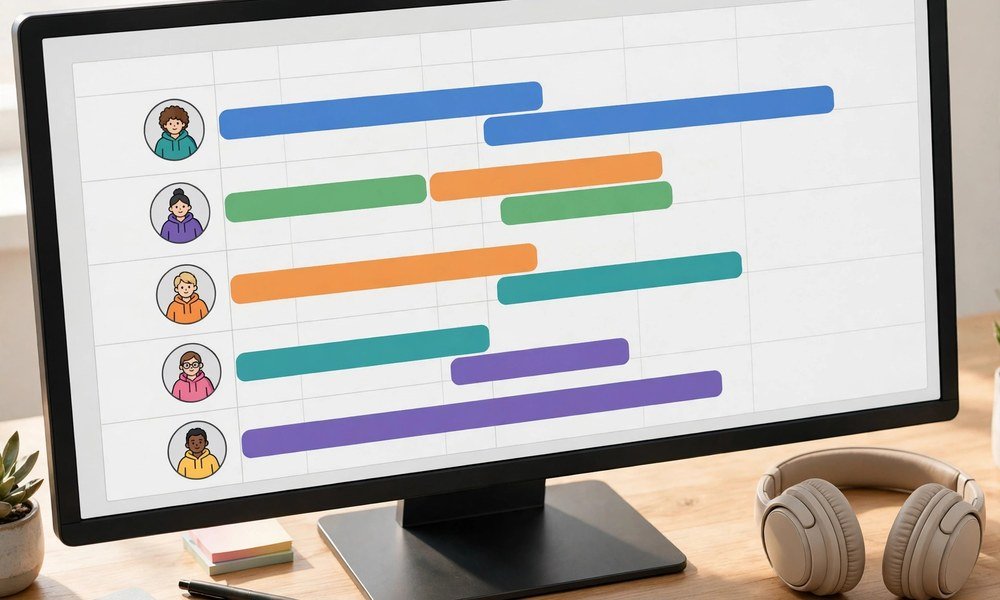
Asana is the most complete project tool for a remote team that needs structure. Tasks have owners, due dates, subtasks, dependencies, and comments, and the timeline view shows how work fits together across weeks. A manager can open the workload view and see who is overloaded and who has room, which matters more when the team is spread across timezones and nobody can see who is busy.
The async features are what make it work remotely. Rules can assign tasks, set due dates, and move work between stages automatically, and the inbox collects every update in one place instead of scattering it across chat. It integrates with Slack, Google Workspace, Zoom, and the tools remote teams already run, and the mobile app is good enough to check a project from anywhere. The free tier covers small teams, and paid plans start at about $11 per user a month. The catch is that the most useful features — workload, advanced reporting, and approvals — sit on the higher plans. For a remote team that wants a serious, proven system, Asana is the safest pick. It also pairs well with the wider project landscape — our roundup of the best project management software compares it against the tools built for co-located teams.
Pros: Clearest task ownership and timelines; strong workload view; excellent integrations.
Cons: Best features need higher plans; can feel heavy for very small teams.
Monday.com — Best visual boards
Monday.com turns projects into colourful boards that anyone can read in seconds. Each board shows tasks as rows, with columns for owner, status, due date, and priority, and the dashboards roll everything up into charts a manager can check in a morning. For a remote team that needs to see the state of work without a meeting, that visual clarity is the whole point.
The automations are the feature teams use most: when a status changes to done, the next person is notified; when a due date passes, the owner gets a reminder; when a task is created, it is assigned by rule. It works well for teams that manage many kinds of work — marketing, product, operations — because each board can be shaped differently. Plans start at about $9 per user a month, with a minimum of three seats, and there is no free plan for teams. The trade-off is that it is a board system first: teams that need deep task dependencies and subtask hierarchies will find Asana or ClickUp more structured.
Pros: Most visual and easiest to read at a glance; strong automations; flexible boards for any workflow.
Cons: No free team plan; weaker on deep task hierarchies than Asana.
ClickUp — Best all-in-one value
ClickUp tries to replace several tools at once: tasks, docs, goals, whiteboards, chat, and time tracking live in one system. The free tier is generous, and paid plans start at about $7 per user a month, which makes it the cheapest serious option here. A remote team can keep its project docs, its task list, and its goals in the same place instead of paying for three subscriptions.
The flexibility is the draw and the risk. ClickUp can be shaped into almost any workflow — sprints, content calendars, client onboarding, bug tracking — and the views include list, board, calendar, timeline, and Gantt. But that flexibility means the first setup takes time, and a team that does not agree on how to use it will end up with a mess. It also includes built-in time tracking, which is useful for remote teams that bill by the hour — our guide to the best time tracking software covers the dedicated tools if you need more depth there. For a remote team that wants maximum features per dollar and is willing to set it up properly, ClickUp is the best value on this list.
Pros: Lowest paid price with the most features; docs, goals, and time tracking included; very flexible views.
Cons: Setup takes time and discipline; can feel overwhelming for new users.
Notion — Best for docs and tasks
Notion is where remote teams keep their knowledge: wikis, meeting notes, project docs, and task lists in one connected workspace. A project page can hold the brief, the timeline, the task list, and the retrospective, and every page links to the others. For a remote team that lives in documents, that combination is hard to beat.
The task features are good but not as deep as a dedicated PM tool. Boards, timelines, and calendars exist, and the databases can track owners, statuses, and due dates, but there is no workload view and no built-in time tracking. The strength is the docs: a remote team that writes things down — decisions, processes, onboarding — will get more value from Notion than from a pure task tool. The free tier covers small teams, and paid plans start at about $10 per user a month. Teams that need serious project tracking usually pair Notion with a dedicated PM tool, using Notion for docs and the other tool for delivery.
Pros: Best docs and knowledge base in this list; flexible databases; low learning curve for writers.
Cons: Weaker timeline and workload views; no built-in time tracking.
Trello — Best simple boards
Trello is the simplest tool on this list: boards, lists, and cards. A remote team can set up a board in five minutes, drag cards between To Do, Doing, and Done, and attach files and comments to each card. It is the best choice for a small team that needs a shared board and nothing else, and the free tier covers the basics with unlimited cards.
The simplicity is the point, and the limit. Trello has no workload view, no Gantt chart, and no built-in reporting beyond the paid dashboard features. Power-Ups add calendar views, custom fields, and integrations, and paid plans start at about $5 per user a month, which makes it the cheapest paid option here. For a team of three to ten people running a content calendar, a hiring pipeline, or a simple product board, Trello is enough. For a team running complex, multi-week projects with dependencies, it will feel too thin. It also works well alongside team chat tools — our roundup of the best collaboration tools for remote teams covers the communication side of remote work.
Pros: Simplest tool here; free tier is genuinely useful; cheapest paid plans.
Cons: Too simple for complex projects; no workload or Gantt views.
Teamwork — Best for client work
Teamwork is built for agencies and teams that manage client projects: time tracking, budgets, billable hours, and client portals are built in rather than bolted on. A remote agency can track time against a task, see whether a project is over budget, and give a client a view of progress without sharing the whole workspace. The free tier covers small teams, and paid plans start at about $10 per user a month.
The project views are strong — list, board, table, and Gantt — and the workload view shows who is over capacity across all projects. The time tracking is the best in this list, with timers, timesheets, and invoicing integrations that matter when the team bills by the hour. The trade-off is ecosystem: Teamwork is less well known than Asana or Monday.com, so there are fewer integrations and fewer templates. For a remote team that does client work and needs to track time and budget properly, it is the most focused option here.
Pros: Best built-in time tracking and budgeting; client portals included; strong workload view.
Cons: Fewer integrations than bigger rivals; less well known, so fewer templates.
Basecamp — Best flat pricing
Basecamp charges a flat $99 a month for unlimited users, which makes it the cheapest option for a large remote team. There is no per-seat pricing, no tier to upgrade, and no feature that unlocks at a higher plan. A team of fifty pays the same as a team of five. The tool itself is deliberately simple: to-do lists, message boards, schedules, docs, and group chat in one place.
The simplicity is the philosophy. Basecamp does not have Gantt charts, workload views, or deep automations, and it does not try to. It gives a remote team one place for everything — the project, the discussion, the files, and the schedule — without the complexity of a full PM suite. That makes it the best choice for a team that wants one calm place to work rather than a powerful system to manage. The trade-off is power: a team running complex, multi-project delivery with dependencies will outgrow it. For a small business or a remote team that values simplicity and flat pricing, it is hard to beat.
Pros: Flat $99 a month for unlimited users; simplest all-in-one workspace; no per-seat surprises.
Cons: Fewest views and automations in this list; not built for complex project delivery.
How to choose
Start with team size and project complexity. A small team with simple work should pick Trello or Basecamp. A team that needs structure and timelines should pick Asana. A team that wants visual boards should pick Monday.com. A team that wants maximum features per dollar should pick ClickUp. A team that lives in docs should pick Notion. And a team that bills clients by the hour should pick Teamwork.
Then check the practical things: does it integrate with your chat and video tools, does the mobile app work well, can you try it free with the whole team for two weeks, and can you export your projects if you leave? A project tool only works if the whole team uses it every day. Run a two-week trial with a real project, not a demo, and let the team decide.
Checklist: before you pay
- Run a two-week trial with a real project and the whole team before committing.
- Confirm it integrates with your chat, video, and file tools.
- Test the mobile app, since remote work happens away from the desk.
- Check the renewal price and what happens when you add your tenth, twentieth, and fiftieth user.
- Make sure you can export tasks, comments, and files if you leave.
- Agree on how the team will use it — statuses, owners, and due dates — before day one.
Frequently asked questions
What is the best project management tool for remote teams?
Asana is the best overall pick for remote teams, with the clearest task ownership and timeline views. Monday.com is the best visual option, and ClickUp is the best all-in-one value.
How much should a remote team spend on project management software?
Most teams pay $7 to $15 per user a month. Basecamp charges a flat $99 a month for unlimited users, which is cheaper for large teams. Free tiers cover small teams well.
Do remote teams need a different tool than office teams?
Yes, in emphasis. Remote teams need async comments, clear ownership, and visible status more than office teams do, because nobody can ask across the desk. The best remote tools make work visible without a meeting.
Should we use one tool for projects and docs?
It depends. ClickUp and Notion combine tasks and docs in one system. Asana and Monday.com are stronger on project delivery but weaker on docs. Many teams use a PM tool for delivery and Notion for docs.
How do we get a remote team to actually use a project tool?
Make it the only place work is tracked. If tasks also live in chat and email, nobody trusts the tool. Agree on statuses and owners, review the board in a weekly meeting, and lead by example.
Can a free plan work for a remote team?
Yes, for small teams. Asana, ClickUp, Notion, Trello, and Teamwork all have free tiers. Pay when you need workload views, advanced reporting, or more seats than the free tier allows.
The bottom line
For most remote teams, Asana is the right answer: it is structured, it makes work visible, and it scales. Teams that want visual boards should pick Monday.com, teams that want maximum value should pick ClickUp, and large teams that hate per-seat pricing should pick Basecamp.
Whichever you choose, the tool matters less than the habit. A project tool only works if every task has an owner and a due date, and if the whole team checks it every day. Pick the one your team will actually open, set it up in the first week, and let it do the remembering.
Note: Prices and plans change. Check the product’s current plan details before buying — no link is provided here by design, all links in this article go to other occcy.com guides.



