

A good USB-C monitor does more than show your work. It charges your laptop, carries video and data over one cable, and turns a cluttered desk into a single clean connection. The best USB-C monitors in 2027 combine sharp panels, honest power delivery, and enough ports to replace a separate dock, so one plug is all you need when you sit down to work.
That simplicity is worth paying for, but only when the details are right. A monitor that advertises USB-C yet delivers just 15 watts will not keep a busy laptop charged, and a panel with washed-out colour will undo the benefit of a tidy desk. The models below were chosen for real-world use: strong power delivery, clear resolution, accurate colour, and ports that match how people actually work.
The shortlist covers office work, creative work, and hybrid setups. Dell leads for all-round value, LG and Samsung suit mixed work and media, ASUS and BenQ serve creators on a budget, and HP and Lenovo cover dependable office use. Prices are approximate starting prices, so check current pricing before you buy.
Key takeaways
- Dell UltraSharp 27 4K USB-C Hub Monitor is the best overall USB-C monitor for most people.
- Look for at least 65W power delivery, or 90W if you use a 14-inch or 16-inch performance laptop.
- 4K resolution at 27 inches gives the sharpest text for office and creative work.
- A built-in USB hub with Ethernet saves the cost of a separate dock.
- Avoid monitors with only 15W charging, no height adjustment, or a single USB-C port.
At a glance: the shortlist
| Product | Best for | Starting price | Standout limit |
|---|---|---|---|
| Dell UltraSharp 27 4K USB-C Hub Monitor U2723QE | Best overall | From $649 | 60Hz refresh rate |
| LG UltraFine 27UP850-W | Best value 4K | From $449 | 96W charging, no Ethernet |
| Samsung ViewFinity S9 5K | Best for Mac users | From $899 | 60Hz, premium price |
| ASUS ProArt Display PA279CRV | Best for creators on a budget | From $459 | 60Hz, basic speakers |
| BenQ PD2705U | Best colour accuracy | From $549 | 60Hz, no built-in webcam |
| HP E27u G5 | Best office monitor | From $399 | QHD, not 4K |
| Lenovo ThinkVision P27u-20 | Best for professionals | From $529 | 60Hz, heavier stand |
| Dell UltraSharp 34 Curved USB-C Hub Monitor U3425WE | Best ultrawide | From $799 | Large desk footprint |
Dell UltraSharp 27 4K USB-C Hub Monitor U2723QE — Best overall
The Dell UltraSharp U2723QE is the safest USB-C monitor most people can buy. Its 27-inch 4K IPS panel is sharp, evenly lit, and calm on the eyes during long workdays, with 98% DCI-P3 colour that suits design work as well as documents.
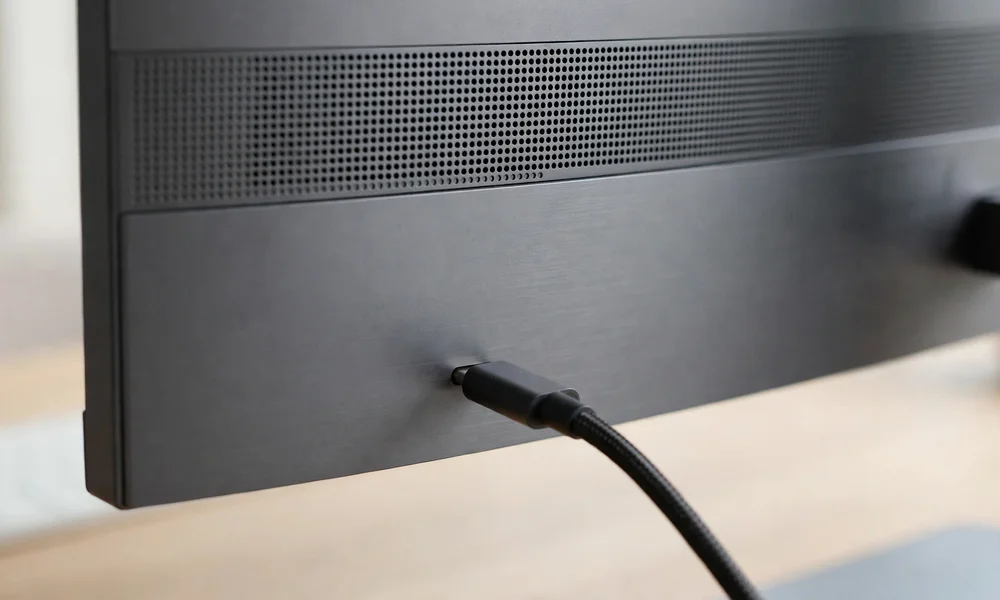
Connectivity is the real strength here. One USB-C port delivers up to 90W of power, while the built-in hub adds USB-A ports, DisplayPort, HDMI, and Ethernet. That is enough to replace a dock for most setups, and it keeps the desk to a single cable. For a broader view of desk setups, see the guide to the best 4K monitors for work and how resolution changes daily use.
Pros: 90W charging, 4K IPS panel, Ethernet and full hub, excellent stand. Cons: 60Hz refresh rate, no built-in webcam, premium price.
LG UltraFine 27UP850-W — Best value 4K
The LG 27UP850-W brings 4K and 96W USB-C charging to a lower price than most rivals. Its 27-inch IPS panel covers 95% DCI-P3, which is strong for photo work and video calls alike, and HDR400 support adds a little extra range for media. Text is crisp, colours are natural out of the box, and the slim bezels suit dual-monitor desks.
It is a simpler monitor than the Dell, with fewer USB ports and no Ethernet, so heavy dock users may still want a hub. For a laptop-first setup with one or two peripherals, though, it is hard to beat.
Pros: 96W charging, accurate 4K panel, good value. Cons: No Ethernet, fewer USB ports, basic speakers.
Samsung ViewFinity S9 5K — Best for Mac users
The Samsung ViewFinity S9 is built for people who want a 5K panel without paying for a studio display. Its 27-inch 5K screen is exceptionally sharp, with 99% DCI-P3 colour and a matte finish that cuts reflections in bright rooms. Mac users get a clean plug-and-play experience over Thunderbolt 4, with 96W charging included.
The S9 also works as a smart display, with built-in apps and a remote, which some buyers will love and others will ignore. It is expensive, but the 5K resolution is a genuine step up from 4K at this size.
Pros: 5K resolution, 96W charging, matte screen, strong Mac support. Cons: High price, 60Hz, smart features not for everyone.
ASUS ProArt Display PA279CRV — Best for creators on a budget
The ASUS ProArt PA279CRV is a creator monitor at an office-monitor price. Its 27-inch 4K IPS panel is factory calibrated, covers 99% DCI-P3 and 99% Adobe RGB, and holds colour well across the screen. That makes it a sensible pick for photographers, illustrators, and video editors who need trustworthy colour without a premium budget.
USB-C delivers 96W of power, and the monitor includes DisplayPort, HDMI, and a small USB hub. The stand is fully adjustable, and the panel supports hardware calibration for long-term accuracy. Speakers are weak, so add external audio if sound matters, but for visual work this is one of the best values available.
Pros: Factory-calibrated colour, 96W charging, low price for a creator panel. Cons: Weak speakers, 60Hz, plastic-heavy build.
BenQ PD2705U — Best colour accuracy
The BenQ PD2705U is aimed squarely at designers who check colour for a living. Its 27-inch 4K IPS panel covers 99% sRGB and Rec. 709, with BenQ’s uniformity technology keeping brightness even from edge to edge. A dedicated hotkey puck switches between colour modes quickly, which saves time when moving between print and screen work.
USB-C provides 65W of charging, enough for most 13-inch and 14-inch laptops, though heavier machines may charge slowly under load. The monitor includes DisplayPort, HDMI, and a USB hub, plus a KVM switch for sharing one screen between two computers. It is a focused tool, and it does its one job very well.
Pros: Excellent colour uniformity, KVM switch, hotkey puck. Cons: 65W charging only, 60Hz, no webcam.
HP E27u G5 — Best office monitor
The HP E27u G5 is a practical QHD office monitor with USB-C at a sensible price. Its 27-inch IPS panel is sharp enough for documents, spreadsheets, and video calls, and the 65W USB-C port charges most business laptops while carrying video and data. The stand is sturdy and fully adjustable, and the three-sided micro-edge design suits multi-monitor rows.
Colour is accurate enough for general work, the panel is flicker-free with low blue light modes, and setup takes minutes. For teams buying several monitors at once, the E27u G5 is a reliable, consistent choice.
Pros: Good office value, 65W charging, sturdy adjustable stand. Cons: QHD, not 4K, no Ethernet, modest colour range.
Lenovo ThinkVision P27u-20 — Best for professionals
The Lenovo ThinkVision P27u-20 is a 27-inch 4K professional monitor with strong colour and solid USB-C support. It covers 99.1% DCI-P3 and 99.5% Adobe RGB, with factory calibration and support for hardware calibration over time. That makes it suitable for design, photography, and CAD work where colour drift matters.
USB-C delivers up to 90W, and the monitor includes Ethernet, DisplayPort, HDMI, and a USB hub, so it can anchor a full workstation from one cable. It is a quiet, dependable professional tool.
Pros: Wide colour range, 90W charging, Ethernet hub. Cons: 60Hz, heavy stand, premium price.
Dell UltraSharp 34 Curved USB-C Hub Monitor U3425WE — Best ultrawide
The Dell U3425WE replaces two monitors with one curved 34-inch ultrawide panel. Its WQHD resolution gives room for a document, a spreadsheet, and a video call side by side, and the gentle curve keeps the edges within comfortable view. Colour covers 98% DCI-P3, so it suits creative work as well as office multitasking.
USB-C delivers 90W of power, and the hub includes Ethernet, USB-A and USB-C ports, DisplayPort, and HDMI. A KVM switch shares the screen between two computers, which is handy for people who run a work laptop and a personal machine. It needs a deep desk, but for multitaskers it is the most productive screen here.
Pros: Huge workspace, 90W charging, KVM and Ethernet. Cons: Large footprint, WQHD not 4K, 120Hz only on some inputs.
How to choose
Start with power delivery. Check your laptop’s charger wattage, then choose a monitor that matches or exceeds it: 65W suits most 13-inch and 14-inch laptops, while 90W or more is safer for 15-inch and 16-inch machines. A monitor that under-delivers will charge slowly or drain under heavy use, which defeats the point of a single cable.
Next, match resolution to screen size. At 27 inches, 4K gives the sharpest text; at 24 inches, QHD is enough; at 32 inches and above, 4K is almost essential. Colour coverage matters most for creative work: look for 95% DCI-P3 or better, and factory calibration if you edit photos or video. For general office work, the guide to the best monitors for work explains how panel type and brightness affect everyday comfort.
Finally, count the ports you actually use. Ethernet, extra USB-A ports, and a second video input are worth more than a slightly brighter panel for most desk setups. Check the stand too: height, tilt, and VESA support matter more over a year of daily use than any single specification on the box.
Checklist: before you buy
- Confirm the USB-C port delivers enough watts for your laptop model.
- Check that the resolution suits the screen size, with 4K preferred at 27 inches.
- Count your peripherals and confirm the hub has enough USB ports.
- Measure your desk depth, especially for ultrawide or 32-inch models.
- Check the stand adjusts for height and tilt, or plan for a VESA arm.
- Confirm the return policy, so you can test colour and backlight uniformity at home.
Frequently asked questions
Does a USB-C monitor charge my laptop?
Yes, if the monitor supports USB-C Power Delivery. Most models here deliver 65W to 96W, which charges most laptops. Check your laptop’s charger wattage first, and choose a monitor that matches it.
Is one USB-C cable enough for everything?
For most setups, yes. One cable carries video, data, and power. You may still need a separate cable for a second monitor, a wired network connection if the monitor has no Ethernet, or a high-speed external drive.
Is 4K worth it on a 27-inch monitor?
Yes for most people. Text is sharper, windows hold more content, and photo and video work looks cleaner. QHD is acceptable on a budget, but 4K is the better long-term choice at this size.
Can I connect two monitors with USB-C?
Often, yes. Some monitors support daisy-chaining over DisplayPort, and many laptops support two external displays. Check your laptop’s display limits first, since some models support only one external screen.
Do USB-C monitors work with MacBooks?
Yes. Modern MacBooks work well with USB-C and Thunderbolt monitors, including charging and video over one cable. The Samsung ViewFinity S9 is a particularly good match, and most others here work with a standard USB-C cable.
What if my laptop has no USB-C port?
Use HDMI or DisplayPort for video and a separate charger for power. If you travel often, the guide to the best portable monitors for work covers lightweight screens that add a second display on the move.
The bottom line
For most people, the Dell UltraSharp U2723QE is the best USB-C monitor to buy: a sharp 4K panel, 90W charging, and a hub that replaces a dock. Budget buyers should look at the LG 27UP850-W, creators on a budget at the ASUS ProArt PA279CRV, and multitaskers at the Dell 34-inch ultrawide.
Whatever you choose, match power delivery to your laptop first, resolution to screen size second, and ports to your real desk setup third. Get those three right and a single cable really is enough.


