The HiDock P1 is a pocket-sized AI voice recorder built around one stubborn problem: recording a call when you are wearing Bluetooth earphones. Most AI recorders either need a bot to join the meeting, a phone on speaker, or a cable snaking to a separate microphone. The HiDock P1 takes a different route, sitting between your earphones and your laptop or phone so it can hear both sides of the conversation while you keep your AirPods in.
Coverage of the device in late November 2026 has put the spotlight on exactly that trick. The recorder pairs with your existing Bluetooth earphones through a feature HiDock calls BlueCatch, and it turns the recording into a transcript and a summary through the free HiNotes app. There is no meeting bot in the participant list, no plug-in to install in Zoom or Teams, and no monthly subscription required for the core transcription.
That combination matters because the AI note-taker market has split into two camps: wearable recorders that capture the room, and software bots that join your calls. The HiDock P1 is neither. It is a small piece of hardware for people who live on calls, and its pitch is that the best recorder is the one that never changes how you take the call in the first place.
Key takeaways
- The HiDock P1 records both sides of Bluetooth earphone calls through HiDock’s BlueCatch technology, with no meeting bot joining the call.
- Core transcription and AI summaries are free for life in the HiNotes app, covering more than 75 languages, with no monthly minute cap on the basic plan.
- The device offers three modes: Call Mode for online calls, Room Mode for face-to-face meetings, and Whisper Mode for quiet voice notes.
- It weighs 72 grams, records for up to 8 hours on a charge in Room Mode, and stores up to 1,000 hours of recordings on the device.
- It launched at $169, while HiDock’s own store has since listed it at $199, so buyers should check the live price before ordering.
| Detail | HiDock P1 |
|---|---|
| Launch price | $169 |
| Current store price | $199 (price varies by retailer and promotion) |
| Call recording | Both sides via BlueCatch and Bluetooth earphones |
| Transcription | Unlimited core transcription, free for life |
| Languages | 75+ languages |
| Recording modes | Call, Room, Whisper |
| Weight | 72 g |
| Battery | Up to 8 hours in Room Mode |
| Storage | Up to 1,000 hours on device |
| Connectivity | Bluetooth 5.3, USB-C |
| Works with | Mac, Windows, iPhone 15 and later, Android with OTG |
| Warranty | 18 months, 30-day returns |
How BlueCatch records Bluetooth calls
The core idea behind the HiDock P1 is simple to describe and hard to build. When you wear Bluetooth earphones, the other person’s voice goes straight to your ears, so an ordinary recorder sitting on the desk hears only your side of the conversation. HiDock’s BlueCatch feature breaks that limit by pairing your earphones with the recorder itself. You connect the P1 to your laptop or phone with a USB-C cable, pair your earphones to the P1, and choose the P1 as the audio device for the call. The audio then travels from the phone or computer through the cable to the P1 and on to your earbuds, which means the recorder captures both directions of the call.
That setup works across the apps people already use. HiDock lists Zoom, Microsoft Teams, Google Meet, Webex, WhatsApp, Slack and phone calls, and the recorder needs no plug-in or account link inside any of them. You join the call as usual, press record on the P1, and nothing appears in the participant list. For people whose employers block meeting bots, or who simply do not want a bot announcing itself in every call, that absence is the point.
There is a catch, and it is a physical one: the cable. For calls, the P1 has to be connected by USB-C to the computer or phone, and your earphones connect through BlueCatch. HiDock’s own guidance confirms that the recorder cannot capture a computer meeting over Bluetooth alone, and an iPhone call needs the P1 plugged into the phone with the earphones routed through it. That makes the P1 a desk companion rather than a device you forget about, and it limits phone support to USB-C iPhones, meaning iPhone 15 and later, plus Android phones and tablets that support OTG. If you take most of your calls walking around with only a phone in your pocket, the cable will feel like a trade-off worth weighing.
Three recording modes for three kinds of conversation
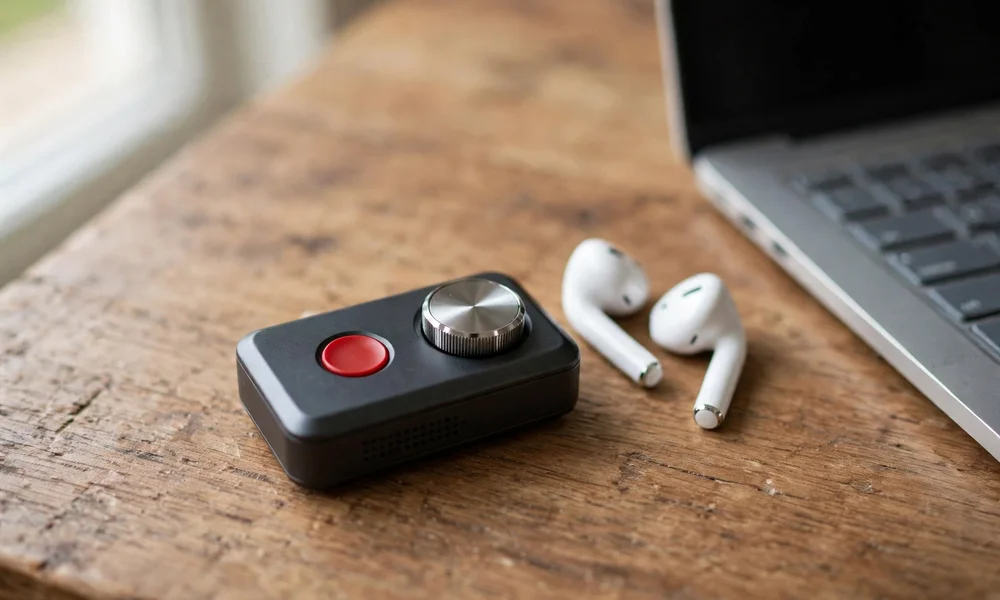
The HiDock P1 is built around three recording modes, and each one answers a different question. Call Mode is the reason most people buy it: it records both sides of a call through your Bluetooth earphones, with noise cancellation applied to keep voices clear. Room Mode is for the meeting across the table, the interview, or the class, where the recorder works on its own using its built-in microphones and no laptop is needed. Whisper Mode is for quick ideas and reminders, letting you hold the button, bring the P1 close, and speak in a low voice without needing to actually whisper.
Room Mode is where the device’s battery and storage figures matter most. HiDock rates the P1 at up to 8 hours of recording per charge in Room Mode, with each recording able to run up to 4 hours before you need to start a new one. When the P1 is plugged into a computer that is on power, total recording time is not limited. Storage on the device is rated at up to 1,000 hours of recordings, so the recorder is unlikely to run out of space before you move files into HiNotes. The device is small enough to live in a laptop bag: it measures 126 by 38 by 15.8 mm and weighs 72 grams, with a magnetic snap-on plate that holds it to the back of a laptop lid and a touch-control cable for starting, muting, or marking a recording without opening an app.
A physical VoiceMark button lets you bookmark key moments mid-recording with a single press, which matters more than it sounds. Long meetings produce long transcripts, and a marker placed at the moment a decision was made is worth more than a perfect transcript you never search. The P1’s aluminium body, control wheel, and magnetic mount all point in the same direction: this is a tool meant to be handled every day, not a delicate gadget kept in a drawer for special occasions.
Free transcription for life, and where the paid plans begin
The most surprising part of the HiDock P1 is not the hardware but the pricing of the software. Many AI recorders cap free transcription at a few hundred minutes a month, then charge a subscription for more. Every HiDock P1 comes with unlimited core transcription and AI summaries for life, in more than 75 languages, with no minutes to count. Recordings stay on the device until you move them to HiNotes, HiDock’s app, for transcription and summaries, and the free Member plan includes 8 or more summary templates, Google Calendar and Outlook connections, and text export.
That privacy posture is worth noting because AI recorders live or die on trust. HiDock states that recordings are not uploaded to the cloud automatically, that users control deletion, and that deleting a note removes it permanently. None of that removes the need to tell people you are recording. HiDock’s own FAQ is direct on this point: recording laws differ by country and by US state, and some require everyone’s consent, so you should let people know before you record. The P1 removes the meeting bot and the speakerphone, not the need to ask.
What it means for people who live on calls
The HiDock P1 arrives at a moment when AI note-taking has become a crowded and confusing market. Software bots join meetings uninvited, wearables record everything within earshot, and subscriptions pile up. The P1’s bet is that a small piece of hardware, used deliberately, is a better answer than an always-on listener or a bot in the participant list. It is a bet on intention: you press record when the conversation matters, and the device captures it cleanly.
Before you buy checklist
- Check that your phone is a USB-C iPhone (iPhone 15 or later) or an Android phone with OTG support, since Lightning iPhones are not supported.
- Confirm your meeting apps are on HiDock’s list: Zoom, Teams, Google Meet, Webex, WhatsApp, Slack, and phone calls.
- Check the live price on HiDock’s site, since listings have ranged from $169 to $229.
- Decide whether the USB-C cable for calls fits your working style, or whether you mostly take calls on the move.
- Plan to claim your 300 free Pro minutes each month in HiNotes under Profile and Plans.
- Remember to tell everyone on the call that you are recording, since consent rules differ by state and country.
Frequently asked questions
Does the HiDock P1 record both sides of a Bluetooth call?
Yes. Its BlueCatch feature pairs your Bluetooth earphones with the recorder, and the P1 connects to your laptop or phone by USB-C, so it captures both sides of the call on Zoom, Teams, Google Meet, and other supported apps, without a bot joining the meeting.
Is transcription really free?
Core transcription and AI summaries are free for life with the P1, with no monthly minute cap, in more than 75 languages. Paid Pro and Unlimited plans add speaker identification, more summary templates, and richer export options, but they are optional.
How much does the HiDock P1 cost?
It launched at $169, and HiDock’s own store has since listed it at $199, with some comparison guides quoting $229 and bundle prices varying further. Check the live price before buying, since the figure has moved since launch.
What are the three recording modes?
Call Mode records online calls through your Bluetooth earphones, Room Mode records face-to-face meetings using the built-in microphones with no laptop needed, and Whisper Mode captures quiet voice notes and ideas when you hold the button and speak close to the device.
How long does the battery last?
Up to 8 hours of recording per charge in Room Mode, with each recording able to run up to 4 hours. When the P1 is plugged into a computer that is on power, total recording time is not limited.
Do I need to tell people I am recording?
Yes. Recording laws differ by country and by US state, and some require everyone’s consent. HiDock’s own FAQ says to let people know before you record, and the P1 removes the meeting bot, not the need to ask.
Bottom line
The HiDock P1 solves a real problem in a way no other recorder quite does: it captures both sides of a Bluetooth earphone call without a bot, and it turns the recording into a transcript and summary for free, for life. The cable requirement and the awkward export of some recordings are genuine limits, and the price has drifted since launch, so buyers should check the live figure. But for anyone who spends the day on calls with earphones in, the P1 is the recorder built around exactly that habit.
If you already use AI tools for voice recording, the P1 is the hardware version of the same idea, and it pairs naturally with a good transcription workflow for turning calls into searchable notes. It also fits the way modern meetings actually happen, which is why the Zoom versus Microsoft Teams choice matters less than having a reliable record of whatever was decided. The HiDock P1 does not try to record your whole life; it tries to record the call you are on, and it does that well.