
If you want to create an AI-powered ecommerce store, the process is simpler than ever. You start by picking a reliable commerce platform with built-in AI, choosing a clear product niche, and using AI tools to build your storefront design, product descriptions, photos, and customer workflows.
Once your catalog and checkout are tested and ready, you can add smarter search, personalized product suggestions, and automated support. This lets you grow your sales without burying yourself in daily busywork.
Not long ago, launching an online store meant spending weeks tweaking themes, writing endless product copy, editing photos, and wrestling with app settings. Today, AI handles much of that heavy lifting.
Still, building a shop that actually wins over buyers takes more than clicking a few buttons. You have to balance that speed with genuine human judgment over your products, pricing, and brand voice.
What Makes an Ecommerce Store Truly AI-Powered?

An AI-powered store is much more than a basic chat bubble sitting in the corner of your homepage. Real integration weaves machine learning and generative AI into both the shopper experience and your daily backend operations.
For your customers, AI creates a smoother shopping trip. It powers smart search bars that understand everyday phrasing, suggests items based on browsing habits, and answers questions right before someone decides to click away.
Behind the scenes, AI takes care of repetitive tasks. It drafts product copy, cleans up photos, predicts when stock will run low, sends timely email and SMS follow-ups, and handles routine tracking or return requests.
Step by Step: How to Create an AI-Powered Ecommerce Store
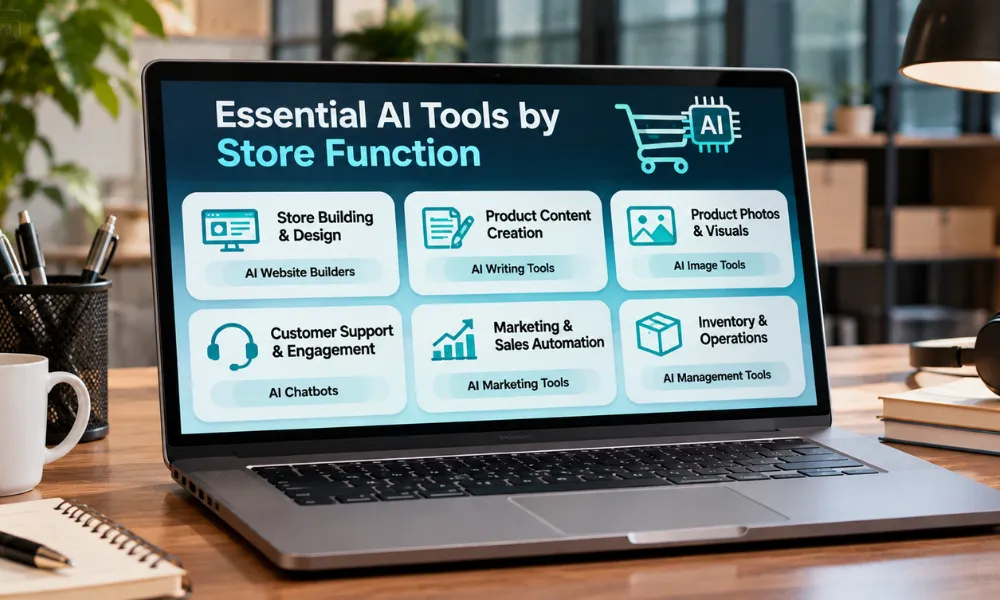
1. Define Your Niche, Audience, and Profit Margins
Before opening a website builder, nail down the business basics that software cannot figure out for you. Get clear on who your ideal buyer is and what exact problem your product solves.
Make sure your pricing leaves enough room to cover shipping, returns, and advertising costs. It helps to launch with a tight catalog of 5 to 15 great products rather than hundreds of random items, allowing you to verify quality before scaling up.
2. Pick an AI-Ready Ecommerce Platform
Your core platform is the backbone of your business, handling inventory, checkout, payments, and taxes. Look for a system that blends native AI features with a solid library of third-party apps:
- Hosted All-in-One Platforms (such as Shopify or Wix): These are great if you want speed and peace of mind. They include built-in AI storefront builders, automatic copywriting tools, and easy app integrations with virtually no technical upkeep.
- Open-Source and Modular Platforms (such as WooCommerce on WordPress): These work best if you want total control over your hosting and custom setups. You can pair flexible commerce plugins with specialized AI tools for writing, image editing, and store management.
- Dedicated AI Store Generators: These services connect directly to major commerce backends to spin up a complete starter store, complete with layouts, supplier products, and sales widgets, from just a few short prompts.
3. Build Your Storefront Layout and Brand Look
Use your platform’s AI site builder to put together a clean, mobile-friendly design. Feed it clear details about your brand personality, target audience, and product style so it picks fitting fonts, colors, and page sections.
Think of the layout it produces as a solid rough draft. Customize your main homepage banner, top navigation menu, and About page so your shop feels like a real brand rather than a generic template.
4. Create Compelling Product Listings and Photos
Your product pages do the heavy lifting when it comes to turning visitors into buyers. If you want a clear walkthrough of the structure, this guide on how to set up a business website product page is a good reference. AI tools can speed up content creation here, as long as you keep every detail accurate:
- Product Photography: Snap clear photos of your products using a modern smartphone in bright, natural light. AI image studios can then strip away messy backgrounds, create clean white-background shots, and place your items into natural lifestyle scenes.
- Product Copy and Tagging: Enter accurate dimensions, materials, and features into an AI writer to draft benefit-driven titles and descriptions. Automated tagging tools can also label items by style, occasion, or fit so shoppers can filter your catalog effortlessly.
5. Configure Payments, Shipping, Taxes, and Store Policies
Set up your checkout flow manually and double-check every single setting. Connect dependable payment processors like Stripe, PayPal, or your platform’s native checkout, establish clear shipping zones, and turn on automated tax calculation.
Publish honest, easy-to-read pages covering your refund policy, shipping times, privacy policy, and terms of service. If you are unsure where these pages belong, this walkthrough on how to set up a business website legal page explains the basics. AI can help outline these pages quickly, but always read through them to ensure they match how you ship orders and comply with local laws.
6. Add Smart Customer-Facing Features
Once your core store runs smoothly, bring in targeted AI tools that lift conversion rates and boost average order values:
- AI Shopping Assistants and Support: Set up a support agent trained on your product catalog, sizing charts, and policies. Today’s AI assistants can answer detailed questions, suggest items, look up order statuses, and start returns around the clock. For a look at the options, see the best AI tools for creating chat pages for small teams.
- Personalized Recommendations: Place smart cross-sell and upsell sections on product pages and inside the cart that adapt automatically to what each visitor is browsing.
- Automated Lifecycle Marketing: Connect an AI-driven email and SMS tool to send abandoned cart reminders, welcome messages, and restock alerts based on real customer behavior. If you are still choosing an email platform, MailerLite vs Brevo for small teams is worth a read, and the best AI tools for creating loyalty pages for small teams can help you keep repeat buyers coming back.
7. Test the Complete Buying Experience Before Launch
Before spending a dime sending traffic to your site, walk through the entire shopping process yourself on both a computer and a smartphone.
Place a real test order and verify that confirmation emails arrive properly. Ask your AI chat assistant a few tough questions, and make sure every page loads quickly.
Essential AI Tools by Store Function
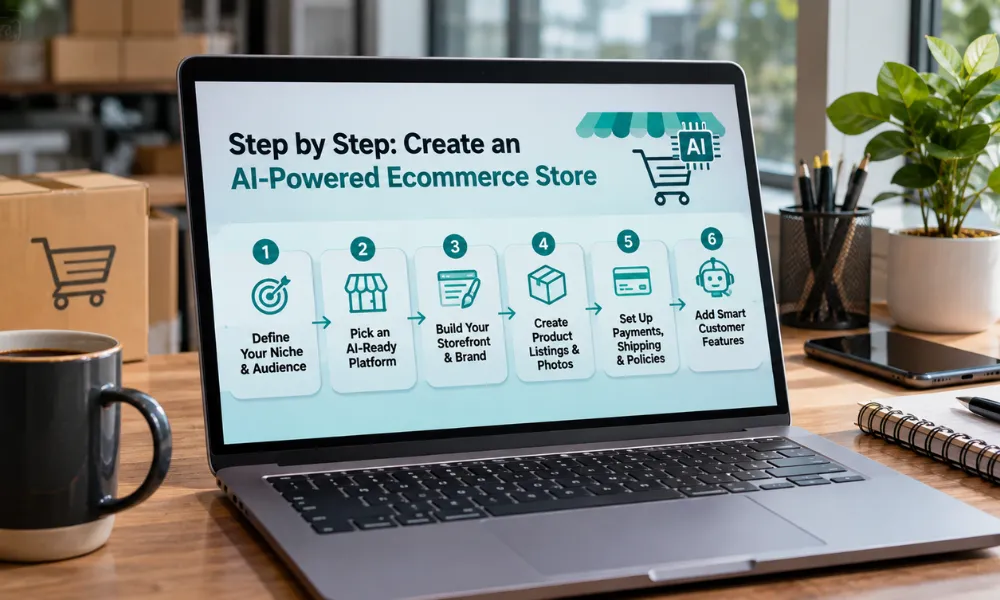
Putting together a good tech stack is all about picking tools that solve real daily problems without adding clutter.
| Store Function | What AI Does | Examples of Tool Categories |
|---|---|---|
| Storefront and Design | Creates page layouts, theme sections, and mobile-ready templates from simple prompts. | Native AI site builders (Shopify, Wix) and AI store generators. |
| Product Visuals | Cleans up backgrounds, builds lifestyle scenes, and enhances smartphone photos. | AI product photography studios and built-in platform photo editors. |
| Copy and Catalog Tagging | Drafts product descriptions, writes metadata, and tags item attributes for better search. | Platform AI writers and automated catalog tagging tools. |
| Customer Support | Handles order tracking, returns, and everyday product questions via chat and email. | Ecommerce helpdesks with store-aware AI agents. |
| Retention Marketing | Groups shoppers by behavior and triggers tailored email and SMS follow-ups. | Behavioral marketing automation platforms. |
| Inventory and Operations | Predicts product demand, alerts you to low stock, and automates backend order routing. | Predictive inventory planners and visual workflow builders. (See also the best retail software.) |
Realistic Startup and Ongoing Costs
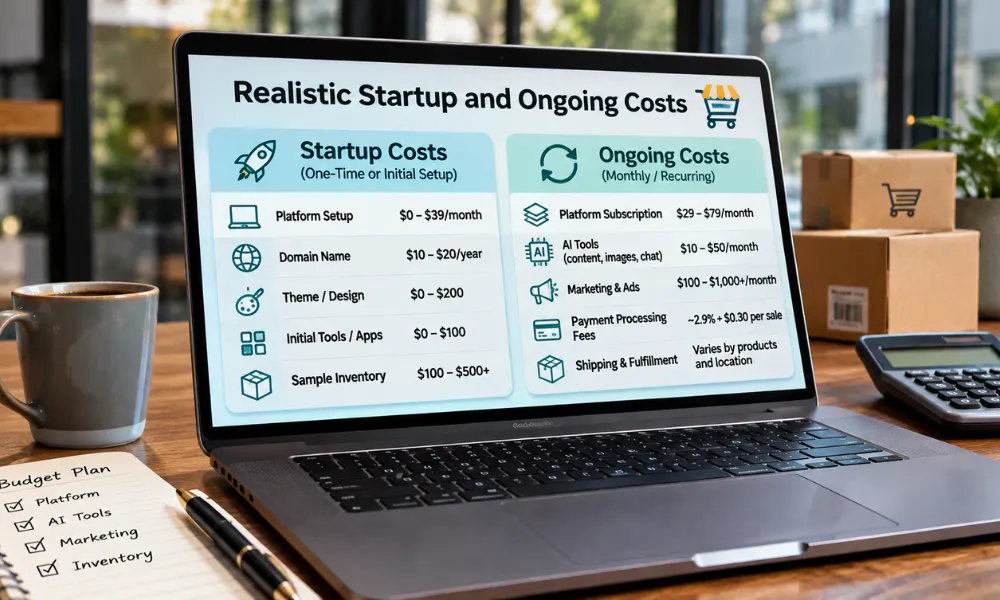
Using AI brings down your upfront launch costs because you do not need to hire a web developer or rent a photo studio right away. Even so, you should plan for a few standard business expenses:
- Domain Name: Usually runs between $10 and $20 per year. Some hosts include one at no extra cost, which we cover in the best web hosting for free domain guide.
- Ecommerce Platform Plan: Expect to pay roughly $10 to $40 per month for starter hosted plans, or a modest monthly hosting bill if you use an open-source setup like WordPress.
- AI Apps and Add-Ons: Many platforms bundle basic AI writing and photo editing tools into their regular plans. Advanced tools for automated support, smart search, or lifecycle marketing generally start around $20 to $100 or more per month, scaling up as your order volume grows.
- Payment Processing Fees: Standard card processing rates (often around 2.5% to 2.9% plus a small flat fee per transaction) apply every time a customer checks out.
Common Mistakes to Avoid When Building with AI
Publishing Unchecked AI Copy
AI tools can occasionally invent product measurements, fabric blends, care instructions, or compatibility specs out of thin air. Always double-check every factual detail and strip out over-the-top hype or placeholder reviews before taking a page live.
Building Bloated, Generic Catalogs
Because AI makes it effortless to crank out product pages, some store owners upload hundreds of hastily generated listings. Shoppers and search engines spot repetitive, soulless copy right away, so focus on depth and genuine helpfulness for each product.
Loading Your Site with Too Many Plugins
Installing a dozen separate AI apps can drag down your page speed, cause software conflicts, and swell your monthly subscription costs. Stick with your platform’s built-in features first, and only add outside tools when you hit a specific bottleneck.
Overlooking the Mobile Checkout Experience
AI-generated store themes often look great on a wide laptop screen while hiding key details or cramming buttons together on a phone. Always test your product options, cart drawer, and payment buttons on an actual mobile device.
Frequently Asked Questions
Do I need coding skills to create an AI-powered ecommerce store?
No. Modern AI store builders, drag-and-drop editors, and visual workflow tools let you design pages, upload products, connect payments, and automate emails without touching a line of code.
How long does it take to build an online store using AI?
You can put together a working storefront draft with initial product listings in less than an hour. However, set aside a few days to verify product details, polish your brand voice, dial in shipping and tax settings, and test your mobile checkout before opening to the public.
What is the best platform for an AI-powered ecommerce store?
The right fit depends on your technical comfort level and goals. Hosted platforms like Shopify and Wix give you the fastest all-in-one launch experience with built-in AI tools, while WordPress paired with an ecommerce plugin offers greater open-source flexibility.
Can AI create product photos if I do not have a professional camera?
Yes. You can shoot clean photos of your products with a modern smartphone in good lighting and use AI photography tools to remove backgrounds, balance lighting, and place your items into realistic studio or lifestyle settings.
How do I make sure my AI store shows up in AI search and answer engines?
Organize your product pages with clear, accurate specs, straightforward FAQ sections, proper structured data, and real customer reviews. If you need help collecting and displaying them, see the best AI tools for creating reviews pages for small teams. AI shopping assistants depend on clean, trustworthy product information when recommending items to buyers.
Will AI replace human management in my ecommerce business?
No. AI takes repetitive production and support work off your plate, like drafting descriptions, tagging inventory, and answering routine tracking questions. You still need human oversight for sourcing products, checking quality, setting prices, and solving unusual customer problems.
Final Thoughts
Creating an AI-powered ecommerce store is not about handing your entire business over to autopilot. It is about clearing away the technical hurdles that normally slow down launching and growing a brand.
By picking a dependable commerce platform, using AI to speed up your design and content workflow, and backing every page with accurate product facts and a smooth mobile checkout, you can build a store that wins customer trust from day one. Start focused, prove your products with real buyers, and add deeper automation as your sales pick up.
Disclaimer: This content is for informational purposes only and reflects our personal opinions and experiences. We just love to write and share what we know and research.