A visitor reaches the bottom of a small business website, looks for a link about cookies, and finds nothing. The banner has disappeared, the choice made in a hurry is forgotten, and there is no page to check what was agreed to. That gap is the reason a cookie page exists: a dedicated page where a visitor can read what cookies the site uses and how to change the choice later.
In 2027 a cookie page is a normal part of a business website, alongside the privacy page and the terms page. It is not the banner that pops up on a first visit, and it is not a long legal document. It is a short page that matches the real tools on the site and gives visitors a way back to their consent settings.
This guide walks through setting up a business website cookie page in 2027, step by step, for a small business owner rather than a lawyer. It covers what the page should contain, how it connects to the banner, where it should link from, and how to keep it accurate. It is general guidance, not legal advice.
Key takeaways
- A cookie page lists the cookies a site uses, what each group does, and how long each group lasts.
- The page, the banner, and the consent controls must agree, or visitors are misled.
- Build the page from a real audit of the tools on the site, not from a copied template.
- Link the page from the footer of every page, from the banner, and from the settings panel.
- Review the page every time a tool is added or removed, and date it.
What a business website cookie page actually is
A cookie page is a public page that explains the cookies a site stores on a visitor device. A cookie is a small text file that a website asks a browser to store. When the visitor returns, the browser sends the file back, and the site recognises the visitor. That round trip is how a basket remembers its contents and how analytics tools count repeat visits.
The page turns that invisible mechanism into something a visitor can read. For a small business, it is usually short, a few hundred words plus a simple table. It names the kinds of cookies the site uses, gives a plain example of each kind, says how long each kind stays on a device, and says who sets them: the business itself, or a third party such as an analytics provider.
The cookie page is different from the cookie policy. A cookie policy is the written statement of the rules the business follows, while the page is the place where visitors read that statement and act on it. Many small businesses combine the two on one page. A guide to what a business website cookie policy is for small businesses explains the policy document in full.
The page is also different from the banner, the small box that appears on a first visit and asks for a choice. The page is the permanent home for the full explanation. A visitor who missed the banner or changed a mind a week later needs the page to find the choice again.
How to set up the page, step by step
The setup starts with an audit, not with writing. Open the site in a fresh browser window and list every tool that sets a cookie: analytics, a contact form, a chat widget, a booking system, an embedded map, an embedded video, a newsletter form, and a payment button. A scanner can find most of them, but a manual check matters too, because a scanner can miss a tool that only loads after a click.
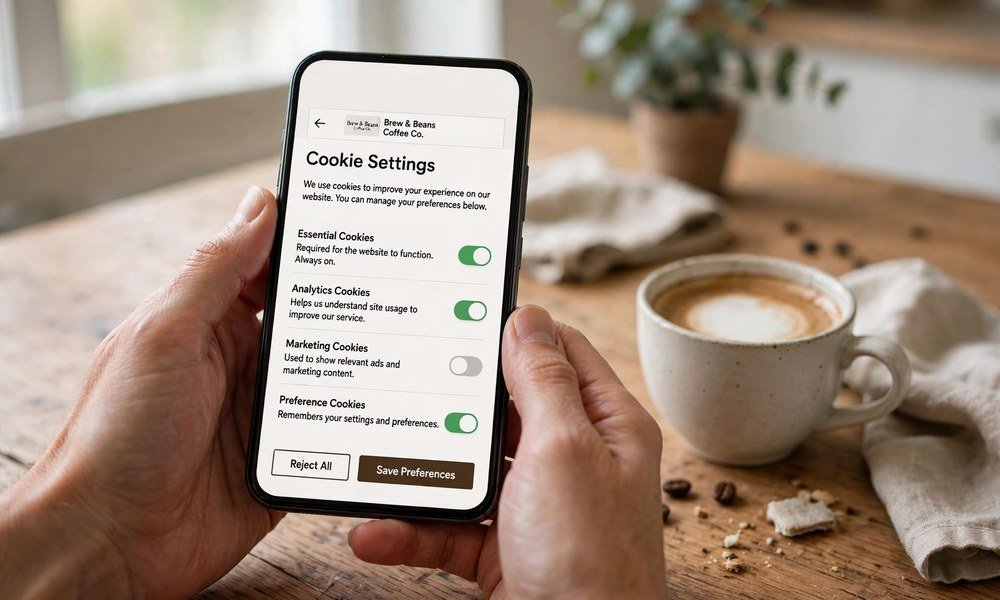
Write the list down in plain language, one line per tool, and group the tools into four categories: strictly necessary, preferences, analytics, and marketing. Strictly necessary covers the tools the site needs to work. Preferences covers choices such as language or region. Analytics covers measuring visits. Marketing covers advertising and tracking across sites.
Next, create the page in the website builder. Give it a clear address, such as the site address followed by cookies, and a clear title, such as Cookie Policy. Write it in short sections: a plain sentence about what a cookie is, then the four groups, one short paragraph each, with a real example in each. Then add a simple table, one row per group, with what it does and how long it lasts.
Then add the consent controls. The page must include a link that reopens the consent settings, labelled in plain words such as Change cookie settings. That link turns a static explanation into a working control. Test it on a phone and on a laptop: the panel should open, and changing a switch should actually change which tools run.
Now place the links to the page. The link belongs in the footer of every page, beside the privacy page and the terms page. It should also appear in the banner and inside the settings panel. The banner and the page must agree: if the banner offers a choice for analytics and marketing, the page must list them. A guide to how to set up a business website cookie banner in 2027 walks through the banner side of that pair.
Finally, publish the page and test it like a visitor would. Open the site on a phone, scroll to the footer, tap the link, and read the page from top to bottom. Then open the site in a private browser window, reject all non-essential cookies, and confirm that analytics and marketing cookies stay absent until a visitor accepts them.
The background: why a separate cookie page became standard
Ten years ago, most small business sites had no cookie page at all. Visitors rarely asked, because the tools were simpler: a counter, a contact form, and not much else. Then sites added analytics, chat widgets, embedded video, maps, advertising pixels, and booking systems. Each tool brought its own cookies, and the total grew from two or three to a dozen or more.
Privacy rules followed the tools. Rules such as the GDPR in Europe require sites to tell visitors about non-essential cookies and to get consent first. The exact rules differ by country and region, but the direction is the same: visitors should be told what is stored and given a real choice before tracking starts. The banner is the moment of choice, and the cookie page is the permanent record.
For a small business, the page also serves a practical purpose: a customer about to spend a large amount will often check the footer links first. A guide to how to set up a business website privacy page in 2027 covers the wider privacy page beside it, and the two should be written together so they never contradict each other.
The caveats that matter
A cookie page can look complete and still fail. The most common failure is a copied template that lists tools the site never runs and names companies the business has never heard of. The fix is simple: start from the audit, write one line per real tool, and delete every line that does not describe the site.
The second failure is a page that disagrees with the banner. The banner might promise that analytics only runs after consent, while the page lists analytics as always on. The fix is a single check after every change: open the banner, open the page, and read them side by side.
The third failure is a page that nobody can find, buried three clicks deep, and the fourth is a page that goes stale after the site adds a new tool. A last updated date and a review after every tool change keeps the page honest.
| Detail | What is known |
|---|---|
| What the page is | A dedicated page listing the cookies a site uses and how long each group lasts |
| How it differs from the banner | The banner asks for a choice on a first visit, while the page holds the full explanation |
| How it differs from the policy | The policy is the written statement, while the page is where visitors read it and reopen their settings |
| Where it should link from | The footer of every page, the banner, and the consent settings panel |
| What it must contain | Four cookie groups with examples, a lifetime table, and a settings link |
| Most common failure | A copied template that lists tools the site does not run |
| How often to review it | After every tool change, and at least once a year even if nothing changes |
Checklist: setting up a cookie page honestly
- Audit every tool on the site first, and group the cookies into strictly necessary, preferences, analytics, and marketing.
- Write the page in plain language, with one real example per group and a table of lifetimes.
- Add a working link that reopens consent settings, and test it on a phone and on a laptop.
- Link the page from the footer of every page, from the banner, and from the settings panel.
- Read the banner and the page side by side and fix every disagreement.
- Stamp the page with a last updated date and review it after every tool change.
Frequently asked questions
Does every small business website need a cookie page?
Most do, because most set cookies. A plain brochure site with no analytics may have little to list, but even that site should say so. A site with analytics, a shop, a booking tool, or an embedded map definitely needs a page.
What is the difference between a cookie page and a cookie banner?
The banner is the small box that appears on a first visit and asks for a choice. The page is the permanent page where the full explanation lives. A visitor who missed the banner needs the page to read it and change the choice later.
Where should the cookie page link from?
The footer of every page is the first place, beside the privacy page and the terms page. The banner is the second place, next to the choice buttons. The consent settings panel is the third place.
Can a business copy a cookie page from another website?
Copying is the most common mistake here. A copied page lists tools the site does not run and makes claims the business cannot defend. Write the page from the audit of the real site, even if the result is shorter than a template.
How often should the cookie page be updated?
Review it every time the site adds or removes a tool. Even if nothing changes, review it at least once a year. A last updated date at the top shows visitors that the review happened.
Does the cookie page need to name every tool the site uses?
It should name every group, give a real example of each group, and name the companies behind the main tools, such as the analytics provider. A page that hides behind vague group names tells the visitor nothing useful.
The bottom line
A cookie page is a small page with a large job. It tells visitors what a site stores, it gives them a way back to a choice made in a hurry, and it shows that the business knows what tools it runs. Audit the tools, write the page in plain language, add a working settings link, and keep it updated.
Most visitors will never read the page, and that is fine. It exists for the careful visitors and for the moments when a choice needs to be changed. Build it once, build it from the real site, and keep it true.
Note: This guide is general information, not legal advice. Privacy rules differ by country and region, and a business with unusual data practices should get advice from a qualified professional.