Trello and Asana are the two project management tools most teams compare first, and they could hardly be more different in how they think about work. Trello turns every project into a visual board of cards you drag from one column to the next, while Asana turns work into structured lists, timelines, and goals with owners and due dates. Both are used by millions of teams in 2027, both offer free plans, and both can run a small business perfectly well — but they suit very different kinds of teams.
The choice matters because switching project tools later is painful. Tasks, comments, attachments, and automations pile up fast, and moving them to a new system costs weeks of lost momentum. What matters most in this comparison is not which tool has the longer feature list, but which one matches how your team actually works: how big the team is, how complex the projects are, how much structure you need, and how much you are willing to pay per person each month.
In short, Trello wins for small teams that want something visual, fast, and easy to learn, while Asana wins for larger teams running multi-step projects with dependencies, deadlines, and reporting needs. The rest of this guide compares the two across price, ease of use, views, automation, integrations, reporting, scaling, and support, so you can pick with confidence.
Key takeaways
- Trello is the better pick for small teams and simple visual workflows — boards and cards are fast to learn and hard to get wrong.
- Asana is the better pick for larger teams and complex projects — timelines, dependencies, portfolios, and goals keep multi-step work on track.
- Both tools offer free plans, but Asana’s paid plans cost more per user and deliver considerably more structure and reporting.
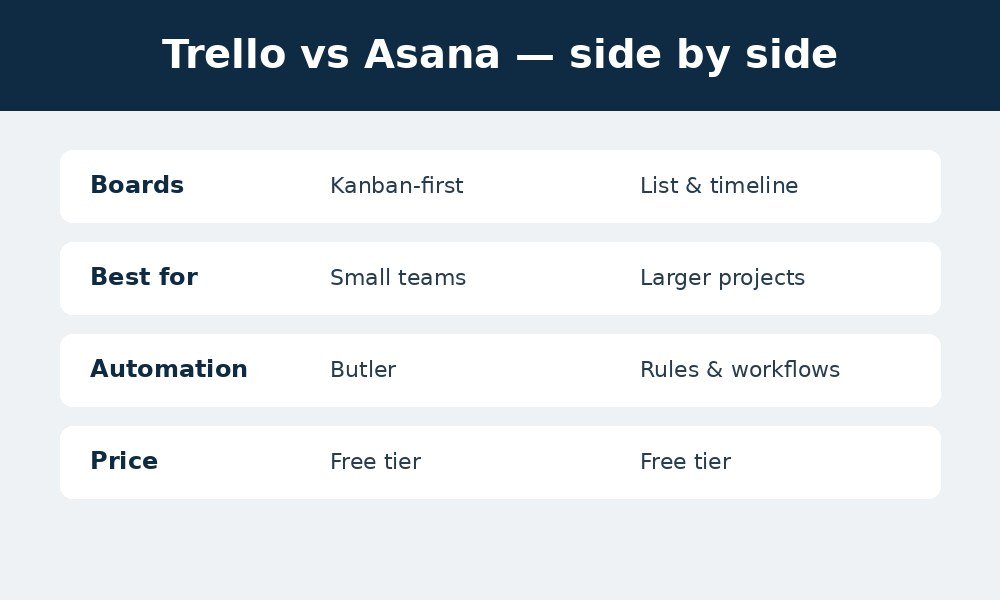
- Trello’s automation tool Butler is simple and visual; Asana’s rules and workflow builder handle more complex multi-step processes.
- If your team grows past roughly 15 to 20 people, Asana’s structure usually pays for itself — Trello boards can become crowded and hard to govern at that size.
At a glance: Trello vs Asana
| Area | Trello | Asana |
|---|---|---|
| Starting price | Free plan; paid plans from around $5 per user per month | Free plan; paid plans from around $11 per user per month |
| Ease of use | Very easy — boards and cards take minutes to learn | Easy to start, deeper to master — more menus and settings |
| Views | Board, timeline, calendar, table, dashboard, map | List, board, timeline, calendar, Gantt, workload, portfolio |
| Automation | Butler — card buttons, rules, and scheduled commands | Rules, workflow builder, and forms with branching logic |
| Integrations | Power-Ups for Slack, Google Drive, Dropbox, and more | Large app directory including Slack, Microsoft Teams, Google, and Adobe |
| Reporting | Basic dashboards on paid plans; limited native reporting | Strong reporting, goals, portfolios, and workload views |
| Scaling | Best up to small and mid-sized teams; boards can get crowded | Built to scale — portfolios and admin controls for large organisations |
| Support | Help centre and email support; priority support on higher plans | Help centre, community, and priority support on paid plans |
Trello — Best for visual simplicity
Trello is built around one idea: work should be visible at a glance. Each project is a board, each board is a set of lists, and each task is a card you drag from “To do” to “Doing” to “Done”. There is almost nothing to learn. A new team member can open a board and understand the state of a project in thirty seconds, which is exactly why Trello remains so popular with small businesses, freelancers, content teams, and marketing teams that juggle many small tasks rather than a few large ones.
Trello’s strength is its flexibility. A board can be a content calendar, a sales pipeline, a hiring tracker, or a product roadmap, and you can reshape it in minutes by renaming lists and adding labels. Cards hold checklists, due dates, attachments, comments, and members, so a surprising amount of detail fits inside a simple-looking card. Power-Ups add calendar views, time tracking, and connections to tools such as Slack and Google Drive, and the Butler automation tool lets you set rules like “when a card moves to Done, mark its due date complete and notify the team”.
The trade-off is structure. Trello has no native way to say “task B cannot start until task A finishes”, no built-in goals tracking, and only basic reporting unless you add Power-Ups or a paid plan. For a team of five running a blog or a design queue, that rarely matters. For a team of fifty running a product launch with fifty interdependent tasks, it matters a great deal. Trello’s free plan is generous for individuals and tiny teams, and paid plans start from around $5 per user per month when billed annually — check current pricing before buying, as plans and prices change. If you want a broader view of the market before deciding, our guide to the best project management software compares Trello and Asana against other leading tools for small businesses.
Pros: Extremely easy to learn; visual boards make progress obvious; generous free plan; flexible enough for almost any workflow; Butler automation is simple to set up.
Cons: Limited native reporting; no task dependencies on basic plans; boards get messy as teams grow; advanced views and admin controls cost extra.
Asana — Best for structured team projects
Asana is built for teams that need structure. Work lives in projects, projects live in portfolios, and every task has an owner, a due date, and a place in a sequence. Views include lists, boards, timelines, Gantt charts, calendars, and workload views that show who is overloaded and who has capacity. For a marketing team running a campaign, a product team shipping a release, or an operations team coordinating across departments, that structure is the whole point.
Where Asana really pulls ahead is in managing complexity. Dependencies link tasks so the next step starts only when the previous one finishes. Milestones mark the moments that matter. Goals connect daily tasks to company objectives, and portfolios give managers one dashboard for every project at once. The workflow builder turns repeatable processes — onboarding a client, approving a design, launching a feature — into forms and rules that route work automatically. None of this is hard to use, but it is more to learn than Trello’s boards, and teams that only need a simple task list may find Asana heavier than they want.
Asana’s free plan covers individuals and small teams with basic task management, while paid plans start from around $11 per user per month when billed annually, with higher tiers adding portfolios, goals, workload management, and advanced reporting — check current pricing before buying. The cost adds up for larger teams, but so does the value: fewer status meetings, fewer dropped tasks, and a single place where anyone can see what is happening and what is blocked. If you are weighing Asana against another structured tool, our Asana vs Monday comparison covers how the two differ on price, views, and team workflows.
Pros: Powerful timelines, dependencies, and Gantt views; portfolios and goals for managing many projects; strong reporting and workload management; large integration directory; scales well to big teams.
Cons: Higher starting price than Trello; more to learn for new users; simple teams may find it overcomplicated; some advanced features need the higher-priced tiers.
Head-to-head: Trello vs Asana
On price, Trello is the cheaper option at every tier. Its paid plans start at roughly half the price of Asana’s, and its free plan covers more of what a small team needs day to day. Asana costs more, but the extra money buys structure: dependencies, portfolios, goals, and reporting that Trello either lacks or only offers through add-ons. A five-person team saves real money with Trello; a fifty-person team usually saves more time with Asana than the price difference costs.
On ease of use, Trello wins outright. Boards and cards are intuitive in a way that lists and portfolios are not, and new users need almost no training. Asana is not difficult, but it has more concepts to learn — projects, sections, custom fields, rules, portfolios — and teams need a few days to settle into it. On views, both tools are strong, but Asana’s timeline, Gantt, and workload views are deeper, while Trello’s board view remains the most pleasant way to see a simple workflow.
On automation, the two tools take different approaches. Trello’s Butler is visual and friendly: pick a trigger, pick an action, done. Asana’s rules and workflow builder handle longer chains of steps and can route work based on form answers, which suits teams with formal approval processes. On integrations, Asana has the broader directory, but Trello’s Power-Ups cover the tools most small teams actually use. On reporting and scaling, Asana is the clear winner — dashboards, goals, and admin controls are built for organisations, while Trello’s reporting stays basic and its boards need discipline to stay tidy at scale.
Verdict: which tool wins for your team
For freelancers and teams of up to about ten people running simple, visual workflows — content calendars, client work, small marketing tasks — Trello wins. It is cheaper, faster to learn, and easier to keep tidy when the work is straightforward. Pick Trello if your team groans at complex software and just wants a board everyone understands.
For teams of ten or more running multi-step projects with deadlines, dependencies, and reporting needs — product launches, campaigns, operations, cross-department work — Asana wins. Its structure prevents tasks from slipping through the cracks, and its timelines and portfolios give managers the visibility Trello cannot match. Pick Asana if your projects have many moving parts and more than one team involved.
For remote teams, Asana also has a slight edge, because its workload views and status updates replace the hallway conversations that remote work removes. That said, either tool works remotely when the team commits to it, and the best remote setup pairs a project tool with good communication habits — see our guide to the best collaboration tools for remote teams for the apps that work well alongside either choice.
Checklist: before you choose
- Count your team and your active projects — under ten people and simple work favours Trello; more people and complex work favours Asana.
- Try both free plans for two weeks with a real project, not a demo — the tool your team actually opens every day is the right one.
- List your must-have views: if you need Gantt charts, dependencies, or workload views, Asana is the safer choice.
- Check the renewal price, not just the first-year price — per-user pricing multiplies fast as the team grows.
- Confirm you can export your data — test the export before you commit months of work to either tool.
- Ask who will administer the tool — Asana needs an owner to manage projects and permissions; Trello needs someone to keep boards tidy.
Frequently asked questions
Is Trello or Asana better for small teams?
Trello is usually better for small teams. Its boards are fast to learn, its free plan is generous, and its paid plans cost less per user. Asana makes more sense once a small team starts running complex projects with dependencies and deadlines.
Can I use Trello or Asana for free?
Yes, both offer free plans. Trello’s free plan includes unlimited cards and up to ten boards per workspace, while Asana’s free plan covers basic task and project management for up to ten teammates. Check current plan limits before signing up, as free-plan details change.
Which tool is better for managing deadlines?
Asana is better for deadlines. Timelines, dependencies, and workload views show exactly what is due, what is blocked, and who is overloaded. Trello shows due dates on cards and in calendar view, but it cannot link tasks so one starts only when another finishes.
Does Trello have automation?
Yes. Trello’s Butler automation lets you create rules, card buttons, and scheduled commands — for example, moving a card automatically when its checklist is complete. It is simpler than Asana’s workflow builder but covers the automations most small teams need.
Can I migrate from Trello to Asana later?
Yes, Asana offers an importer for Trello boards, and third-party tools can move cards, comments, and attachments. Migration is doable but takes planning: boards map to projects, lists map to sections, and automations need rebuilding by hand.
Which tool is better for remote teams?
Asana has a small edge for remote teams thanks to workload views, status updates, and portfolios that replace in-person check-ins. Trello works well remotely too, especially for teams that prefer a visual board and a separate chat tool for daily communication.
The bottom line
Trello and Asana are both excellent tools that solve different problems. Trello is the best choice when work is visual, teams are small, and simplicity matters more than structure. Asana is the best choice when projects are complex, teams are growing, and you need timelines, dependencies, and reporting to keep everything moving. The wrong choice is not either tool — it is picking a tool your team will not use, so trial both with real work before you pay.
Whichever you choose, revisit the decision once a year. Teams change, projects get more complex, and both tools add features regularly. A team that outgrows Trello’s boards will feel it in missed deadlines and messy cards; a team that finds Asana heavy will feel it in low adoption. Match the tool to the team you have now, not the team you had last year.
Note: Prices and plans change. Check the product’s current plan details before buying — no link is provided here by design, all links in this article go to other occcy.com guides.