
A 404 page is the page a visitor sees when a link leads nowhere. For a small business, that dead end can cost a sale, a booking, or a phone call, and it often happens quietly, with no complaint from the visitor. The owner only learns about it later, if at all, when traffic falls or a customer mentions a broken link. The right tool changes that pattern. It finds broken links, lists every 404 error in one place, and makes the fix simple, usually with a redirect to a live page.
This roundup ranks seven tools for managing a small business website 404 page in 2027. The ranking weighs ease of use for a non technical owner, the quality of the broken link report, redirect support, crawl limits, and price. A free tool that only lists errors is useful, but a tool that also helps fix them earns a higher place. Every tool here works for a small site, and none of them needs a developer on staff to run the first check.
The shortlist covers a desktop crawler, two full audit suites, a free search console report, a WordPress plugin pair, and a simple free checker. Screaming Frog leads for depth and control. Google Search Console leads for price, because it costs nothing. The best choice for most small businesses is a mix: a free monitor for daily watch, plus one deeper crawler for a monthly check.
Key takeaways
- Screaming Frog is the best overall pick for a full 404 audit on a small site.
- Google Search Console is the best free way to watch 404 errors over time.
- Ahrefs and Semrush suit owners who also want backlink and keyword data in the same plan.
- Broken Link Checker and Redirection are the simplest WordPress pair for daily upkeep.
- Fix the links that get traffic first, then work through the long tail of old errors.
At a glance: the shortlist
| Tool | Best for | Starting price | Standout limit |
|---|---|---|---|
| Screaming Frog SEO Spider | Full site crawls | Free to 500 URLs, paid licence from about 259 dollars per year | Free tier stops at 500 URLs |
| Ahrefs Site Audit | Broken links at scale | From about 129 dollars per month | Credit limits vary by plan |
| Google Search Console | Free monitoring | Free | Shows only pages Google found |
| Semrush Site Audit | Scheduled audits | From about 139 dollars per month | Project limits vary by plan |
| Broken Link Checker | WordPress sites | Free plugin, paid cloud checks available | Large sites can slow the dashboard |
| Redirection | Redirect upkeep | Free plugin | WordPress only |
| Dead Link Checker | Quick free checks | Free, paid plans for larger checks | Single page checks are limited |
1. Screaming Frog SEO Spider — Best overall
Screaming Frog SEO Spider is a desktop crawler that visits every page on a site and records the status code for each address. A 404 shows up in a clear list, with the pages that link to it, so the owner can see whether the broken address matters or sits unused in an old post. The free version crawls up to 500 URLs, which covers most small business sites in full. The paid licence removes that cap and adds scheduled crawls, saved projects, and deeper export options.
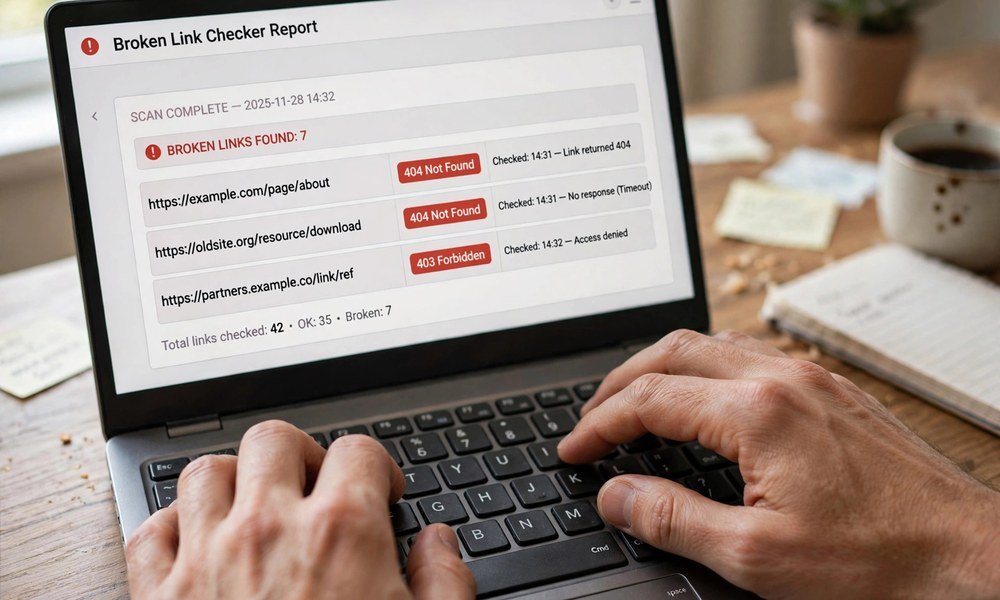
The tool also flags redirect chains, soft 404 pages, and images that fail to load, which helps an owner fix more than the headline errors. Filters sort the list by status code, so a 404 report takes seconds to build once the crawl ends. For a full picture of what a 404 page means for visitors, read our guide to what a business website 404 page is for small businesses before the first crawl.
Pros: deep crawl data, clear link source for each error, generous free tier. Cons: desktop only, the interface looks technical at first, no cloud monitoring in the free version.
2. Ahrefs Site Audit — Best for finding broken links at scale
Ahrefs Site Audit crawls a site in the cloud and groups every issue by type, with 404 errors near the top of the list. Each error links to the pages that point at it, and to the external sites that link in from outside, which matters when a dead page still earns traffic from elsewhere. The audit also scores overall site health, so an owner can track whether the error count falls month by month. The tool suits a business that already pays for backlink or keyword research, because the audit sits inside the same plan.
Pros: cloud crawls, external link data, scheduled audits with history. Cons: high starting price, credit limits, more features than a small owner may need.
3. Google Search Console — Best free monitoring
Google Search Console is the free tool from Google that reports the pages Google tried to crawl and could not find. The Pages report lists 404 errors under the not found label, with the date Google last saw each one. That list is the closest thing to a live record of the errors that search engines actually meet, and it costs nothing. Every small business with a website should have it set up, even if another tool does the deeper crawl work.
Pros: free, direct data from Google, simple fix confirmation. Cons: no redirect tools, only pages Google found, reports update slowly.
4. Semrush Site Audit — Best for scheduled audits
Semrush Site Audit runs a full technical crawl and places 404 errors in a themed issues list, with a short explanation of why each one matters. The audit runs on a schedule, so an owner gets a fresh report each week or month without opening the tool. The dashboard shows the error count over time, which makes it easy to see whether a cleanup worked or whether new errors keep appearing after each content change.
Pros: scheduled audits, clear trend charts, broad technical checks. Cons: high price, project limits on lower plans, learning curve for new users.
5. Broken Link Checker — Best for WordPress sites
Broken Link Checker is a WordPress plugin that scans posts, pages, and comments for links that no longer work. It lists each broken link with the page that holds it, and lets an owner edit the link or remove it from the same screen. That direct fix saves the step of opening each post by hand. The plugin also checks links in the background, so new errors appear in the dashboard without a manual scan.
Pros: finds links inside content, fixes from the same screen, simple setup. Cons: can slow large sites, no redirect manager, WordPress only.
6. Redirection — Best for redirect upkeep
Redirection is a free WordPress plugin that manages 301 redirects and logs every 404 error a visitor meets. The log is the key feature: it shows the exact address requested, how often it was requested, and the date of the last hit. An owner can turn the most requested dead addresses into redirects in a few clicks, and leave the addresses that nobody visits alone. That focus saves time and keeps the redirect list short.
Pros: free, clear 404 log, auto redirects on address changes. Cons: no site crawl, WordPress only, logs need regular review.
7. Dead Link Checker — Best for quick free checks
Dead Link Checker is a simple web tool that scans a single page or a whole site for dead links and reports the result in a plain list. The free check is fast, needs no account, and suits an owner who wants a quick answer before a launch or after a small edit. The report shows the broken address, the status code, and the page that links to it, which is enough to fix most single page problems.
Pros: free quick checks, no account needed, clear plain report. Cons: limited depth, no redirect tools, paid plans needed for large sites.
How to choose
Start with the size of the site and the way it is built. A WordPress site under 500 pages does well with Broken Link Checker for finding errors and Redirection for fixing them, plus Google Search Console for free monitoring. A larger site, or a site built outside WordPress, needs a crawler such as Screaming Frog, which finds errors that no visitor has reported yet. A business that already pays for Ahrefs or Semrush should use the audit inside that plan before buying a second tool. Pair the tool with a clear page design, as shown in our guide to how to create a business website 404 page in 2027.
Checklist: before you pay
- Run the free tier or trial on the real site and read the full 404 list.
- Check the crawl limit against the true page count, including old posts.
- Confirm that the report shows which pages link to each dead address.
- Check whether redirects can be made inside the tool or need a second plugin.
- Look at the renewal price, not only the first month or first year price.
- Confirm that data can be exported, so the error list is not locked inside one tool.
Frequently asked questions
How many 404 errors are normal on a small site?
A small number is normal. Pages get deleted, products sell out, and old links stay live elsewhere. A handful of errors is fine. A rising count, or errors on pages that still get traffic, needs action.
Should every 404 get a redirect?
No. Redirect the dead pages that still get visits or links. Leave a dead address alone when nobody visits it and nothing links to it, and let the 404 page handle the rare visitor who lands there.
What is the fastest free way to find 404 errors?
Google Search Console is the fastest free option for errors Google has seen. Screaming Frog is the fastest free crawler for a site under 500 pages, because it checks every link, not only the ones Google found.
How often should a small business check for broken links?
Check once a month as a routine, and again after any redesign, product removal, or bulk edit. A site that changes weekly should check weekly, even if the check is only a quick scan.
Can a 404 page hurt search rankings?
A few 404 errors do not hurt a whole site. A large set of broken internal links can waste crawl time and send visitors away, which hurts over time. Fix the errors that matter first.
Where do I start after the first audit?
Start with the dead pages that get the most visits, then the pages with links from other sites. Our guide to how to set up a business website 404 redirect in 2027 walks through the redirect step for the most common cases.
The bottom line
For most small businesses, Screaming Frog is the best first tool for a full 404 audit, Google Search Console is the best free monitor, and the WordPress pair of Broken Link Checker and Redirection covers daily upkeep at no cost. A business that already pays for Ahrefs or Semrush can use the audit inside that plan and skip a separate crawler. The tool matters less than the routine: check often, fix the visited pages first, and keep the redirect list short.
Watch the error count after each fix, and check again after the next site change. Prices and crawl limits change, so check current pricing before buying a paid plan, and test the free tier on the real site first.
Note: Prices and plans change. Check the current plan details before buying — no link is provided here by design, all links in this article go to other occcy.com guides.