
A growing front-end project can make a simple change feel risky when related code is scattered across folders. Feature-Sliced Design gives a team a clearer way to group code as projects grow. A segment groups code by technical purpose, such as ui or model. This approach can make business responsibilities easier to find than folders named only for file types. It also sets rules for how parts of an application may depend on each other. It does not require one framework or state manager. The useful test is whether a new teammate can find a feature’s code without tracing imports across the whole project.
Key Takeaways
- FSD groups front-end code around business domains and user-facing functionality.
- Layers set a clear direction for dependencies between parts of an application.
- Slices group code by business domain, while segments group it by technical purpose.
- Public APIs give other slices a controlled way to use a slice.
- A team can adopt FSD gradually, one package or part of an application at a time.
What Is Feature-Sliced Design in Software Development? A Practical Definition
Feature-Sliced Design organizes front-end application code around business domains and sets rules for dependencies between its parts. This business-oriented methodology helps a team find code by what the application does, not only by the kind of file it uses.
FSD groups code by business purpose and limits which parts can depend on one another. A structure built around components/, utils/, or services/ groups files mainly by technical type. That layout can work, but code for one user-facing function may end up spread across many folders.
Organize code so its location reflects the job it does, and keep dependencies moving in defined directions.
With FSD, a front-end developer can look for a business domain or user action, then find related code within that part of the application. The structure also gives teams shared terms for discussing ownership and changes.
Feature-Sliced architecture applies to front-end applications built with any programming language, UI framework, or state manager. That includes React, Vue, and other tools. FSD is a front-end architecture, not a React-only convention, and it does not dictate how every file must work.
Teams can adapt the methodology to fit their application, as long as they agree on its boundaries and follow them. Treat FSD as a set of structural conventions, not as a framework or a required technology stack.
How Do FSD Layers Control Dependencies?
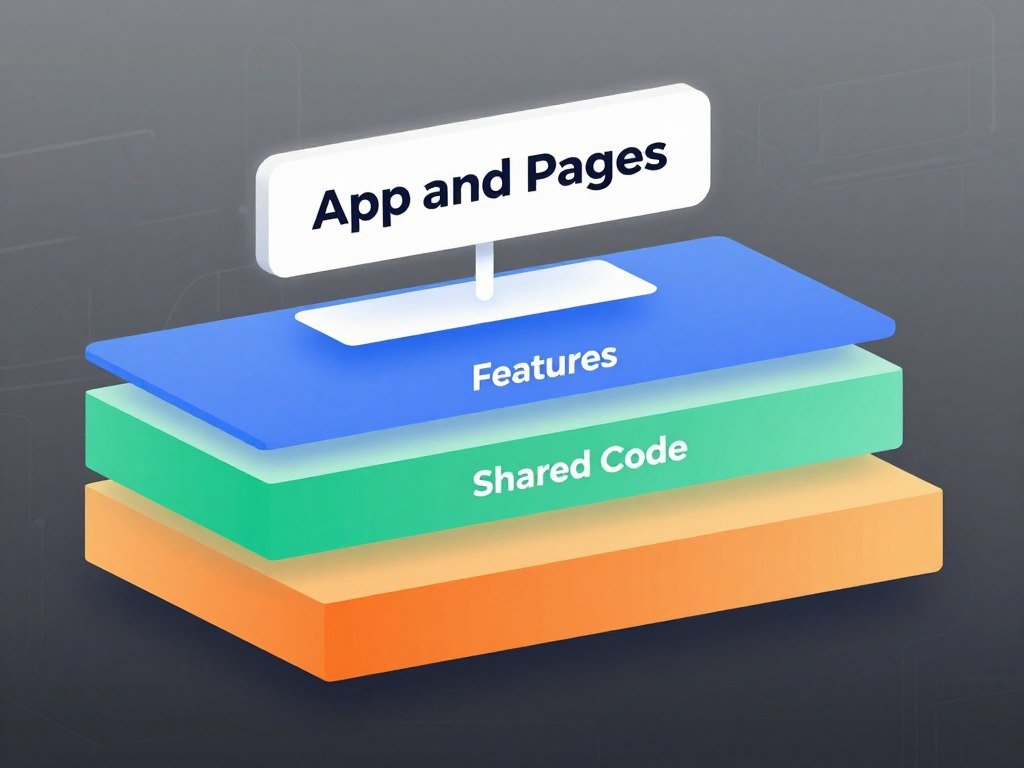
FSD’s layers form a one-way hierarchy: code higher in the order can use code below it, not the reverse. This one-way structure gives developers clear rules for dependencies across an application.
A module may import from a lower layer, but not from a higher layer or a sibling slice. The rule helps prevent code from depending on itself through a tangle of cross-links.
The seven layers from App to Shared
From top to bottom, the seven layers are App, Processes, Pages, Widgets, Features, Entities, and Shared. Processes is deprecated, so many projects do not use it.
App sits at the top, while Shared sits at the bottom. A project may leave out layers it does not need. The same import rule still applies to every layer the project uses.
What the top-to-bottom import rule permits
A Pages module can import from a Features module because Features sits lower. A Features module cannot import from Pages, since Pages sits higher.
Imports between slices on the same layer are also not allowed. For example, one Feature should not import another Feature’s internal code. That keeps each slice from relying on a same-layer neighbor.
The rule concerns the source and destination of an import, not the order in which code runs. It applies whether you use a few layers or most of the defined layers.
When an import seems useful but points upward, look for a lower layer that can own the shared responsibility. Before adding an import, check that its destination is lower in the layer order and not a sibling slice.
How Do Slices and Segments Organize Code?
A slice answers which business domain code belongs to, while a segment answers what technical purpose that code serves. This two-part view helps you place a file without treating all code as one flat set of folders.
Slices group by business domain, and segments group by technical purpose within that structure. A layer sets the larger position in the architecture.
Slices keep a business domain together
Names such as user, product, and cart can mark business domains. Each slice should keep related code together and remain independent from other slices on its layer.
A vertical slice is an end-to-end piece of functionality that crosses technical layers. An FSD slice is different: it is a business-domain unit within one layer. The shared word “slice” does not make these terms interchangeable.

Segments separate code by technical purpose
Common segment names include ui, api, model, lib, and config. They are useful options, not required names. A ui segment may hold a view, while model code can manage domain state.
App and Shared can use custom segments. Pick names that describe what the code does, rather than naming a segment after file kinds such as components, hooks, or types.
| Concept | Grouping basis | Scope | Example |
|---|---|---|---|
| Layer | Architectural role | Application level | Features |
| Slice | Business domain | One layer | Product |
| Segment | Technical purpose | One slice or allowed layer | ui |
For instance, product/ui and product/model can serve different technical purposes within the same business slice. Keep a slice cohesive, and choose segment names that tell teammates what the contents do.
What Belongs in Each FSD Layer?
Each FSD layer has a different job, from application setup at the top to generic reusable code at the bottom. The main purpose of each layer helps you decide where a change belongs.
Place code in the layer that matches its responsibility, not simply the folder that seems convenient. App and Shared use segments but do not contain slices.

| Layer | Responsibility | Example |
|---|---|---|
| App | Application setup | Providers and startup code |
| Pages | Route-level views | Product detail page |
| Features | User actions | Add a product to cart |
| Entities | Business-domain objects | Product data |
| Shared | Generic cross-application code | Button or date helper |
Pages bring together the code needed for a route-level view. Widgets can hold larger UI blocks, while Features handle user actions. Entities represent business objects that the application works with.
Processes is deprecated and often has no role in a new project. Teams can leave it out rather than add a layer without a clear job.
Widgets can be useful for large UI blocks, such as a header or a dashboard panel. Yet FSD generally recommends avoiding Widgets when they handle user actions that already belong in Features. Add a Widget only when it has a clear composition role that is not already owned by a user-action Feature.
What Does a Feature-Sliced Design Example Look Like?
In a hypothetical storefront, a product page can assemble domain objects, user actions, and page-level UI without treating them as one undifferentiated component. This storefront example shows how the application can separate work by responsibility.
Keep the product view, product data, and cart action in places that match their jobs. A page can combine them without owning every detail.
Map a storefront by business responsibility
These placements are examples, not a required folder tree. They show where a front-end developer might look when changing a part of the storefront.
- Product and Cart domain objects belong in Entities.
- Product search and add-to-cart actions belong in Features.
- A route-level product view belongs in Pages.
- A composed product-and-cart UI block belongs in Widgets only when it has a distinct composition role.
Trace one action through the layers
Imagine a user selecting a product on its detail page. The Pages layer provides the route-level view, while a product Entity supplies the domain data shown there.
The user then chooses add-to-cart. A Feature handles that action, while the Cart Entity holds the cart’s business data. The page can show the result through its own composition or through a Widget with a separate role.
After the action, the cart display reflects the updated state. Developers can look for the user action in Features and cart data in Entities, instead of searching one oversized page component.
The example illustrates responsibilities, not a mandatory folder tree. A small storefront may need no Widget if the page can compose its parts clearly. Keep page-specific composition close to the page unless another layer has a distinct responsibility for it.
Why Do FSD Slices Need a Public API?
A slice’s public API is the one supported doorway for other parts of the application to use it. This controlled entry point protects the slice’s internal files from outside imports.
Code outside a slice should use its public API, not reach into its internal file structure. An entry point such as index.ts can export the parts that other code may use.
For example, another slice can import an intended component through the feature’s public entry point. It should not import directly from a file such as ui/AddToCartButton or model/addToCart.
This boundary gives the slice room to change its internal layout. If a developer moves or renames a private file, outside imports can stay the same when the public API remains stable.
A public API also makes the intended use of a slice easier to see during code review. Teammates can tell which functions and components are designed for outside use.
Do not export every internal file for convenience. Export only the components or functions that other slices genuinely need.
How Can Teams Check FSD Boundaries?
A codebase makes architectural rules easier to follow when violations show up during development. This early feedback can help a team catch dependency problems before they spread.
Use automated checks for rules that can be tested, then document the conventions that need human judgment. The feature-sliced/eslint-config package can flag FSD relationship violations.
Steiger can check additional FSD practices, including naming and guidance for specific layers. The tools can support review, but the team still needs to agree on how its own project uses the methodology.
Where available, automate checks for these common boundaries:
- Imports follow the project’s layer direction.
- Code outside a slice uses its public API.
- Slices avoid dependencies on other slices at the same layer.
Write down deliberate team conventions alongside those checks. That record helps a new developer understand why the project allows a choice that differs from a default rule.
Automated rules work best when they match the codebase rather than enforcing settings nobody agreed to use. Keep automated checks aligned with the conventions the team has actually agreed to use.
How Can You Use FSD with React, Next.js, or an Existing Project?
FSD can sit alongside a React or Next.js application structure, so adopting it does not require a whole-project rewrite. This gradual approach lets a team shape the code while keeping its framework conventions.
Start with a small boundary, then add structure as the application’s responsibilities become clear. FSD can be adopted in a monorepo or in one package.
Keep framework conventions alongside FSD
FSD works with React and can also sit alongside Next.js. Keep the framework’s routing and required conventions, then use FSD to organize application code within those limits.
React.lazy defers loading a component’s code until the component first renders. The imported module must provide a valid React component at its default property.
Declare lazy at the module’s top level to avoid resetting component state during re-renders. Render the lazy component inside Suspense, which shows fallback content while the code loads.
For example, a route can load a page component with React.lazy and wrap it in Suspense. The fallback might show a loading message while the browser fetches the component code.
Migrate gradually instead of rewriting everything
Move one part at a time rather than pausing work for a full rewrite. A team can begin in one package, even if the rest of the monorepo still uses another structure.
- Shape App and Shared around setup and generic code.
- Distribute existing UI broadly across Widgets and Pages.
- Resolve import violations gradually, then extract Entities or Features when warranted.
Existing components do not need to fit a perfect design on day one. As a team learns where business responsibilities sit, it can make focused changes to the relevant areas.
Use the FSD community Skill with coding agents
The FSD community Skill is designed for AI coding agents and applies FSD v2.1 principles. It can guide an agent as it creates or changes code in an application.
The Skill recommends starting with app, pages, and shared. Add features or entities when a stable responsibility belongs across more than one part of the application.
A coding agent still needs the project’s framework rules and local conventions to do useful work. Start the migration at a boundary the team can review and maintain, such as one package or one part of the application.
Is FSD the Right Architecture for Your Project?
FSD is most useful when a front-end application has enough domain complexity and expected change to benefit from explicit boundaries. This clear threshold helps you weigh structure against the time it takes to maintain it.
Choose FSD for a growing, long-lived application with complex business domains or several developers. A small prototype or simple, short-lived project may work better with a lighter feature-folder structure.
Use the lightest structure that keeps the application understandable as its responsibilities grow.
When FSD is a good fit
FSD is intended for front-end applications, not libraries. A library needs to serve other code as a reusable package, while FSD focuses on organizing an application and its business responsibilities.
For a small prototype, a full set of architecture conventions can add work before the product has settled. If you are still choosing the app’s first user and task, a focused first app prototype can help you learn what structure the project needs.
Common software architecture patterns include these five examples:
- Layered architecture
- Client-server architecture
- Microservices architecture
- Event-driven architecture
- Microkernel architecture
These are common patterns, not a universal ranking. The right choice depends on the application’s needs and the team’s way of working.
How FSD differs from other architecture patterns
FSD organizes front-end code through business domains, layers, and dependency rules. Technical-folder organization groups files by type, while Atomic Design groups UI parts by their level of composition.
| Approach | Organizing axis | Main boundary | Typical focus |
|---|---|---|---|
| FSD | Business domains and layers | Layer and slice | Front-end application code |
| Technical-folder organization | File type | Folder of files | Components, utilities, or services |
| Atomic Design | UI composition level | UI building block | Reusable interface parts |
MVC and MVP are other patterns based on responsibilities. They are not direct substitutes for FSD’s front-end organization, though a project can use ideas from more than one pattern.
A software layer is a functional division in code. A tier is a functional division that runs on infrastructure separate from the other divisions.
In a three-tier architecture, presentation and data communicate through the application tier. A 2026 comparison of FSD and feature-based modular design reported a 5.3-fold reduction in change scope for its feature-based model; its study of structural complexity also notes that import graphs do not capture runtime dependencies. Choose the lightest structure that keeps the project understandable as its responsibilities grow.
Conclusion
FSD is worth considering when a front-end project needs clearer ownership and dependable dependency direction. Its main value is a predictable, business-oriented structure that helps a team find code and manage how parts of the application depend on each other.
You do not need to reorganize an entire application before learning whether the method fits. Pick one screen or package, then write down the team’s conventions for its boundaries and imports.
Review how easily developers can find a feature and change it without surprising another part of the project. Pick one contained screen or package, agree on its boundaries, and test whether the structure helps the team find and change code.
FAQ
What is a 3 layer architecture?
A three-tier architecture separates presentation, application, and data responsibilities. Presentation and data communicate through the application tier, rather than connecting directly. For example, a web page can send a request to application logic, which then reads or writes data. The word “tier” refers to divisions that run on separate infrastructure, not simply separate folders in one codebase.
What does vertical slice mean in software development?
A vertical slice is an end-to-end piece of functionality that crosses technical layers. For example, a sign-up action might include a screen, business rules, and data access. An FSD slice means something different: it groups code around one business domain within a single FSD layer. The terms share a name, but describe different ways to divide software.
What is FSD in React?
FSD is a front-end code-organization methodology that works with React but is not specific to React. It sets conventions for grouping application code and for dependencies between parts. A React team can keep using React components, state tools, and routing while applying FSD to the code’s structure. The same method can also be used with other frameworks and state managers.
What is a feature slice?
In FSD, a slice groups code around a business domain and keeps its internals behind a public API. A slice might hold code for a product or a user, while separate segments organize its technical purposes. Other parts of the application should use the slice’s supported entry point instead of importing its internal files directly. This gives the slice room to change inside.
What is 4 layer architecture in React?
FSD defines seven layers, including Processes, which is deprecated, but a project can use only the layers it needs. A four-layer setup is therefore a project-specific selection, not a separate standard FSD architecture. The important rule is to keep dependencies moving in the allowed direction among the layers the project uses. React does not require a particular number of FSD layers.
What is the best architecture for React?
FSD is a strong choice for a growing React application with complex business domains or several developers. A lighter structure can suit a small prototype or a short-lived project better. The best fit depends on how much the application changes, how many responsibilities it has, and how much structure the team can maintain. React itself does not require FSD.
What is lazy() in React?
React.lazy loads a component’s code when the component is first rendered. Render the lazy component under Suspense and provide fallback content for the time its code is loading. The imported module must provide a valid React component as its default export. Declare the lazy component at the module’s top level to avoid resetting its state during re-renders.



