

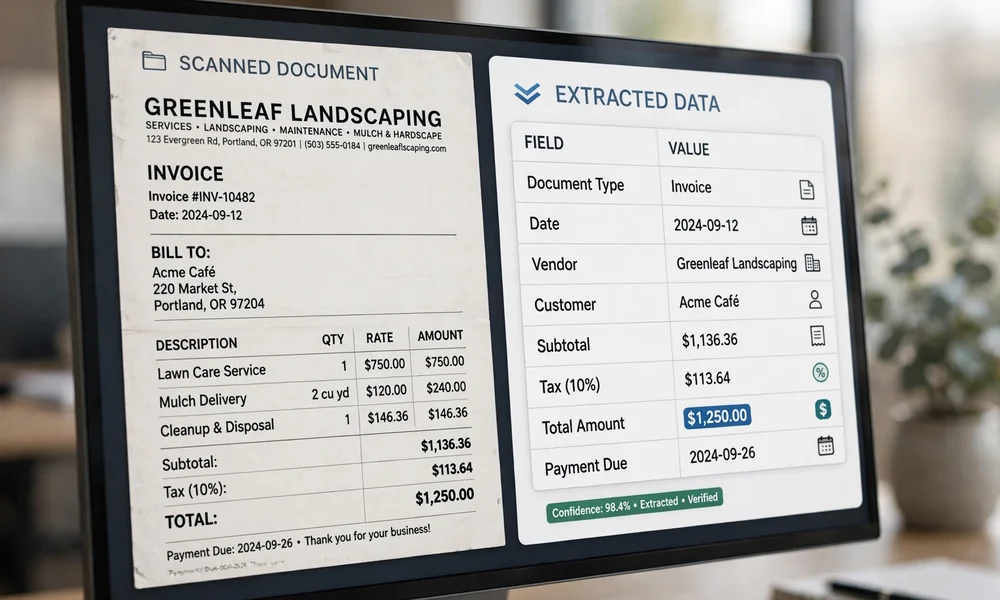
Best AI tools for text extraction in 2027 pull the numbers, names, dates and line items out of invoices, receipts, contracts and forms, and they do it by reading scanned pages and PDFs the way a careful clerk would, only thousands of times faster. The best tools in this list turn messy documents into clean, structured data that flows straight into accounting, CRM and spreadsheet systems, with confidence scores that show exactly which fields need a human check.
Text extraction matters because most business data still arrives as paper or PDF, and typing it in by hand is slow, expensive and full of errors.
Our shortlist covers eight tools, from simple no-code parsers to enterprise document intelligence platforms, and every pick was chosen for real extraction accuracy, honest pricing and output a non-specialist can trust. Prices are approximate starting prices, so check current pricing before you buy, because plans, page limits and model training options change often.
Key takeaways
- Docparser is the best overall choice for small teams that want accurate extraction from invoices and forms without code.
- Rossum is the best option for finance teams that need invoice extraction they can trust at high volume.
- Amazon Textract is the best pick for developers who need extraction inside an AWS pipeline at low unit cost.
- ABBYY Vantage is the best choice for enterprises with complex, low-quality or handwritten documents.
- Nanonets is the best option for teams that want a custom model trained on their own document layouts.
At a glance: the shortlist
| Product | Best for | Starting price | Standout limit |
|---|---|---|---|
| Docparser | No-code document parsing | From about $39 per month | Page limits on low plans |
| Nanonets | Custom AI extraction models | From about $0.10 per page | Costs rise with volume |
| Rossum | Finance-grade invoice extraction | From about $500 per month | High starting price |
| ABBYY Vantage | Enterprise document AI | Custom pricing | No public starting price |
| Amazon Textract | AWS document extraction | From about $0.0015 per page | Needs AWS skills |
| Google Document AI | Cloud document processing | From about $0.005 per page | Needs coding skills |
| Azure AI Document Intelligence | Microsoft document AI | From about $0.01 per page | Best inside Azure |
| Parseur | Email and PDF extraction | From about $99 per month | Smaller feature set |
Docparser — Best overall
Docparser is the easiest text extraction tool to start with, and it leads this list in 2027 because it lets a non-technical team build a working parser in an afternoon. You upload a sample document, point at the fields you need, and Docparser learns where they sit on the page, then extracts them from every similar document that arrives. best AI tools for research Pricing starts at about $39 per month, so check current pricing for the page volume you need, because the cheapest plan caps how many documents you can process. For a small business drowning in invoices and forms, it is the fastest way to stop typing data by hand.
Pros: Very easy setup, no coding needed, strong integrations, affordable start.
Cons: Page caps on low plans, and unusual layouts need manual rules.
Nanonets — Best for custom extraction models
Nanonets is the best choice when your documents do not look like anyone else’s, because it trains a custom AI model on your own samples. You upload a few dozen examples, label the fields you need, and the model learns to find them even when the layout shifts, the scan is skewed or the font changes. Pricing starts at about $0.10 per page, so check current pricing for your monthly volume, because the bill grows with every page processed. For a team with unusual or varied document types, a model trained on your own files beats a generic template every time.
Pros: Custom models for unusual layouts, handles tables well, simple API.
Cons: Needs labelled samples to train, and per-page costs add up at scale.
Rossum — Best for finance teams
Rossum is built for finance teams that process invoices at scale, and it is the strongest pick when accuracy on money fields is non-negotiable. Its AI reads invoices, purchase orders and receipts in many languages and layouts, extracts vendor, totals, tax and line items, and flags anything uncertain for a human to confirm, so errors are caught before they reach the ledger. Pricing starts at about $500 per month, so check current pricing for your document volume, because it is priced for teams, not casual users. For an accounts payable department, that accuracy pays for itself in avoided mistakes.
Pros: High accuracy on financial documents, learns from corrections, strong ERP links.
Cons: High starting price, and onboarding takes time.
ABBYY Vantage — Best for enterprise documents
ABBYY Vantage is the enterprise option for documents that defeat simpler tools: poor scans, handwriting, stamps, tables spanning pages and dozens of languages. It combines optical character recognition with AI models that understand document structure, and it lets business users train skills for specific document types without writing code. Pricing is custom, so expect a sales conversation and a quote based on volume and deployment. best AI tools for market research For a large company processing contracts, claims or loan files in many formats, Vantage is one of the most capable platforms available.
Pros: Handles difficult documents, strong OCR, on-premises option, enterprise security.
Cons: Custom pricing only, with a longer implementation process.
Amazon Textract — Best for developers on AWS
Amazon Textract is the natural choice for developers already running on AWS, because it extracts text, tables and forms from documents at a very low unit price. It goes beyond simple OCR by understanding that a value sits next to its label and that rows belong in a table, and it can also detect signatures and query a document in plain language. Pricing starts at about $0.0015 per page for basic text, so check current pricing for the features you need, because tables and forms cost more per page. For a high-volume AWS workload, it is hard to beat on price.
Pros: Very low unit cost, understands tables and forms, tight AWS integration.
Cons: Needs AWS and coding skills, and the console is developer focused.
Google Document AI — Best for cloud developers
Google Document AI gives developers a reliable API for extracting text, tables, form fields and entities from documents, backed by pre-trained processors for invoices, receipts, contracts and identity documents. Custom processors let teams train extraction on their own document types when the standard models are not precise enough. best AI writing tools Pricing starts at about $0.005 per page, so check current pricing for your volume tier, because costs fall at scale and the first pages each month are free. For a team building a document product on Google Cloud, it is the obvious foundation.
Pros: Reliable API, strong pre-trained processors, wide language support.
Cons: Requires coding, and custom training adds cost and complexity.
Azure AI Document Intelligence — Best for Microsoft teams
Azure AI Document Intelligence, formerly Form Recognizer, is the best extraction option for organisations already running on Microsoft 365 and Azure. Its prebuilt models handle invoices, receipts, IDs, contracts and tax forms, while custom models learn your own layouts from a handful of samples. Pricing starts at about $0.01 per page, so check current pricing for the model and volume you need, because some features cost more. For a Microsoft shop, the native integration is the deciding factor.
Pros: Strong Microsoft integration, good prebuilt models, custom training available.
Cons: Best value only inside Azure, and pricing varies by model.
Parseur — Best for email and PDF extraction
Parseur is the simplest tool on this list for teams whose documents arrive by email, because it gives you a mailbox that reads attachments automatically. Every email sent to your Parseur address is parsed for the fields you define, whether the data sits in the body, a PDF or a spreadsheet attachment, and the results go to Google Sheets, Zapier or your own API. Pricing starts at about $99 per month, so check current pricing for the document volume you need, because the cheapest plans cap monthly pages. For a small team that lives in email, it removes a daily chore with almost no setup.
Pros: Email-first workflow, very fast setup, good for recurring documents.
Cons: Smaller feature set than enterprise platforms, and page caps on low plans.
How to choose
Start with the documents you actually process, not the ones a vendor demos. A tool that excels on clean printed invoices can fail on handwritten forms or multi-page contracts, so test each shortlisted option on a real sample of your own files before you commit.
Decide how much coding your team will really do. No-code parsers suit operations and finance teams, while developer APIs suit engineers who already own a pipeline, and picking the wrong side wastes months.
Check accuracy on the fields that matter most, not the overall score. A tool that reads totals perfectly but misses tax lines is worse than one that is slightly less accurate overall but reliable where money is involved.
Checklist: before you pay
- Trial the tool on a real sample of your own documents before paying.
- Check the starting price, renewal price and what counts as a billable page.
- Confirm cancellation terms and whether trained models export cleanly.
- Verify accuracy on your hardest documents, not only clean samples.
- Check support for every language and layout your documents use.
- Confirm data privacy, retention and hosting options for sensitive files.
Frequently asked questions
What is text extraction in simple terms?
Text extraction is software that reads a document, whether a scan, a PDF or a photo, and pulls out the structured information inside it, such as invoice numbers, dates, totals and line items, so the data can be used in other systems without retyping. LINK1
Do I need to code to use a text extraction tool?
No, not with the no-code options on this list. Docparser, Parseur and Rossum let you define fields by pointing at them in a browser, while developer APIs such as Amazon Textract and Google Document AI need coding, and ABBYY Vantage sits in between.
How accurate is AI text extraction?
Accuracy depends on the tool and the quality of the document. Clean printed invoices often extract at 95 percent or better on key fields, while poor scans, handwriting and unusual layouts lower that figure
Can text extraction handle handwritten documents?
Partly. The best tools on this list, such as ABBYY Vantage and Azure AI Document Intelligence, read many kinds of handwriting, but accuracy is lower than for printed text
What is the difference between OCR and text extraction?
OCR only turns a picture of text into characters. Text extraction goes further: it understands which characters are the invoice number, which are the total and which belong in a table, so the result is structured data rather than a block of plain text.
How much does text extraction cost?
A small team can start at roughly $39 to $99 per month for a no-code parser, developer APIs bill from about $0.0015 per page, and enterprise platforms start at about $500 per month
The bottom line
For most teams, Docparser is the strongest starting point because it delivers accurate extraction without code at an affordable price, with Nanonets as the best upgrade for unusual layouts and Amazon Textract as the cheapest route for high-volume developer pipelines. That combination covers the common cases: operations teams get a working parser in days, finance teams get accuracy they can trust, and nobody pays for capacity they do not use.
Watch per-page pricing and accuracy on your hardest documents as your volume grows, and re-test accuracy every quarter on fresh files and the best text extraction tool in 2027 is the one that still reads your documents correctly at the volume you actually process.



