

A server is a computer built to serve other computers. Every time you open a website, check email, stream a video, or save a file to the cloud, a server somewhere answers that request and sends back what you asked for. It does this day and night, often for thousands of people at once, usually without a keyboard, mouse, or monitor attached.
Unlike the laptop or phone in your hands, a server is designed for reliability and constant availability rather than for one person to sit in front of. It runs specialised software, stores shared data, and handles requests over a network.
Understanding what a server does matters because servers sit behind almost everything digital. When a website loads slowly or an app goes offline, a server is usually part of the story. This guide explains what servers are, how they work, and the main types.
Key takeaways
- A server is a computer that provides services, data, or resources to other computers, called clients.
- Servers are built for uptime, with redundant power, cooling, and storage so they keep running around the clock.
- The main types are web, file, database, mail, application, and game servers, each tuned for a different job.
- Servers can live on premises, in a data centre, or in the cloud, depending on control, cost, and scale.
- Security, backups, and maintenance matter as much as hardware, because a neglected server is an easy target.
At a glance: servers
| Detail | What is known |
|---|---|
| Definition | A computer or program that provides services to other computers over a network |
| Main job | Store, process, and deliver data and applications |
| Typical hardware | Multi-core processors, large memory, fast storage, redundant power supplies |
| Common types | Web, file, database, mail, application, and game servers |
| Where they run | On premises, in a data centre, or on cloud infrastructure |
| Key strength | High availability and serving many users at once |
| Main risk | Downtime, security breaches, and data loss if backups and patching are neglected |
| Who needs one | Businesses, websites, apps, and anyone sharing data with many users |
What a server actually is
The word server describes a role, not a single kind of machine. Any computer can act as a server if it runs software that answers requests from other computers. In practice, though, the term usually means a powerful machine built for that job, sitting in a rack in a data centre, running all day and all night.
A useful comparison is a restaurant. Your device is the customer, the network is the waiter, and the server is the kitchen. You place an order, the request travels across the network, the server prepares what you asked for, and the answer comes back.
Servers differ from personal computers in a few clear ways. They usually have more processing cores and memory, faster and more reliable storage, and duplicate parts so that one failure does not stop the whole machine. Many have no screen at all and are managed remotely.
How a server works
A server works through a simple cycle: listen, receive, process, respond. Its software listens on a network connection for incoming requests. When one arrives, the server reads it, works out what is needed, and sends back a response: a web page, a file, or a list of matching records.
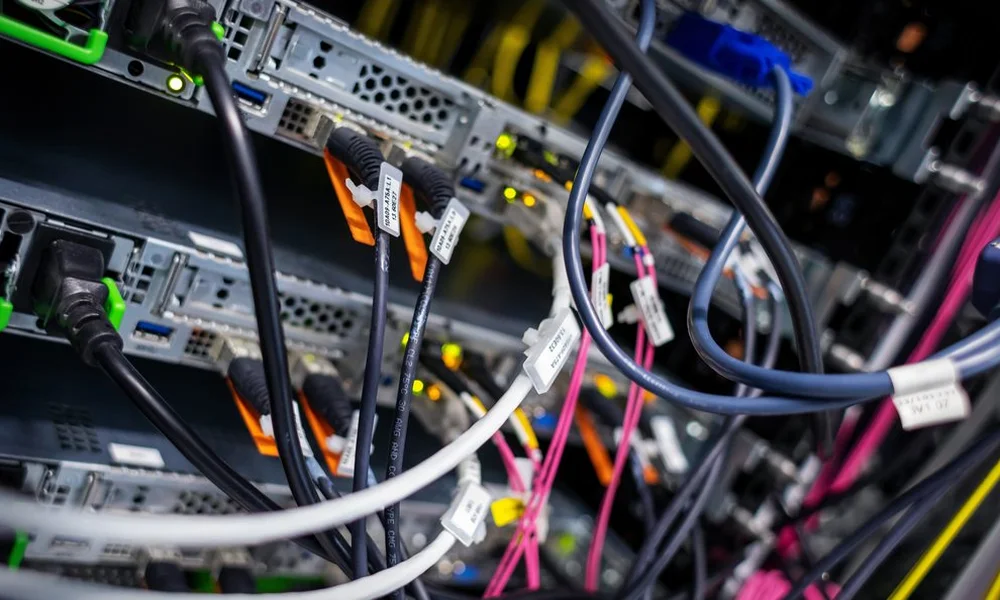
Behind that cycle sit four main resources. The processor handles the work of running programs and answering requests. Memory holds the data being worked on right now so the processor can reach it quickly. Storage keeps files, databases, and programs safe between requests. The network connection carries requests in and answers out, usually passing through a router on the way; our explainer on what a router is and how it directs your traffic covers that first hop in detail.
Most servers also run management software that watches their health, tracking temperature, disk space, memory use, and failed login attempts, and alerting an administrator before a small problem becomes an outage. Updates and security patches are applied on a schedule, and backups copy important data somewhere safe.
When demand grows, a server setup grows with it. A small site may run on one machine, while a busy service spreads the load across many servers, with a load balancer directing each request to the machine with the most spare capacity.
The main types of servers
Servers are usually named after the job they do. A web server stores website files and sends web pages to browsers. A file server stores shared documents so a team can open the same files from any desk. A database server stores structured data and answers queries, and it sits behind most apps that need to look things up quickly. A mail server sends, receives, and stores email, while an application server runs the business logic of an app, such as processing an order or checking a login.
Game servers host multiplayer matches and keep every player in sync, and a good one keeps delay low, because even a fraction of a second of lag changes the result. Many games run on dedicated servers in data centres close to their players for exactly this reason.
How servers are hosted matters too. An on-premises server sits in your own building, giving you full control but also full responsibility for power, cooling, and repairs. A cloud server is a virtual machine rented from a provider, which you can resize or replace in minutes. To understand that option better, read our guide to what cloud computing is and how it works.
Physical, virtual, and cloud servers
A physical server is a real machine you can touch. A virtual server is a slice of a physical machine, created by software, that behaves like a computer of its own. Cloud servers are virtual servers rented on demand, with the provider handling the building, power, and hardware.
The benefits — and the risks
The biggest benefit of a server is centralisation. Files, accounts, and applications live in one managed place instead of scattered across individual devices. That makes backups simpler, permissions easier to enforce, and updates consistent. When a customer places an order, the record is stored once, in one place, where it can be found again.
Servers also bring scale. One well-configured server can serve hundreds or thousands of users, and a cluster of servers can serve millions. They run unattended and restart services automatically when something fails, so the website, the email, and the shared files are simply there when needed.
The risks are real, and they deserve equal attention. A server is a single point of failure if it is not backed up, and a single point of attack if it is not secured. Outdated software, weak passwords, and open network ports are the usual ways attackers get in. Hardware fails too, usually at the worst moment, which is why redundant power supplies, spare disks, and tested backups are part of any serious setup.
Cost is the other trade-off. Buying and running your own server means paying for hardware, electricity, cooling, and someone to look after it. Renting a cloud server swaps that upfront cost for an ongoing bill that grows with use. Neither is wrong; the mistake is choosing without counting the full cost, including maintenance and the price of downtime. Security deserves its own attention, and our guide to how encryption works and why it matters covers the basics worth knowing before exposing any server to the internet.
Where servers show up in real life
Servers are easy to miss because they work in the background. When you stream a film, a media server finds the right file, adjusts the quality to your connection, and sends it in small pieces. When you pay for something online, an application server checks the details, talks to the payment system, and records the order.
Small businesses use servers more quietly. A file server holds the shared folders for the whole office, a mail server handles the company email addresses, and a backup server copies everything each night so a stolen laptop or a failed disk does not wipe out months of work.
Server vs personal computer
A server and a personal computer share the same basic parts, but they are tuned for different jobs. A personal computer is built for one person doing many things at different times. A server is built for many people doing the same few things at the same time, without interruption.
The practical differences show up in the details. Servers usually run for months without a restart, use error-correcting memory that catches data corruption, and store data on redundant disks so one disk failure loses nothing. Personal computers are faster to start, easier to carry, and better at graphics and sound. Neither is better in general; each is the right tool for its own job, and the clearest test is who it serves: if a computer mainly serves other computers, it is a server.
Checklist: choosing the right server setup
- List what the server must do: website, files, email, or database, and how many users it will serve.
- Decide where it lives: on premises for full control, or cloud for flexibility and no hardware to maintain.
- Size it honestly: enough processor cores, memory, and fast storage for busy periods, not just quiet ones.
- Plan backups before you go live, and test restoring from them.
- Lock it down: strong passwords, two-factor sign-in, a firewall, and regular security updates.
- Set up monitoring and alerts so you hear about problems first.
Frequently asked questions
Is a server just a powerful computer?
Mostly, yes, but the role matters more than the power. A server is a computer set up to provide services to other computers over a network. A powerful gaming PC is not a server until it runs software that answers requests from other machines.
Do I need a server for a small business?
Not always. A very small team can work from cloud apps and shared folders without owning any server hardware. A server becomes worth it when you need shared files with controlled access, a company email system, or reliable backups that you manage yourself.
What is the difference between a server and the cloud?
The cloud is a way of renting servers, not a replacement for them. Cloud providers own vast data centres full of physical servers and rent out virtual slices of them. When you use a cloud service, your data still lives on a server; you just do not own the machine yourself.
How much does a server cost?
It varies widely. A small cloud server can cost a few dollars a month, a capable business server a few thousand dollars to buy, and a large setup tens of thousands plus ongoing power and maintenance. The honest comparison includes running costs and the cost of downtime, not just the purchase price.
Can a server run at home?
Yes. Many people run a small home server for file storage, media streaming, or backups, often on an old computer or a compact network storage device. It needs the same care as any server: updates, backups, and sensible security.
What happens when a server goes down?
Everything that depends on it stops until it returns: websites show errors, email queues up, and apps cannot reach their data. That is why serious setups use redundancy, with spare disks, backup power, and standby servers that take over automatically.
The bottom line
A server is a computer whose job is to serve others: storing data, running applications, and answering requests from any device allowed to ask. Good servers are also well maintained, well secured, and properly backed up, because their value is measured in the hours they stay available.
If you are choosing one, start from the job, not the specifications. Decide what it must serve, how many people depend on it, and what happens if it stops. The right answer might be a single machine in the office, a rented cloud server, or no server of your own at all. What matters is that the choice is deliberate and the backups are tested.


