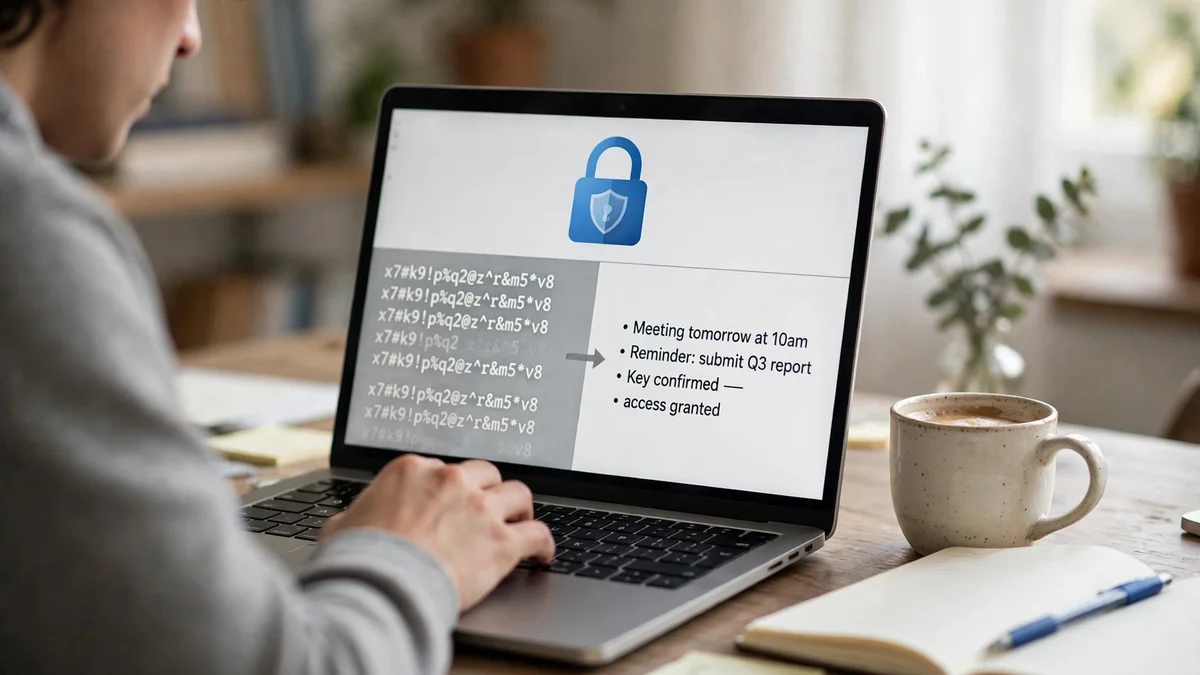
Encryption keeps your messages, passwords, bank details and photos private as they travel across the internet and sit on your devices. Every time you see a padlock in your browser, send a message on WhatsApp or log in to your bank, encryption is working in the background, scrambling your information so only the intended recipient can read it.
The basic idea is simple. Encryption takes readable information, called plaintext, and turns it into unreadable scrambled text, called ciphertext, using a mathematical formula and a secret value known as a key. Without the right key, the scrambled text looks like random characters and is practically impossible to turn back into the original message. With the key, the process reverses in a fraction of a second.
This guide explains how encryption works in plain language: the two main types, the step-by-step process behind a secure connection, the algorithms that protect most of the internet today, and where encryption shows up in your everyday life.
Key takeaways
- Encryption scrambles readable data into ciphertext using a key, and only someone with the right key can reverse it.
- Symmetric encryption uses one shared key and is fast, while asymmetric encryption uses a public and private key pair and is used to exchange keys safely.
- Most secure websites combine both: asymmetric encryption sets up the connection, then symmetric encryption handles the actual data.
- AES-256 is the standard symmetric algorithm behind Wi-Fi, messaging apps and disk encryption, and it is considered secure against current computers.
- Encryption protects data in transit and at rest, but it cannot help if someone steals your password or your unlocked device.
Encryption at a glance
| Detail | What to know |
|---|---|
| Plaintext | The original readable message, photo or file before encryption |
| Ciphertext | The scrambled, unreadable output produced by encryption |
| Key | A secret value that controls the scrambling; without it, decryption is impractical |
| Symmetric encryption | One shared key encrypts and decrypts; fast, used for large amounts of data |
| Asymmetric encryption | A public key encrypts and a private key decrypts; used to share keys safely |
| Common algorithms | AES-256 for symmetric encryption, RSA and ECC for asymmetric encryption |
| Where you see it | HTTPS websites, messaging apps, Wi-Fi, password managers, full-disk encryption |
| Main limit | It protects data, not accounts; a stolen password or unlocked phone defeats it |
What encryption actually is
Encryption protects information by transforming it into a form that is meaningless to anyone who does not hold the key. Think of it like a locked safe: the contents are still inside, but only the person with the combination can open it.
The transformation is done by an algorithm, a precise set of mathematical steps that takes your message and the key and produces the ciphertext. The same algorithm with a different key produces completely different ciphertext, which is why the key, not the algorithm, is the real secret. Modern algorithms are public and well studied; their strength comes from the key, a long string of random bits.
Keys are measured in bits. A 128-bit key has about 340 undecillion possible combinations, and a 256-bit key has vastly more, so trying every combination, an attack called brute force, would take the fastest supercomputers far longer than the age of the universe. That is why strong encryption is trusted for banking, health records and government communications.
Encryption differs from two nearby ideas. Hashing is one-way: it turns data into a fixed-length fingerprint that cannot be reversed, which is how websites store passwords without keeping the password itself. Encoding only changes data format so systems can handle it, and anyone can reverse it. Encryption is the only one designed to keep a secret the right person can later recover.
How encryption works, step by step
When you open a secure website, your browser and the server run through a handshake that takes less than a second. First, the server sends its digital certificate, which contains its public key and proves the site is who it claims to be. Your browser checks it against trusted authorities, so a fake site cannot easily pretend to be your bank.
Next, your browser and the server agree on a temporary session key using asymmetric encryption: your browser encrypts a random value with the server’s public key, and only the server’s private key can decrypt it. Because the private key never leaves the server, nobody listening in can learn the session key. This solves the oldest problem in cryptography: how to share a secret key with someone you have never met.
Once the session key is agreed, both sides switch to the much faster symmetric encryption. Everything you send is encrypted with that session key before it leaves your device and decrypted by the server on arrival, and the reply is encrypted the same way. When you close the tab, the session key is discarded.
The same pattern appears in messaging apps with end-to-end encryption: your phone encrypts the message with a key only the recipient’s phone holds, so the app’s own servers carry the ciphertext but cannot read it. If either side loses their key, those messages become unreadable.
The two main types of encryption
Symmetric encryption uses a single key for both locking and unlocking. It is fast, which makes it the workhorse for large files, hard drives and live internet traffic. Its weakness is key distribution: both sides need the same key, and getting it to the other side securely is a problem in itself.
The standard symmetric algorithm is AES, the Advanced Encryption Standard, usually with a 256-bit key, written as AES-256. It scrambles data in fourteen rounds of substitution, shuffling and mixing, and it protects Wi-Fi networks, messaging apps, cloud storage and full-disk encryption on modern phones and laptops.
Asymmetric encryption, also called public-key encryption, uses a pair of mathematically linked keys. The public key can be shared with anyone and is used to encrypt, while the private key is kept secret and used to decrypt. A message encrypted with your public key can only be read with your private key.
The best-known asymmetric algorithms are RSA and ECC, elliptic-curve cryptography. RSA relies on the difficulty of factoring very large numbers, while ECC gives similar security with much shorter keys, which is why it is popular on phones. Asymmetric encryption is slower, so it is used mainly for handshakes, key exchange and digital signatures rather than bulk data.
Where encryption protects you every day
The padlock in your browser means the site uses HTTPS, ordinary web traffic wrapped in TLS, the protocol behind the handshake above. Without HTTPS, anyone on the same network, a coffee shop Wi-Fi network for example, could read the pages you visit and the data you submit. A VPN adds a further encrypted tunnel for all of your traffic, which is why a VPN for public Wi-Fi is often recommended in cafes, airports and hotels.
Messaging apps with end-to-end encryption protect your chats, calls and file transfers from interception. Email is weaker: it is usually encrypted while travelling between servers but readable by the providers at each end. If email privacy matters, email encryption software keeps the message scrambled until it reaches the recipient.
Your devices encrypt data at rest as well. Modern phones encrypt storage by default, tied to your passcode, so a stolen phone does not give up its photos easily. Laptops offer full-disk encryption through BitLocker on Windows and FileVault on Mac. Cloud storage encrypts files on its servers, though the provider usually holds the keys.
Passwords are protected by a related chain of encryption. A password manager for business use, or a personal one, stores your logins in an encrypted vault that only your master password can open, encrypted on your device before it is synced anywhere. This is why a strong, unique master password matters more than the brand of the tool.
Benefits and risks of encryption
The main benefit is confidentiality: encryption keeps private information private even when it passes through networks and servers you do not control. It also provides integrity, because tampered ciphertext produces obvious garbage when decrypted, and authentication, because digital signatures let you verify who sent a message and whether it was changed.
The risks are real but different from what people expect. Encryption does not stop phishing, malware or a weak password. If someone tricks you into typing your login on a fake site, that connection is itself encrypted, and the attacker still gets your password. If malware runs on your computer, it can read data before encryption or after decryption. Encryption protects data in transit and at rest, not data in use on a compromised device.
Key management is the other weak point: a lost private key can mean permanently lost data, and a leaked key can mean a total breach. Quantum computing is a longer-term concern, since a powerful enough quantum computer could one day break RSA and ECC, which is why post-quantum algorithms are already in development, but AES-256 is expected to remain strong.
Checklist: is your data actually encrypted?
- Check for HTTPS and the padlock icon before entering passwords or card details on any website.
- Turn on end-to-end encryption in your messaging apps and confirm it is enabled for chats and calls.
- Enable full-disk encryption on your laptop and a strong passcode on your phone.
- Use a password manager with an encrypted vault and a unique master password you do not reuse anywhere.
- Keep your software updated so you get the latest TLS versions and patched encryption libraries.
- Store recovery keys and backup codes somewhere safe and offline, separate from the device they protect.
Frequently asked questions
How does encryption work in simple terms?
Encryption scrambles readable data into unreadable ciphertext using a formula and a secret key. Only someone with the right key can reverse it, so anyone who intercepts the data without the key sees only random-looking characters.
What is the difference between symmetric and asymmetric encryption?
Symmetric encryption uses one shared key to both encrypt and decrypt, and it is fast. Asymmetric encryption uses a public key to encrypt and a private key to decrypt, and it is used mainly to exchange keys safely. Most secure systems use both together.
Is AES-256 encryption safe?
Yes. AES-256 is the standard used by governments, banks and messaging apps, and no practical attack against it is known. Brute-forcing a 256-bit key would take far longer than the age of the universe with current computers.
Does encryption slow down my internet?
Very slightly, but not noticeably. Modern devices have hardware built in to run encryption quickly, and the handshake at the start of a connection takes a fraction of a second. The security benefit is far larger than the tiny performance cost.
Can encrypted messages be hacked?
The encryption itself is rarely the weak point. Attackers usually succeed by stealing a password, phishing, installing malware, or finding a device unlocked. Strong encryption plus unique passwords and two-factor authentication is what keeps messages safe.
What happens if I lose my encryption key?
It depends on the system. With end-to-end encrypted chats, losing your key can mean losing old messages permanently. With full-disk encryption, losing the recovery key can mean the whole drive is unreadable. Always save recovery keys and backup codes safely.
The bottom line
Encryption works by turning readable data into ciphertext with a key, and only the holder of the right key can turn it back. Symmetric encryption does the fast, heavy work, asymmetric encryption solves the problem of sharing keys safely, and together they protect nearly everything you do online.
The technology is strong and runs automatically, but it is only one part of staying safe. Keep software updated, use unique passwords with a password manager, and turn on two-factor authentication. Encryption guards the road your data travels on; you still have to watch who you hand it to.