
The best e-signature software for SaaS in 2027 has to do more than collect a signature. A SaaS deal runs through a master services agreement, a data processing agreement, a security review and a renewal, and each step needs a signature that is fast to collect, easy to prove and simple to find later. When signing stalls, revenue stalls with it.
SaaS teams also sign at volume. Sales closes new customers, customer success renews them, procurement signs vendors, and people operations signs employees. One tool usually serves all of them, so it needs permission controls and templates for each team, plus an audit trail that stands up in a dispute.
We compared the leading tools on SaaS fit, security, integrations, automation and price. DocuSign leads overall, PandaDoc is strongest for sales-led deals, and SignNow is the best value for smaller SaaS teams. Prices below are approximate starting prices; check current pricing before buying.
Key takeaways
- DocuSign is the best overall choice for SaaS, with the strongest security, integrations and signer recognition.
- PandaDoc suits sales-led SaaS teams that need quotes, order forms and payments in one document.
- Adobe Acrobat Sign fits teams that already work in PDF and want signing inside Adobe tools.
- SignNow gives growing SaaS teams the core workflow at the lowest starting price.
- Check SSO, audit logs and envelope limits on the plan you choose, because enterprise security features are often paywalled.
At a glance: the shortlist
| Product | Best for | Starting price | Standout limit |
|---|---|---|---|
| DocuSign | Overall SaaS use | From $15 per month | SSO and advanced security on higher plans |
| PandaDoc | Sales-led deals | From $19 per user, per month | Best features need paid plans |
| Adobe Acrobat Sign | PDF workflows | From $10 per user, per month | Automation needs higher tiers |
| SignNow | Best value | From $8 per user, per month | Interface feels dated in places |
| Dropbox Sign | Simple team signing | From $15 per month | Fewer advanced workflow tools |
| Zoho Sign | Zoho-based teams | From $10 per user, per month | Best value inside Zoho apps |
| Concord | Contract management | From $39 per month | Higher entry price than pure signers |
| Signeasy | Mobile and field signing | From $10 per user, per month | Smaller integration library |
DocuSign — Best overall
DocuSign is the default e-signature tool for SaaS, and the reason is trust. Enterprise buyers have signed DocuSign documents many times, so legal and procurement teams rarely question the process.
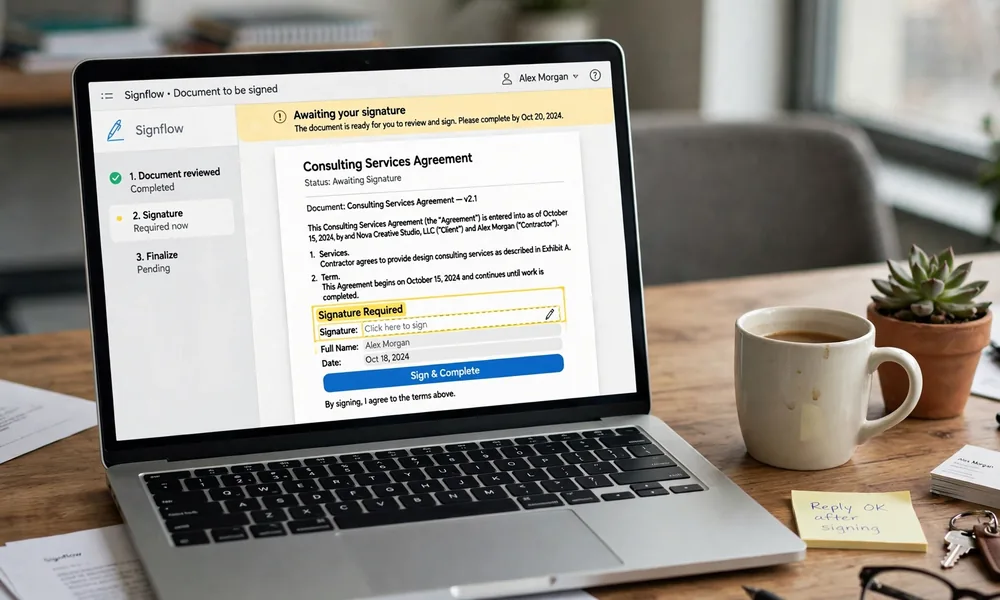
For SaaS teams, the useful features go beyond signing. Templates cover master services agreements, order forms, data processing agreements and renewal letters. Bulk sending handles mass renewals, and conditional routing sends a document to legal or finance only when a term needs approval.
Pros: most trusted by enterprise buyers, strong templates and bulk send, wide CRM integrations, detailed audit trail.
Cons: higher price, SSO and advanced security paywalled, envelope limits on lower plans.
PandaDoc — Best for sales-led deals
PandaDoc is built for SaaS sales teams that sell through documents. A quote, an order form or a proposal can include pricing tables, product details and a payment button, so a customer signs and pays without leaving the document.
The content library keeps pricing, terms and product descriptions consistent across the team, so a rep cannot accidentally send an old price. Approvals let a manager check discounts before they reach a customer, and analytics show when a prospect opens a document and which sections they read.
Pros: quotes with built-in payments, content library, approval workflows, document analytics.
Cons: best features need paid plans, more setup than simple signers, less suited to pure legal use.
Adobe Acrobat Sign — Best for PDF workflows
Adobe Acrobat Sign fits SaaS teams that already work in PDF. Contracts, security questionnaires and data processing agreements usually arrive as PDFs, and Acrobat Sign lets a team prepare, send and sign them without converting files or learning a new editor.
The signing experience is polished and professional, which helps when a document goes to an enterprise legal team. Automated reminders chase unsigned agreements, and the audit trail records each step.
Pros: excellent PDF handling, polished signing experience, useful reminders, good value for Adobe users.
Cons: fewer sales features, automation needs higher tiers, less depth in CRM workflows.
SignNow — Best value
SignNow is the best value for a growing SaaS team that needs the core workflow without enterprise pricing. Templates, reminders, an audit trail and mobile signing are included from the start, and the setup is quick enough for a small team to adopt in a day.
It handles the usual SaaS documents well: master services agreements, order forms, renewal letters, vendor contracts and employment paperwork. In-person signing works at conferences and customer events, and integrations with Google, Microsoft, Salesforce and Zapier cover the common connections.
Pros: lowest starting price, templates and audit trail included, in-person signing, solid integrations.
Cons: dated interface in places, advanced features less polished, support varies on entry plans.
Dropbox Sign — Best for simple team signing
Dropbox Sign is the simplest tool on this list, and that is its strength for small SaaS teams. Upload a document, place the fields, add the signers and send. There is almost nothing to learn, which means a new hire can send their first agreement on day one.
Templates cover repeat documents such as order forms and renewal letters, and the signing page is clean enough that customers rarely ask for help.
Pros: very easy to learn, clean signing page, useful templates, good Google and Slack links.
Cons: fewer advanced workflows, limited conditional logic, weaker enterprise security options.
Zoho Sign — Best for Zoho-based teams
Zoho Sign is the obvious pick for a SaaS team already running Zoho. It connects directly with Zoho CRM, Zoho Books and Zoho Recruit,
Signing itself is straightforward, with templates, reminders and an audit trail, and signers need no Zoho account. The mobile app is reliable, and the price is fair for what is included. For a team that has standardised on Zoho, the time saved by the integration outweighs the smaller feature set.
Pros: deep Zoho CRM and Books integration, simple signing, good mobile app, fair price.
Cons: weaker outside Zoho, smaller integration library, fewer advanced sales features.
Concord — Best for contract management
Concord is different from the other tools here: it is a contract platform with signing built in, rather than a signing tool with folders added on. For a SaaS team drowning in renewals, that distinction matters. Concord tracks deadlines, renewal dates and key terms across every agreement, and alerts the team before a contract auto-renews.
Signing, negotiation and storage live in one place, so a team can see the full history of a customer agreement without searching email. That visibility is what finance and legal teams ask for first.
Pros: renewal and deadline tracking, full contract history, version control, useful reporting.
Cons: higher entry price, longer setup, overkill for simple signing needs.
Signeasy — Best for mobile and field signing
Signeasy is built for signing away from a desk, which fits SaaS teams that meet customers at conferences, offices and events.
It also works well for in-person signing at customer sites, where a champion can sign an order form on the spot instead of taking it back to legal. Templates and reminders cover the basics, and integrations with Google Drive, Dropbox, HubSpot and Zapier cover the common connections.
Pros: excellent mobile app, strong in-person signing, simple templates, quick setup.
Cons: smaller integration library, less depth on desktop, limited advanced automation.
How to choose
Start with who signs and how often. A sales-led team closing deals every week needs templates, CRM integration and analytics. A legal-led team managing renewals needs deadline tracking, permissions and a strong audit trail. Count documents per month, including renewals, and check the plan limit before committing.
Next, check security requirements. Enterprise customers often ask for single sign-on, audit logs and compliance certifications, and those features are usually on higher plans. If your buyers run security reviews, confirm the tool passes them before you standardise on it.
Finally, run a real test. Send a master services agreement and an order form through the tool, sign them on a phone, and find the completed documents a week later. If any step feels slow or confusing, your customers will feel it too. Our guide to invoicing software is a useful companion read, because signed order forms and invoices usually travel together in a SaaS billing flow.
Checklist: before you pay
- Count monthly documents, including renewals, and check the plan limit for a busy month.
- Confirm single sign-on and audit logs are included on the plan you choose, if your buyers require them.
- Test templates for your repeat documents, such as master services agreements and order forms.
- Check the CRM integration updates deal records when a document is signed.
- Confirm renewal and deadline alerts, if you manage many customer contracts.
- Read the cancellation and renewal terms before the trial ends, so a forgotten renewal does not lock you into a higher tier.
Frequently asked questions
What is the best e-signature software for SaaS?
DocuSign is the best overall choice for most SaaS companies because enterprise buyers trust it, it integrates with the major CRMs, and it handles templates, bulk sending and audit trails well. Sales-led teams should also compare PandaDoc, and small teams on a budget should look at SignNow.
Are e-signatures legally valid for SaaS agreements?
In most major markets, electronic signatures are legally valid for SaaS agreements such as master services agreements and order forms. Rules vary by country and document type, so check the rules that apply to your business and keep the audit trail for every signed document.
Do e-signature tools integrate with Salesforce and HubSpot?
Yes. DocuSign, PandaDoc, SignNow and Dropbox Sign all integrate with Salesforce and HubSpot, usually letting a rep send a document from the deal record and update the record when it is signed. Check the exact features on your plan, because automation depth varies.
How much should a SaaS team pay for e-signature software?
Most SaaS teams pay between $8 and $39 per user, per month. Enterprise security features such as single sign-on often cost more, so compare the price of the plan that actually meets your security requirements, not just the cheapest headline price.
Can customers sign without creating an account?
Yes. With every tool on this list, a signer opens a link, reviews the document and signs without creating an account. That removes friction at the exact moment a deal is closing, which is why e-signatures convert faster than emailed PDFs.
What is the difference between e-signature software and contract management?
E-signature software focuses on collecting signatures and proving they happened, while contract management also tracks renewals, deadlines, versions and obligations after signing. Our guide to contract lifecycle management software explains the difference in more detail, and our roundup of sales intelligence software for small businesses covers another tool sales teams often pair with signing.
The bottom line
For most SaaS companies, DocuSign is the pick: it is the tool enterprise buyers already trust, and its templates, integrations and audit trail cover the full deal cycle. If your team sells through documents, PandaDoc is the better fit; if you manage hundreds of renewals, Concord earns its price; and if budget is the deciding factor, SignNow delivers the essentials for less.
Whichever tool you choose, test it with a real agreement before the next quarter close. The best e-signature software for your SaaS team is the one your customers sign without a second email, and that your team can find again when renewal time comes.