The best mechanical keyboards for Linux in 2027 are the boards that work fully without Windows-only software. Linux users need keyboards that remap keys, change lighting, and swap switches through open firmware or on-board controls, because many makers never release a Linux app. The right board treats Linux as a first-class system, not an afterthought.
That requirement changes the shortlist. Boards with QMK or VIA firmware, open-source configuration tools, and hot-swappable switches score highly, while boards that lock lighting and macros behind a Windows-only program fall behind. A Linux keyboard should also offer a Super key that works with common desktop environments, a wired mode for firmware updates, and a layout that fits coding, writing, and terminal work.
This guide compares eight mechanical keyboards for Linux, from open-hardware favourites to mainstream boards with strong Linux support. Every pick works on major distributions such as Ubuntu, Fedora, and Arch, and prices are approximate starting prices, so check current pricing before you buy.
Key takeaways
- System76 Launch is the best mechanical keyboard for Linux, with open firmware and a Linux-first design.
- Keychron Q1 Pro is the best premium pick, with QMK and VIA support and a solid aluminium case.
- Keychron K8 Pro offers the best value for Linux users who want hot-swappable switches.
- Razer BlackWidow V4 X works on Linux through the community OpenRazer project.
- Choose QMK or VIA support first, because it decides whether you can remap keys without Windows.
At a glance: the shortlist
| Product | Best for | Starting price | Standout limit |
|---|---|---|---|
| System76 Launch | Linux-first design | From $285 | Premium price |
| Keychron Q1 Pro | Premium build | From $199 | Heavy aluminium case |
| Keychron K8 Pro | Overall value | From $94 | No dedicated media keys |
| Keychron V1 | Budget QMK board | From $84 | Plastic case |
| Keychron V3 Max | Full-size QMK | From $109 | Large footprint |
| Ducky One 3 | Typing feel | From $119 | No wireless on most models |
| Logitech MX Mechanical | Office and productivity | From $149 | Low-profile switches only |
| Razer BlackWidow V4 X | Gaming on Linux | From $99 | Needs OpenRazer for lighting |
System76 Launch — Best for Linux
The System76 Launch is the best mechanical keyboard for Linux because it was designed for Linux from the start. It runs open-source firmware, ships with a Super key instead of a Windows key, and configures through a web-based tool that works in any browser on Linux. There is no Windows-only software to work around.
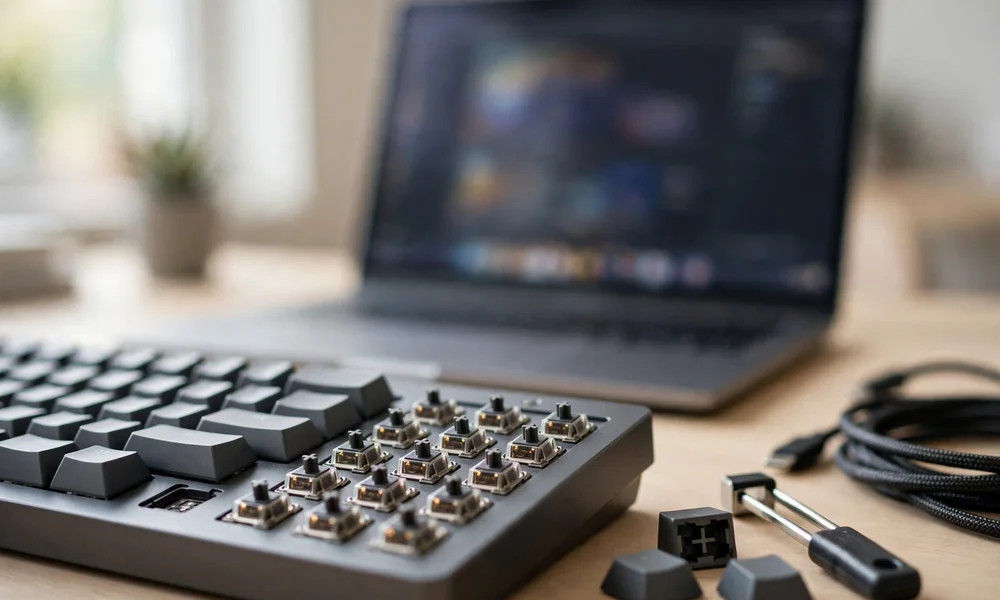
The Launch is a configurable, hot-swappable board with a split spacebar option, a detachable USB-C cable, and a sturdy build. It works out of the box on Ubuntu, Fedora, and Pop!_OS.
Pros: Open-source firmware, Linux-first design, hot-swappable switches, browser-based configuration.
Cons: Premium price, compact layout needs learning, heavier than plastic rivals.
Keychron Q1 Pro — Best premium keyboard for Linux
The Keychron Q1 Pro brings a premium aluminium case, gasket-mounted typing feel, and full QMK and VIA support to Linux users. You can remap every key, build layers, and adjust lighting from VIA in a browser, with no proprietary software needed. The board connects over Bluetooth, 2.4 GHz wireless, or USB-C, and the PBT keycaps feel excellent.
Sound is a highlight: the gasket mount and case foam produce a deep, muted keystroke that suits long coding sessions. Hot-swappable switches let you change feel without soldering, and the 75% layout keeps function keys and arrows while saving desk space.
Pros: QMK and VIA support, premium aluminium build, excellent sound, three connection modes.
Cons: Heavy case, premium price, 75% layout drops the number pad.
Keychron K8 Pro — Best value for Linux
The Keychron K8 Pro is the best value mechanical keyboard for Linux. It offers hot-swappable switches, QMK and VIA support, and three connection modes for under $100, which is rare at this price. The tenkeyless layout suits most desks, and the aluminium frame feels far more solid than the price suggests.
On Linux, VIA handles remapping and layers, and the board stores settings on board so they work on any machine you plug into. For a first mechanical keyboard on Linux, this is the sensible default.
Pros: Hot-swappable switches, QMK and VIA support, three connection modes, strong value.
Cons: No dedicated media keys, small key legends, no number pad.
Keychron V1 — Best budget QMK keyboard
The Keychron V1 gives Linux users full QMK and VIA support at a budget price. It is a 75% board with hot-swappable switches, PBT keycaps, and a straightforward layout that keeps function keys and arrows. The plastic case keeps the price down, but the typing feel is still good, with sound-dampening foam inside.
For a deeper look at boards built for long coding sessions, see our guide to the best keyboards for programming. The V1 connects over USB-C, which is the most reliable option for firmware updates and daily use.
Pros: Full QMK and VIA support, hot-swappable switches, low price, good sound for the cost.
Cons: Plastic case, wired only, no wrist rest included.
Keychron V3 Max — Best full-size QMK keyboard
The Keychron V3 Max is the pick for Linux users who need a full-size board with a number pad. It brings the same QMK and VIA support as the rest of the Keychron range, with hot-swappable switches, PBT keycaps, and a choice of wired, Bluetooth, and 2.4 GHz connections. The full layout suits spreadsheets, data entry, and terminal work with number-heavy shortcuts.
VIA remapping works in a browser on Linux, so you can set up layers for your desktop environment without installing anything. It takes up more desk space, but for number-pad users there is no better Linux-friendly option at this price.
Pros: Full-size layout with number pad, QMK and VIA support, three connection modes, hot-swappable.
Cons: Large footprint, heavier than compact boards, no dedicated media keys.
Ducky One 3 — Best typing feel on Linux
The Ducky One 3 is loved by typists for its deep, satisfying keystroke, and it needs no software at all on Linux. Thick PBT keycaps, a well-dampened case, and Cherry MX switches produce a sound and feel that stay comfortable through long writing sessions. Lighting and macros are controlled with key combinations on the board itself.
It comes in full-size, tenkeyless, and smaller layouts, so you can match it to your desk and your workflow. If you want a keyboard that simply works on Linux without any configuration tool, the One 3 is a strong choice.
Pros: Excellent typing feel, thick PBT keycaps, no software needed, several sizes available.
Cons: No wireless on most models, plain design, limited macro features.
Logitech MX Mechanical — Best for office and productivity
The Logitech MX Mechanical is a low-profile mechanical keyboard aimed at office work and productivity on Linux. Its low-profile switches feel closer to a laptop keyboard, with a short travel that suits fast typing, and the backlit keys adjust to ambient light. It connects over Bluetooth or the Logi Bolt receiver, and pairs with up to three devices.
On Linux, the board works as a standard keyboard out of the box, and the Solaar community tool can manage pairing and battery status. The full-size layout includes a number pad, and the slim aluminium design looks at home in an office.
Pros: Low-profile switches, quiet typing, multi-device pairing, slim aluminium design.
Cons: Switches are not hot-swappable, no QMK support, premium price for office use.
Razer BlackWidow V4 X — Best for gaming on Linux
The Razer BlackWidow V4 X is the best gaming option for Linux users who are comfortable with community tools. It works as a standard keyboard out of the box, and the OpenRazer project plus Polychromatic can control lighting and macros on Linux. The six macro keys and media roller are genuinely useful in games and in daily use.
Razer Green clicky or Yellow linear switches give a clear choice between tactile feedback and smooth speed, and the sound-dampening foam keeps typing quieter than older Razer boards. For gaming performance at a fair price, it earns its place here.
Pros: Good gaming switches, six macro keys, media roller, fair price.
Cons: Lighting needs OpenRazer, no official Linux software, ABS keycaps can shine over time.
How to choose
Start with firmware. QMK and VIA support is the single most important feature for a Linux keyboard, because it lets you remap keys, build layers, and control lighting without Windows software. Open-source firmware and on-board controls are the next best options. Avoid boards that lock essential features behind a Windows-only app unless you are happy using a community tool.
Then choose layout and switches. Full-size suits number-heavy work, tenkeyless suits most users, and 65% or 75% boards suit small desks. Linear switches are smooth and fast, tactile switches give feedback for typing, and clicky switches are loud and best kept away from shared rooms. Hot-swappable boards let you change switches later, which is worth paying for if you are unsure.
Check connection and compatibility before you buy. Wired USB-C is the most reliable for firmware updates, while Bluetooth and 2.4 GHz wireless suit laptops and multi-device setups. If you work in a shared space, our guide to the best silent keyboards for office work covers quieter boards that will not disturb colleagues.
Checklist: before you buy
- Confirm QMK, VIA, or open firmware support for remapping on Linux.
- Check that lighting and macros work without Windows-only software.
- Pick a layout that fits your desk and your need for a number pad.
- Choose a switch type that suits typing, coding, or gaming.
- Look for hot-swappable switches and PBT keycaps.
- Check current pricing, Linux compatibility notes, and the returns policy.
Frequently asked questions
Do mechanical keyboards work on Linux?
Yes. Any USB or Bluetooth mechanical keyboard works on Linux as a standard input device. The difference is configuration: QMK and VIA boards let you remap keys on Linux, while some mainstream boards need Windows software for lighting and macros.
What is QMK, and why does it matter on Linux?
QMK is open-source keyboard firmware that lets you remap keys, build layers, and set macros. VIA is a tool that edits QMK settings in a browser. Together they give Linux users full control without proprietary software.
Can I use Razer or Corsair keyboards on Linux?
Yes, for basic typing and gaming. Lighting and macros need community tools such as OpenRazer, which work well but are not officially supported. If you want official support, choose a QMK board instead.
Which switch is best for coding on Linux?
Tactile switches are usually best for coding because the bump confirms each key press without the noise of clicky switches. Linear switches suit fast typing and gaming, and hot-swappable boards let you try both.
Do I need a Windows key on a Linux keyboard?
No. On Linux the key works as the Super key, which opens menus and shortcuts in most desktop environments. Boards such as the System76 Launch ship with a Super key legend instead.
Are hot-swappable keyboards worth it on Linux?
Yes. Hot-swappable boards let you change switches without soldering, so you can tune feel and sound cheaply. They are especially useful on Linux, where you may want quiet switches for an office and tactile switches at home. For a compact alternative, our guide to the best low-profile keyboards covers slim boards that travel well.
The bottom line
For most Linux users, the Keychron K8 Pro is the best mechanical keyboard in 2027, with QMK support, hot-swappable switches, and a fair price. If you want a Linux-first board and can pay more, the System76 Launch is the purest choice, while the Keychron Q1 Pro is the premium pick for build and sound.
Choose firmware support first, then layout and switches. Check current pricing and the returns policy before you buy.