A tablet for artists is a drawing desk, a sketchbook and a portfolio in one device. The best tablets for artists in 2027 combine a pressure-sensitive stylus with a colour-accurate screen, and an app library that covers sketching, painting and illustration.
What matters most is the stylus. Pressure sensitivity, tilt support and low latency decide whether drawing on glass feels like drawing on paper or like dragging a mouse. The screen matters too: colour accuracy, brightness and a laminated display all affect the final artwork.
We compared the leading drawing tablets for illustration, concept art and comic work, and these seven are the ones professional and hobby artists keep coming back to.
Key takeaways
- Apple iPad Pro (M4) is the best overall tablet for artists, with the best stylus and the best drawing apps.
- Samsung Galaxy Tab S9 Ultra is the best Android pick, with a huge screen and the S Pen in the box.
- Wacom One 13 touch is the best dedicated drawing tablet, with the most natural pen feel.
- Apple iPad Air (M2) is the best value Apple pick for artists on a budget.
- Buy for the stylus and the screen first: everything else is secondary for drawing work.
At a glance: the shortlist
| Tablet | Best for | Starting price | Standout limit |
|---|---|---|---|
| Apple iPad Pro (M4) | Most artists | From $999 | Pencil sold separately |
| Samsung Galaxy Tab S9 Ultra | Big-screen Android | From $1,200 | Very large and heavy |
| Wacom One 13 touch | Dedicated drawing | From $600 | Needs a computer |
| Apple iPad Air (M2) | Value Apple pick | From $599 | No ProMotion display |
| Samsung Galaxy Tab S9 FE+ | Mid-range Android | From $600 | Less colour-accurate |
| Microsoft Surface Pro 11 | Desktop software | From $1,000 | Heavier than rivals |
| XP-Pen Artist 13 | Budget drawing | From $250 | Needs a computer |
Apple iPad Pro (M4) — Best overall
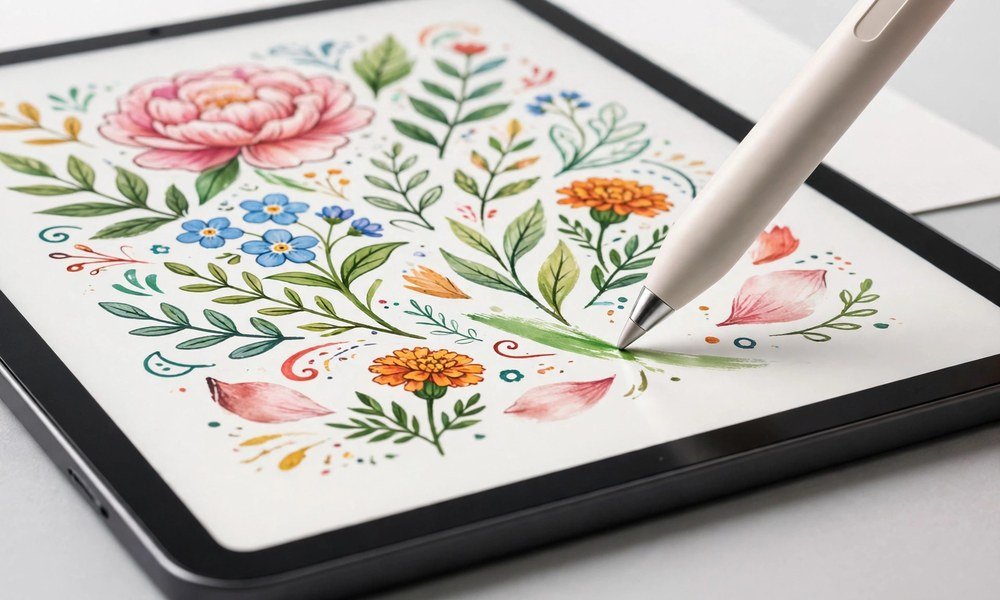
The iPad Pro is the tablet most professional artists use, and the M4 model is the best yet. The 11-inch or 13-inch display is the most colour-accurate screen on any tablet, with deep blacks and brightness that holds up in a studio, and the Apple Pencil Pro adds squeeze gestures and barrel roll for shading. Procreate, Clip Studio Paint and Adobe Fresco all run beautifully, and the M4 chip handles large canvases with dozens of layers without slowing down. Battery life is around 10 hours, and the tablet is thin and light enough to carry to a life-drawing class. The price is the obvious downside, and the Pencil is sold separately, but for serious illustration work there is nothing better.
Pros: Best drawing apps; colour-accurate display; fast M4 chip
Cons: Expensive, and the Pencil costs extra
Samsung Galaxy Tab S9 Ultra — Best Android pick
The Tab S9 Ultra is the biggest tablet here, with a 14.6-inch AMOLED display that gives artists room to work. The S Pen is included, with 4,096 levels of pressure sensitivity and tilt support, and it feels natural on the laminated screen. Clip Studio Paint, Krita and Infinite Painter all run well, and the tablet handles large files without complaint. The screen is gorgeous for colour work, and the battery lasts around 11 hours. The size is the trade-off: it is a desk tablet more than a portable one, but for artists who work at a desk, the extra canvas space is worth it.
Pros: Huge, beautiful screen; S Pen included; strong app support
Cons: Very large and heavy; pricey
Wacom One 13 touch — Best dedicated drawing tablet
The Wacom One 13 touch is the only tablet here made by a company that only makes drawing tools, and it shows. The pen feels the most like a real pencil, with the best pressure curve and the least parallax of any tablet on this list, and the 13.3-inch display is bright and colour-accurate. It works as a second display for a computer, so it fits into a desktop workflow, and it runs the full versions of Photoshop, Clip Studio Paint and other desktop software. It is not a standalone tablet, so it needs a computer, but for artists who already own one, it is the best drawing surface available.
Pros: Most natural pen feel; works with full desktop software
Cons: Needs a computer; not a standalone tablet
Apple iPad Air (M2) — Best value Apple pick
The iPad Air gives artists almost everything the Pro offers for considerably less money. The M2 chip handles Procreate and Clip Studio Paint with ease, the 11-inch display is bright and colour-accurate, and Apple Pencil support is the same. The main compromises are the lack of ProMotion, which makes the stylus feel very slightly less smooth, and the smaller maximum storage. For most artists, neither matters, and the Air is the sensible buy if the Pro is out of reach.
Pros: Near-Pro performance for less money; same app library
Cons: No ProMotion display; storage upgrades are pricey
Samsung Galaxy Tab S9 FE+ — Best mid-range Android pick
The Tab S9 FE+ is the best mid-range tablet for artists who want a big screen without paying Ultra prices. The 12.4-inch display is bright and sharp, the S Pen is included, and the tablet handles Clip Studio Paint and Krita well. The screen is not as colour-accurate as the Ultra’s, so serious colour work needs calibration, but for sketching, comics and concept art it is more than good enough. Battery life is around 12 hours, and the tablet is water resistant, which is a nice bonus for a device that gets carried everywhere.
Pros: Large screen for the price; S Pen included; long battery
Cons: Less colour-accurate than the Ultra; mid-range chip
Microsoft Surface Pro 11 — Best for desktop art software
The Surface Pro 11 is the best tablet for artists who need full desktop software. It runs the complete versions of Photoshop, Illustrator and Clip Studio Paint, so there are no mobile-app compromises, and the Slim Pen 2 is excellent for drawing. The 13-inch display is bright and sharp, and the kickstand makes it easy to angle like a drawing board. Battery life is around 10 hours, and the device works as a full laptop when the keyboard is attached. It is heavier than an iPad, and the pen is sold separately, but for artists whose workflow lives on a PC, it is the right tool.
Pros: Full desktop art software; excellent pen; doubles as a laptop
Cons: Heavier than rivals; pen costs extra
XP-Pen Artist 13 — Best budget drawing tablet
The XP-Pen Artist 13 is the cheapest route to a proper drawing display, and it is a strong pick for students and hobbyists. The 13.3-inch screen is bright and colour-accurate for the price, the battery-free stylus has 8,192 levels of pressure sensitivity, and it works with Photoshop, Clip Studio Paint and Krita on a computer. It is not a standalone tablet, so it needs a PC, and the build is plastic rather than premium, but for the price it offers the best drawing experience of any budget option on this list.
Pros: Very affordable; excellent pressure sensitivity; works with major software
Cons: Needs a computer; plastic build
How to choose
Start with the stylus. Pressure sensitivity, tilt and latency matter more than the processor, because they decide how the tablet feels in your hand. Check that your preferred drawing app runs on the tablet, because the app library is what makes an iPad or a Galaxy tablet worth the money.
Then check colour accuracy. If you sell your work or print it, a colour-accurate screen saves hours of correction. Our guide to the best AI tools for graphic design covers tools that can help with backgrounds, colour palettes and quick mockups. the best tablets with a stylus
Checklist: before you pay
- The stylus has at least 4,096 levels of pressure sensitivity, with tilt support
- The screen is laminated, so the pen tip meets the pixels
- Colour accuracy covers at least 100% of sRGB
- Your drawing app is available, with full layer support
- The tablet handles large canvases without lag
- A matte screen protector is available to reduce glare
Frequently asked questions
Is an iPad better than a Wacom for drawing?
For standalone drawing, yes. The iPad runs Procreate and Clip Studio Paint on its own, while a Wacom needs a computer. For desktop workflows, Wacom’s pen feel is still the best.
Do I need the Apple Pencil Pro?
Not necessarily. The standard Apple Pencil is fine for most artists. The Pro adds squeeze gestures and barrel roll, which matter most for professional illustrators.
What is the best drawing app for beginners?
Procreate is the best all-round app for beginners on iPad, and it is a one-time purchase. On Android, Infinite Painter is the closest equivalent.
Can I use a tablet for professional illustration work?
Yes. Many professional illustrators work entirely on an iPad Pro or a Galaxy Tab Ultra, and publishers accept digital files from both.
Is a matte screen protector worth it for drawing?
Yes. It reduces glare and adds a paper-like texture that makes the stylus feel more natural. It is the cheapest meaningful upgrade for any drawing tablet.
How much storage do I need for art?
256 GB is a good minimum. Large canvases with many layers add up fast, and you do not want to be deleting work to make room.
the best AI tools for graphic design
The bottom line
For most artists, the iPad Pro is the best tablet you can buy, and the iPad Air is the best value alternative. If you want the biggest canvas, the Galaxy Tab S9 Ultra is the Android pick, and if you already own a powerful computer, a Wacom One will give you the best pen feel.
Whatever you choose, buy a matte screen protector and a good case. The protector improves the drawing feel immediately, and the case protects the screen you will be staring at for hours a day.
Note: Prices and plans change. Check the product’s current plan details before buying — no link is provided here by design, all links in this article go to other occcy.com guides.