
Learning how to use AI for salon appointment booking is one of the fastest ways a small salon can stop losing clients to missed calls. Most salons lose bookings every week simply because nobody answers the phone while stylists are busy with scissors in hand, and every unanswered call is a client who books somewhere else within minutes. An AI booking assistant answers instantly, day or night, checks the real diary, and confirms the appointment before the client changes their mind.
The change is not about replacing the friendly voice at reception. It is about making sure that voice is never the only way in. Clients in 2027 expect to book the way they order food and hail a ride: on their phone, in under a minute, without waiting for opening hours. A salon that offers that fills quiet Tuesday mornings and last-minute gaps that used to sit empty, while the team spends its time cutting hair instead of playing phone tag.
This guide walks through the whole setup, from choosing the right tool to training it on your services, prices, and stylists, and it covers the mistakes that make AI booking feel cold or confusing. Follow the steps in order and a salon of any size can have a working system live within a week.
Key takeaways
- AI booking answers instantly at any hour, so salons stop losing clients to unanswered calls.
- The best systems check the live diary, match the service to the right stylist, and confirm by text.
- Training the AI on real services, prices, durations, and stylist skills is what makes bookings accurate.
- No-shows fall when smart reminders go out and rescheduling is easy.
- Human staff still matter: tricky requests, complaints, and loyal regulars should still reach a real person quickly.
What AI salon booking actually does
An AI salon booking system is a digital receptionist that talks to clients by text, chat, or voice, understands what they want, and books it into the salon diary. A client might type “I need a balayage with Maya next Thursday afternoon” and the system checks Maya’s availability, works out that balayage takes two and a half hours, offers the open slots, and confirms the one the client picks.
Behind that simple exchange, the system does several jobs at once. It keeps the diary accurate so two clients are never booked into the same chair, applies the right price and duration for each service, and spots when a service needs a patch test or a consultation first.
The result is a fuller diary and a calmer front desk. Reception staff stop spending their day on the phone and start spending it on the clients in the salon. For a wider view, our guide to the best AI tools for small businesses in 2027 explains which categories of software are worth a salon owner’s attention first.
Step 1: Map your services, stylists, and timings
Before touching any software, write down everything the AI needs to know. List every service with its exact name, price, and duration, including add-ons that change the timing, such as a toner after a bleach. Note which stylists can do which services, because an AI that books a complex colour correction with a junior stylist who has never done one will create a very unhappy afternoon.
Also map the rules your team follows without thinking: which stylists work which days, how long the gap between appointments should be for cleaning, whether new colour clients need a patch test 48 hours before, and whether certain services need a consultation first. Write these in plain language, because they become the instructions the AI follows.
Step 2: Choose an AI booking tool that fits a salon
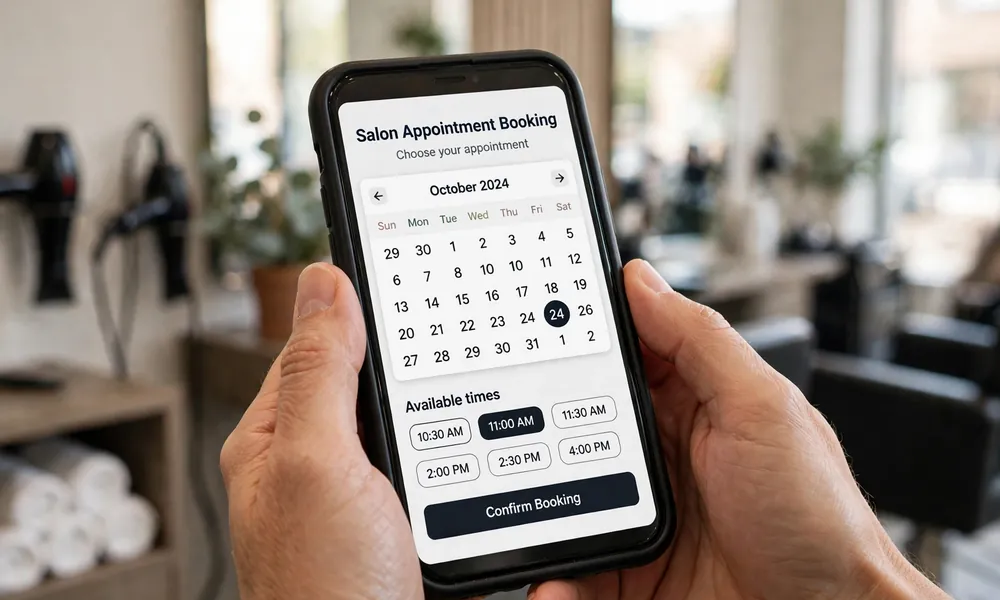
Not every booking tool with an AI label is built for salons, so choose one that understands chairs, stylists, and service durations. Look for a tool that connects to the diary your salon already uses, handles deposits if you take them, sends text reminders automatically, and lets clients reschedule themselves without calling.
Price matters, but the cheapest option is rarely the best value if it books the wrong stylist or cannot handle a simple request like “same as last time”. Check whether the tool offers a voice option as well as chat, and check that you can step in and take over a conversation at any point. Our guide to booking software for freelancers in 2027 covers the features that matter most when a diary is the heart of the business.
Step 3: Connect the tool to your diary and client list
Once you have chosen a tool, connect it to the live diary and import your client list with service history and stylist preferences. This is the step that makes the AI feel personal instead of robotic: a returning client greeted by name and offered their usual stylist and Friday slot is far more likely to book again. Remove duplicates and old numbers first, because the AI will message whatever is in the list.
Test the connection with a few fake bookings before going live. Book a cut, a colour, and a treatment across different stylists and days, and check that each lands in the right chair at the right time with the right duration. Sort out any sync problems now, while the stakes are zero.
Step 4: Train the AI on your salon’s voice and rules
Training the AI means giving it the words your salon uses and the boundaries it must respect. Feed it your service menu, your price list, your cancellation policy, and a few examples of how your team talks to clients, so its messages sound like your salon rather than a call centre. Tell it what it must never do: never promise a stylist who is off that day, never discount a price, and never book a chemical service without checking the patch test rule. Keep the tone warm and short.
Write the answers to the questions clients ask most: how long a balayage takes, whether you do walk-ins, what happens if they are late, and how deposits work. The AI will use these as its first source instead of guessing, and guessing is where most booking errors start.
Step 5: Launch quietly and watch the first fifty bookings
Do not announce the AI to every client on day one. Switch it on for online bookings and after-hours calls first, and let it handle the straightforward requests while your team watches every booking it makes. Check each one for the first few days: right service, right stylist, right time, right price. When you spot a mistake, fix the rule that caused it, because the same mistake will repeat until the rule changes.
Ask the first clients who use it what they thought, and listen for the word “easy” more than the word “clever”. Once fifty bookings have gone through cleanly, put the booking link everywhere: your website, your social profiles, your email signature, and a small card at reception for clients who want to rebook before they leave.
Step 6: Use reminders and waitlists to fill every gap
The real money in AI booking comes after the booking is made, in the reminders and the gaps it fills. Set the system to send a confirmation immediately, a reminder the day before, and a short message two hours ahead for clients who have missed appointments before. Make rescheduling a one-tap job, because a client who can move an appointment easily will move it instead of not turning up.
Turn on the waitlist so that when a client cancels, the system offers the slot to the next person waiting instead of leaving the chair empty. It can also spot quiet periods and offer a small incentive, such as a free treatment upgrade, to clients who book into them.
Troubleshooting: when AI salon booking goes wrong
The most common problem is the AI booking a service with the wrong duration, which then runs over and delays every client after it. The fix is to check the timing table for that service and add a buffer for slower stylists. Another frequent issue is clients who feel fobbed off by a bot when they have a genuine problem, such as a bad colour result. The fix is a clear handover rule: any message containing words like complaint, unhappy, or refund goes straight to a human within minutes, and the AI says so plainly.
Confusing messages are the third common fault, usually because the AI was given too little training on the salon’s real services. If clients keep asking the same follow-up question, add the answer to the AI’s instructions. And if bookings drop after launch, the cause is usually that the booking link is hard to find: put it at the top of the website and in the first line of every social profile. For the human side of automated conversations, our guide to using AI for customer support without losing the personal touch explains how to keep automated replies feeling warm.
Checklist: using AI for salon appointment booking
Run through these checks before the system goes live, and again once a month after that.
- Every service is listed with the correct name, price, duration, and the stylists who can perform it.
- The AI is connected to the live diary and a test booking lands in the right chair at the right time.
- Patch test, consultation, and deposit rules are written into the AI’s instructions in plain language.
- Confirmation and reminder messages are switched on, and rescheduling takes one tap for the client.
- Complaints and tricky requests hand over to a human quickly, and the AI says so clearly.
- The booking link is easy to find on the website, social profiles, and at reception.
Frequently asked questions
Will clients be put off by booking with AI instead of a person?
Most clients care about speed and convenience, not about who takes the booking. If the AI answers instantly, offers the right slots, and confirms clearly, clients rarely notice it is automated, and they can still reach a human whenever they want one.
How much does AI salon booking cost?
Many salon booking tools with AI features cost between thirty and one hundred dollars a month for a small salon. That is usually less than the revenue from a single filled chair on a quiet day, so most salons recover the cost within the first week.
Can AI handle complex bookings like colour corrections?
It can take the first details and offer a consultation, but a full colour correction should always involve a human. Set the AI to book a consultation first and let the stylist plan the service after seeing the hair.
What happens if the AI makes a wrong booking?
The booking appears in the diary like any other, so staff can spot it and fix it, and the client gets a corrected confirmation. The important step is to find the rule that caused the error and correct it.
Does AI booking work for a one-person salon?
Yes, and it may help a solo stylist most of all, because there is nobody else to answer the phone while they are working. A one-person salon can run the whole system from a phone.
Can the AI take deposits or payments?
Many tools can take a card hold or a deposit at the time of booking, which cuts no-shows sharply. Check that clients see the deposit terms clearly before they confirm.
The bottom line
Using AI for salon appointment booking is not about buying the cleverest software on the market. It is about writing down how your salon already works, giving those rules to a tool that answers instantly, and watching the first bookings closely until they are right. A salon that does that fills more chairs, loses fewer clients to unanswered phones, and gives its team time back for the work that needs human hands.
The habit to build in 2027 is simple: let the AI handle the routine bookings, the reminders, and the waitlist, and keep humans in charge of the conversations that need judgement, warmth, or an apology. In a business built on repeat visits, effortless booking is what keeps clients coming back.