Phone cameras now rival dedicated gear for many creators. A 2024 report from market research firm Canalys found that smartphones accounted for the majority of all photos and videos uploaded to social platforms, and that share keeps climbing. Yet shaky handheld footage remains the fastest way to make a good video look amateur. A tripod solves that problem for less than the price of most lenses, but the market is crowded with flimsy models that wobble in a light breeze.
This guide cuts through the noise. It covers what separates a tripod that survives real shoots from one that collects dust, which features matter for different creator workflows, and the mistakes buyers make most often. The goal is simple: help creators pick a phone tripod that fits how they actually film, not how a spec sheet says they should.
The Mount Is the Make-or-Break Spec
Almost every tripod and phone mount uses a 1/4″-20 UNC thread, the same standard cameras have used for decades. That single detail is good news, because it means a phone clamp can ride on a cheap travel tripod, a full-size video tripod, or even a light stand. Compatibility problems rarely come from the screw. They come from the clamp on top of it. (Tripod (photography)))
Phone clamps typically grip widths somewhere in the 55–90 mm range, which covers most current handsets. The catch is cases. A bulky protective case or a pop socket can push a phone past a clamp’s usable limit, and a clamp that “fits” can still block side buttons or press the power key mid-shoot. Before buying, measure the phone with the case on and compare that number to the clamp’s stated range. A clamp that barely fits is a clamp that will fail you at the worst moment.
Quick-release systems are the second compatibility trap. Some tripods use Arca-Swiss-compatible plates, a widely adopted standard that lets accessories swap between brands. Others use proprietary plates that work only with that manufacturer’s heads. If a creator already owns camera gear, matching the plate system saves money and time. If they don’t, it rarely matters, but it’s worth knowing which system a tripod uses before committing.
What Separates a Good Phone Tripod From a Bad One
Spec sheets list height and weight. They rarely list the things that decide whether footage comes out sharp. Here’s what to check.
Stability Under Load
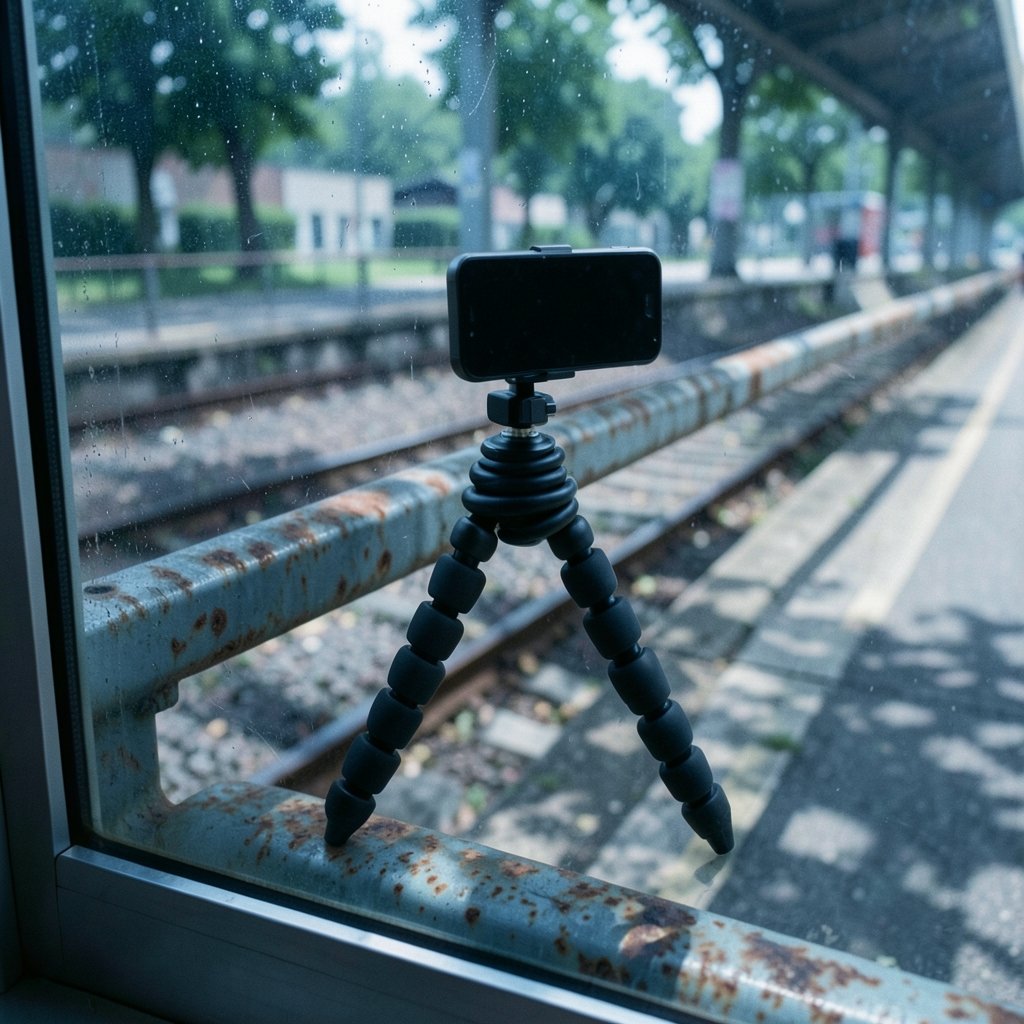
A phone weighs little, so almost any tripod can hold one when the air is still. The real test is leverage. A tall tripod with a light base acts like a sail, and wind vibration shows up as micro-jitter in footage even when the frame looks steady to the eye. Flexible-leg tripods like the GorillaPod family, which Joby popularized starting in the mid-2000s, solve this by gripping railings, branches, and fences instead of standing on the ground. That design trades maximum height for adaptability, and for street creators it often wins.
Head Movement
A pan-and-tilt head with a smooth fluid motion matters for anyone recording video rather than stills. Cheap ball heads tend to jump when loosened, which ruins slow pans. For talking-head shots and timelapses, a simple ball head is fine. For movement, look for a head with separate pan and tilt locks.
Height and Reach
Eye-level framing usually beats looking up a creator’s nose. A tripod that tops out below chest height forces awkward angles or a stack of books. Travel models compromise here, and that’s a fair trade for portability, but creators who film standing presentations should check the maximum height first.
Remote Shutter Support
Bluetooth remote shutters are cheap and widely available, but pairing behavior varies by operating system and app. Some remotes trigger the native camera app; others need the manufacturer’s app. Creators who film alone should confirm the remote works with the app they actually use before a shoot, not during one.
Matching the Tripod to the Workflow
There’s no single best phone tripod, because creators film in wildly different ways. The table below maps common workflows to the features that matter most.
| Creator workflow | Priority feature | Why it matters |
|---|---|---|
| Vlogging on the move | Flexible legs, low weight | Grips uneven surfaces; fits in a bag |
| Talking-head YouTube videos | Tall max height, stable base | Eye-level framing, no wobble |
| Product and tabletop shots | Short column, fine adjustment | Close framing without a towering rig |
| Live streaming | Desk clamp or sturdy stand | Long sessions without drift |
| Travel and outdoor filming | Folded length, wind resistance | Packs small, survives gusts |
The pattern is clear: portability and stability pull in opposite directions. Lightweight travel tripods trade steadiness for packability, and wind sensitivity is one of the most common complaints in user reviews of ultralight models. Creators who shoot outdoors should either weight the tripod down with a bag hooked to a center hook or accept that calm days are filming days.
Practical Tips That Save Shoots
Experience teaches a few lessons that no product page mentions. These are the habits that separate smooth productions from frustrating ones.
- Test the clamp with the case on. Mount the phone, shake it gently, and check that no button is being pressed. Do this before the return window closes.
- Weigh down the center column outdoors. Many tripods include a hook under the head for hanging a bag. It’s the cheapest anti-wind upgrade available.
- Lock the phone’s stabilization setting deliberately. Some phones apply aggressive electronic stabilization that fights tripod-mounted footage. Check the camera app’s settings for the right mode.
- Mark your favorite height. A strip of tape on the leg saves setup time on repeat shoots.
- Carry a spare quick-release plate. Losing one mid-trip turns a tripod into a paperweight, and plates are cheap.
- Pair the tripod with a remote shutter. Tapping the screen to start recording causes vibration at the exact moment the clip begins.
The most common mistake, though, is buying for the shoot a creator wishes they did rather than the one they actually do. Someone who films desk tutorials doesn’t need a rugged flexible-leg tripod, and a backpacking vlogger doesn’t need a five-pound studio stand. Matching gear to real habits beats buying the most-reviewed option every time.
Where Phone Tripods Fit in a Creator’s Kit
A tripod is one piece of a larger setup, and it works best when paired with the right supporting tools. Creators building out a full production stack often pair stable footage with good audio and efficient editing. For instance, a solid tripod plus a set of best earbuds for phone calls and meetings covers both filming and the client calls that fund it. Editing workflows benefit from knowing how to use AI for content creation to cut turnaround time, and creators who publish visuals alongside video will find an AI infographic generator for visual content useful for turning data into shareable graphics.
Gear choices also depend on the phone itself. Creators weighing an upgrade should compare how each handset handles video stabilization and mounting before deciding, and a breakdown like iPhone 18 vs Galaxy S26: which phone should you buy today helps frame that decision around real filming needs rather than spec-sheet bragging rights.
Common Buying Mistakes to Avoid
A few errors show up again and again in forums and reviews. Avoiding them saves money and frustration.
Buying on height alone. The tallest tripod isn’t the most stable one. A shorter tripod with a wider stance often produces sharper footage.
Ignoring the plate system. Mixing proprietary and standard plates creates a drawer full of incompatible parts. Decide on one system early.
Skipping the weight rating. Phone tripods are usually rated well below camera tripods, and that’s fine for a phone. But adding a light, a microphone, or a tablet pushes past the limit fast. Check per-model specs rather than assuming.
Assuming magnetic mounts are universal. MagSafe-compatible magnetic mounts arrived after Apple introduced MagSafe on the iPhone 12 in October 2020, and they work beautifully for compatible phones. They do nothing for phones without the magnet array. Third-party magnetic mounts existed before MagSafe too, so the technology isn’t new, just standardized. Android users should check for a compatible magnetic ring or stick with a clamp.
Neglecting the surface. A tripod is only as steady as what it stands on. Grass, sand, and sloped pavement all demand different setups, and flexible-leg models handle all three better than rigid ones.
How Much Should Creators Spend?
Budget matters, and the good news is that phone tripods cost far less than camera tripods. Entry-level models handle a phone fine for indoor shoots. Mid-range options add smoother heads, better clamps, and more stable legs. Premium travel tripods cost more because of materials and engineering, not because they hold a phone any better. (USA.gov)
The sensible approach is to spend on the features that match the workflow and skip the rest. A creator who films indoors on a desk can put the savings toward audio, which affects perceived quality far more than a fancier tripod ever will. Money spent on stability is money well spent, but only up to the point where stability stops being the bottleneck.
Conclusion
The best phone tripod for content creators is the one that matches their actual filming habits, fits their phone with the case on, and stays steady in the conditions they shoot in. The 1/4″-20 thread standard means almost any clamp works with almost any tripod, so the real decisions come down to clamp fit, head smoothness, height, and how much portability the creator is willing to trade for stability. Buy for the shoot you do every week, test the clamp before the return window closes, and weight the tripod down when the wind picks up. Do those three things, and shaky footage becomes a problem of the past.
FAQ
What thread size do phone tripods use?
Most phone tripods and mounts use a 1/4″-20 UNC thread, the same standard used by cameras. That means phone clamps can attach to camera tripods, light stands, and other accessories with the same screw, which makes mixing brands far easier than most buyers expect.
Will my phone fit in a standard tripod clamp?
Most clamps grip widths of roughly 55–90 mm, which covers the majority of current smartphones. The catch is bulky cases and pop sockets, which can push a phone past the limit or block buttons. Measure the phone with the case on and compare it to the clamp’s stated range before buying.
Are magnetic phone mounts worth it?
They’re excellent for phones with a built-in magnet array, such as MagSafe-compatible iPhones, because they attach and detach in seconds. For phones without magnets, a clamp is the safer choice unless the creator adds a compatible magnetic ring. Magnetic mounting is convenient but less secure than a firm clamp during movement.
Do I need a remote shutter for my phone tripod?
Not strictly, but it helps. Tapping the screen to start recording introduces vibration right as the clip begins, and remotes let creators step back for wider shots. Pairing behavior varies by operating system and app, so test the remote with the app you actually use before a shoot.
How do I stop my tripod from wobbling in the wind?
Lower the tripod if possible, widen the leg stance, and hang a bag from the center hook to add weight. Flexible-leg tripods can grip railings and fences instead of standing free, which removes wind exposure entirely. Ultralight travel models are the most wind-sensitive, so plan outdoor shoots around calmer conditions.
Can I use a phone tripod with a tablet or small camera?
Sometimes, but check the weight rating first. Phone tripods are usually rated well below camera tripods, and adding a tablet or a compact camera can exceed the limit quickly. The 1/4″-20 thread will physically connect, but the legs and head may not handle the extra load steadily.