The best gaming mice for small hands in 2027 are short, narrow and light enough that your fingers reach every button without stretching. The short answer: the Razer Viper V3 Pro is the strongest pick for most small-handed players. It is one of the lightest wireless mice available, its symmetrical shape suits claw and fingertip grips, and its sensor and polling are built for competitive play.
Most gaming mice are designed around an average adult male hand, so smaller-handed players stretch for the side buttons, drag a mouse that is too long, or grip a shape that curls their fingers awkwardly. A mouse that fits properly improves aim, reduces wrist strain and lets you play longer without fatigue. This guide explains how to measure your hand and ranks the best compact mice for each grip style.
Key takeaways
- Hand length is the best guide to mouse size: hands under about 17cm long suit compact mice under 120mm in length.
- Weight matters: a mouse under 60g is far easier to control than one over 80g.
- Claw and fingertip grips suit smaller mice best, needing less contact with the palm.
- Wireless is now as fast as wired on the best mice, and it removes cable drag.
- Side button placement matters: on a mouse that is too long, the front side button is out of reach of a small thumb.
How to measure your hand and choose a mouse
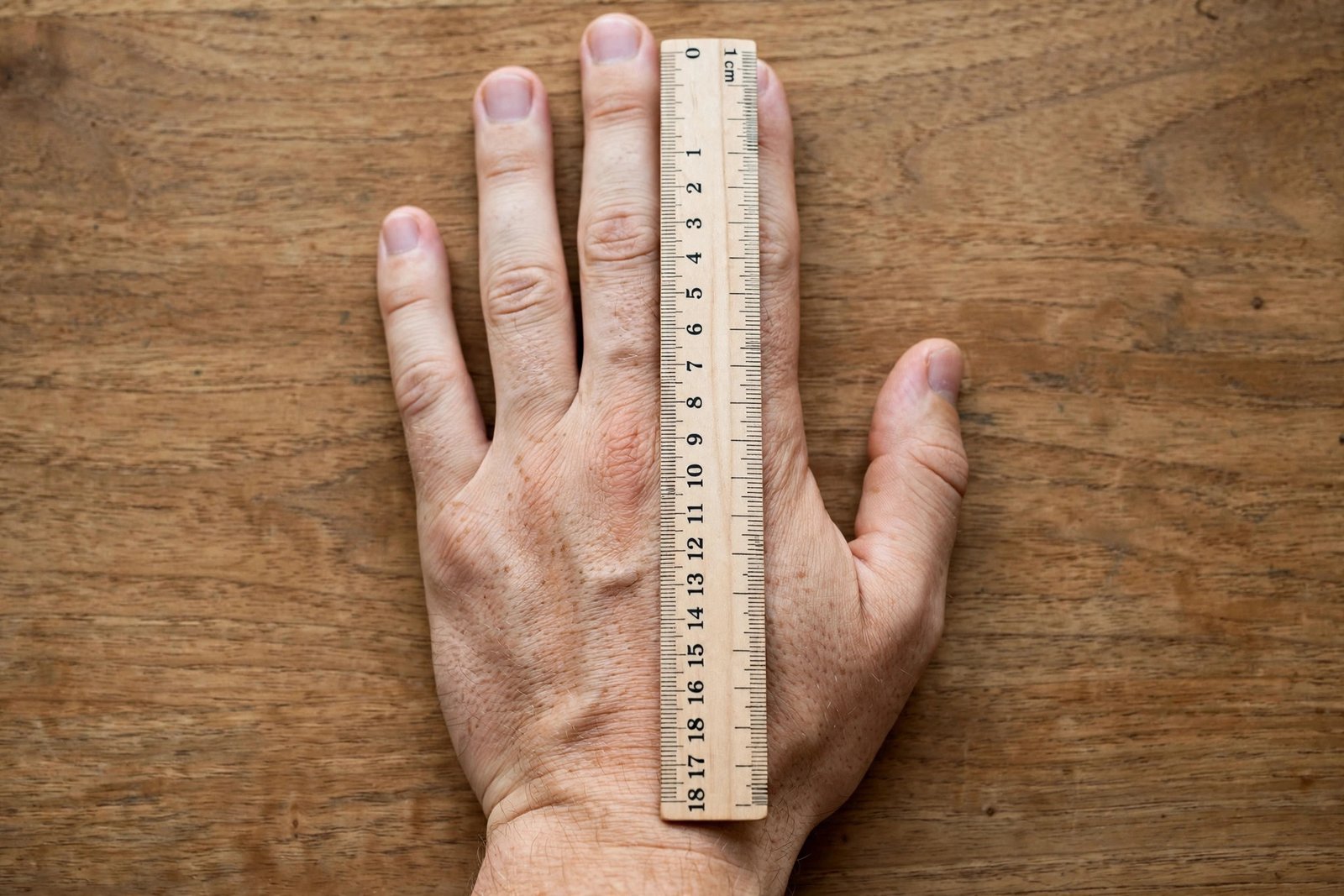
Start with a ruler and your dominant hand. Measure from the tip of your middle finger to the crease of your wrist for hand length, then across your palm at its widest point for hand width. Hands under about 17cm long and under about 8.5cm wide are generally classed as small, and suit mice under 120mm long and under 65mm wide.
Grip style matters as much as size. In a palm grip, your whole hand rests on the mouse, which needs a longer, taller shape. In a claw grip, your palm rests on the back of the mouse while your fingers arch onto the buttons, which suits a shorter mouse with a raised hump. In a fingertip grip, only your fingertips touch the mouse, which suits the smallest, lightest shapes. Most small-handed players use claw or fingertip grips.
Weight is the next thing to check. A lighter mouse is easier to start, stop and flick, and puts less strain on your wrist during long sessions. The best competitive mice now weigh under 60g — anything under 70g is light, under 60g very light. Compare the manufacturer-stated weight before you buy.
Sensor quality is a solved problem at the top end: the best optical sensors track accurately at high speeds, and most leading mice offer 26,000 DPI or higher. That matters less than it sounds, since most players use 400 to 1,600 DPI. Polling rate — how often the mouse reports its position — matters more: 1,000Hz is standard, and 4,000Hz and 8,000Hz wireless polling are available on the best mice, though the difference is small for most players.
Shape beats specifications. Two mice with identical sensors can feel completely different because of width, hump position and button placement. A symmetrical mouse suits both hands and most grip styles; an ergonomic mouse is shaped for the right hand and usually too long for small hands. Side buttons should fall naturally under your thumb, and the scroll wheel should be reachable without shifting your grip.
The best gaming mice for small hands 2027
Razer Viper V3 Pro
Best for: most small-handed players who want the lightest, fastest wireless mouse.
The Viper V3 Pro is the benchmark for small-handed competitive players. Razer lists it at 54g, one of the lightest wireless gaming mice you can buy, and its symmetrical shape suits claw and fingertip grips without feeling cramped. The optical sensor tracks accurately at high speeds, and the mouse supports 8,000Hz wireless polling with the included HyperPolling dongle.
The buttons feel crisp, the side buttons are easy to reach with a small thumb, and battery life is strong for a mouse this light. The shape is low and flat, which suits claw and fingertip players but may feel too low for palm-grip players. It is expensive — but for competitive play with small hands, nothing else in this guide matches it.
Logitech G Pro X Superlight 2
Best for: players who want a proven esports mouse with the best wireless reliability.
The G Pro X Superlight 2 is the mouse most professional players use, and it works just as well for small hands. Logitech lists it at 60g, and its symmetrical shape is short and narrow enough for claw and fingertip grips. The HERO 2 sensor is accurate and consistent, and Logitech’s Lightspeed wireless is among the most reliable in the industry, with 8,000Hz wireless polling available.
There are no RGB lights and no extra buttons beyond the essentials, which keeps the weight down and the shape clean. The side buttons suit smaller thumbs, and the PTFE feet glide smoothly on most pads. It costs more than the budget picks here, but it is the safest choice if you want a mouse that simply works.
Pulsar X2 Mini
Best for: fingertip players who want an ultra-light mouse for less than the big brands.
The Pulsar X2 Mini is built specifically for smaller hands: a shorter Pulsar X2, with a symmetrical shape, a raised rear hump that suits claw grips, and a weight of around 52g — one of the lightest mice in this guide. The optical sensor is accurate, the switches feel crisp, and the mouse supports high polling rates over 2.4GHz wireless.
Build quality is good for the price, and the mouse comes in several colours. The software is less polished than Razer’s or Logitech’s, and the shape is a little narrow for palm-grip players. For fingertip players on a budget, it is the best value in this guide. Check the current price, as it is often discounted.
Razer Cobra
Best for: players who want a small, light wired mouse with strong lighting.
The Razer Cobra is the smallest mouse in Razer’s main range, and the best choice if you prefer wired or want to spend less. It is compact and symmetrical, with a short body and a light weight, and its shape suits claw and fingertip grips. The optical sensor is accurate for its price, and Chroma RGB lighting runs along the base and the logo.
The wired version is the value pick; a wireless Cobra Pro is also available if you want to cut the cable. The cable is flexible and light, so it drags less than a stiff cable, though a bungee or a wireless mouse is still better for cable-free movement. Side buttons are easy to reach, and the scroll wheel suits smaller fingers.
Logitech G305 Lightspeed
Best for: players who want a cheap, reliable wireless mouse that fits small hands.
The G305 Lightspeed is the budget pick, and a favourite for small-handed players for years. It is compact and symmetrical, runs on a single AA battery, and its HERO sensor is accurate enough for competitive play. Its Lightspeed wireless connection is the same technology used in Logitech’s flagship mice, so there is no noticeable lag.
The trade-offs are weight and simplicity. With a standard AA battery it weighs around 99g, heavy by modern standards; a lighter lithium AA battery brings it down noticeably. There is no RGB lighting and no extra buttons, and the battery is replaceable rather than rechargeable. For the price, it is the best way to try a small wireless mouse without spending much.
Gaming mice for small hands compared
| Mouse | Weight | Length | Connection | Standout strength | Main compromise |
|---|---|---|---|---|---|
| Razer Viper V3 Pro | 54g | Short | Wireless, 8,000Hz | Lightest flagship | Expensive, low shape |
| Logitech G Pro X Superlight 2 | 60g | Short | Wireless, 8,000Hz | Most reliable wireless | No RGB, expensive |
| Pulsar X2 Mini | Around 52g | Short | Wireless | Ultra-light, small-hands shape | Software less polished |
| Razer Cobra | Light | Short | Wired | Small, affordable, strong lighting | Wired cable drag |
| Logitech G305 Lightspeed | Around 99g with AA | Short | Wireless | Cheapest wireless | Heavy with standard battery |
Caption: The best gaming mice for small hands 2027 at a glance — weight and length matter more than DPI.
How to choose the right mouse for small hands
Work through this checklist to avoid the most common mistake: buying a popular mouse designed for a larger hand.
- Measure your hand. Length under about 17cm and width under about 8.5cm means a compact mouse under 120mm long.
- Identify your grip. Claw and fingertip grips suit short, light mice. Palm grips need a longer mouse, so small-handed palm players should look for the shortest ergonomic mouse they can find.
- Set a weight limit. Under 70g is light and under 60g is very light. If you play fast shooters, aim for under 60g.
- Check the side buttons. They should fall under your thumb without stretching. If you cannot reach the front side button, the mouse is too long for you.
- Decide wired or wireless. Wireless removes cable drag and is now as fast as wired on the best mice. Wired is cheaper and never needs charging.
- Test the shape if you can. A display model tells you more in thirty seconds than any specification sheet. Hold it in your usual grip and click the side buttons.

If your mouse feels too big, your keyboard may be part of the problem: a compact board frees desk space. Our guide to the best gaming keyboards covers the best compact layouts, and the best gaming phones round-up covers the leading handsets.
FAQs
What size mouse is best for small hands?
A mouse under 120mm long and under 65mm wide, weighing under 70g, suits most hands under about 17cm long — the Razer Viper V3 Pro and the Pulsar X2 Mini are good examples. Measure first: hand width matters as much as length.
Is a lighter mouse always better for small hands?
Almost always, yes. A lighter mouse is easier to flick and stop, and puts less strain on your wrist — the difference between a 55g mouse and a 90g mouse is obvious within minutes of play.
Should I use a claw or fingertip grip with small hands?
Most small-handed players find claw or fingertip grips most comfortable, because they need less contact with the mouse. Claw gives more control; fingertip gives the fastest micro-adjustments. Try both for a few days each and keep the one that feels natural.
Is wireless as good as wired for gaming mice?
Yes, on the best mice. Modern 2.4GHz wireless connections from Razer and Logitech match wired latency, and some support 8,000Hz polling. Bluetooth adds latency and is not recommended for competitive play. Wireless also removes cable drag.
The bottom line
The best gaming mouse for small hands fits your grip and disappears in your hand. For most players, that is the Razer Viper V3 Pro: light, short, fast and well built. The Logitech G Pro X Superlight 2 is the safest alternative, the Pulsar X2 Mini the best value for fingertip players, and the Logitech G305 the cheapest way to try a small wireless mouse.
Start by measuring your hand, then shortlist two mice and check the current price on each. If you can, hold them in a shop first: shape is personal, and no specification sheet can tell you how a mouse feels in your grip. Then read our guide to the best gaming desks for small rooms to complete the picture.