

Quick Answer: How do I choose gaming chairs?
Choosing a gaming chair comes down to matching the chair to your body and your desk, not to the label on the box. Start with seat height and depth, lumbar support, adjustable armrests, and backrest recline, then check weight capacity, foam density, breathability, warranty, and return policy before buying.
Office chairs and gaming chairs are judged by the same ergonomic principles, so a well-built task chair is a legitimate alternative to a racing-style seat. Mesh-back designs often suit hot rooms better, while padded bucket seats appeal to people who want a wrapped-in feel.
Before committing, compare seat height range, seat depth, lumbar adjustability, armrest movement, weight rating, user height range, material breathability, warranty length, and return window.
Why the “Gaming” Label Tells You Almost Nothing
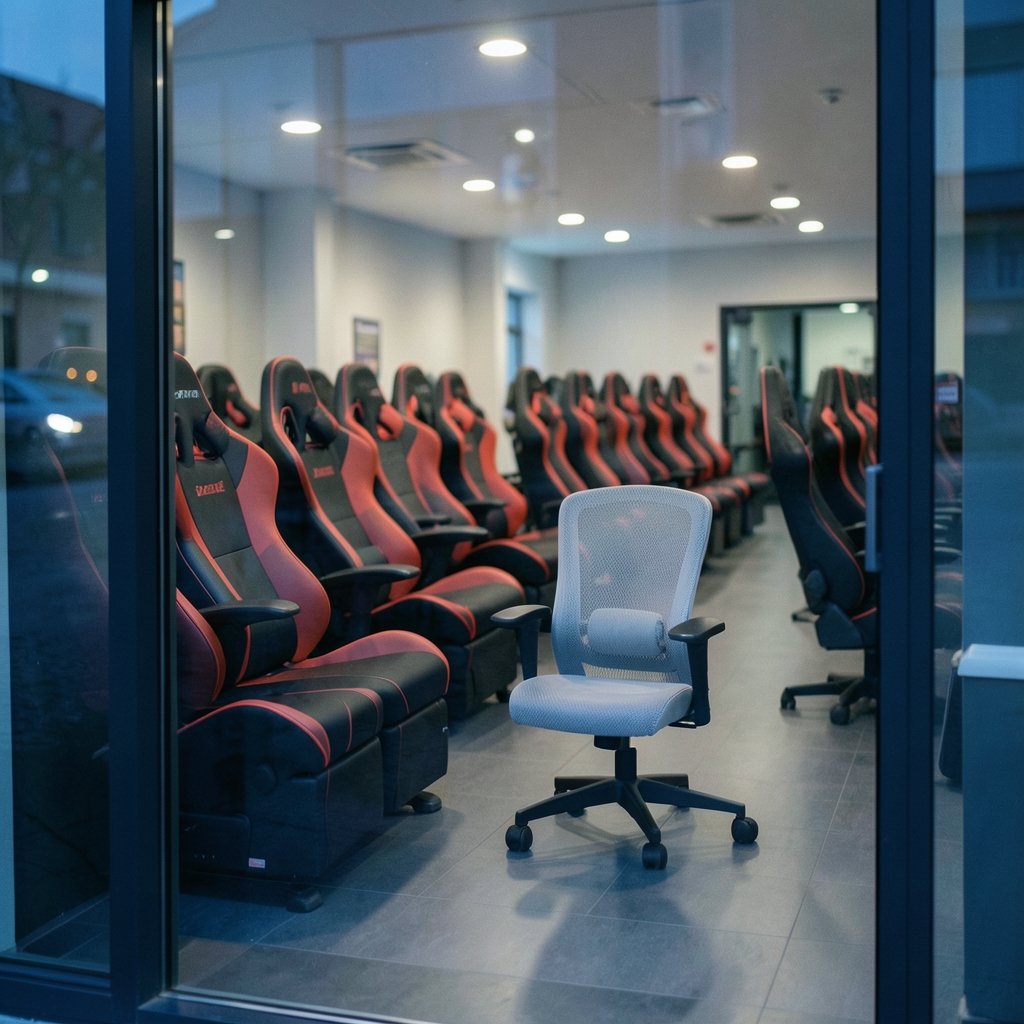
Walk into any furniture showroom and you will see rows of chairs with bolsters, bright stitching, and names that sound like sports cars. It is easy to assume those features mean something scientific. Mostly, they do not.
Ergonomic guidance for desk work does not separate “gaming” chairs from office chairs. The same principles apply to both: seat height and depth, lumbar support, adjustable armrests, and backrest recline. The racing-style bucket seat is styled after motorsport seating, a design meant to hold a driver in place inside a moving car, not to support eight hours of desk posture. That does not make every gaming chair bad. It does mean the shape is a fashion choice first and an ergonomic one second.
The practical takeaway is simple. Judge a chair the way you would judge any tool you sit in for hours. Ignore the RGB. Ignore the word “pro” on the box. Look at the adjustments, the materials, and the numbers on the spec sheet.
Start With Your Body, Not the Brand
Before comparing models, measure yourself and your space. This takes five minutes and saves months of regret.
- Sit in a normal dining chair and measure from the floor to the crease behind your knee. That number is roughly your ideal seat height.
- Measure from the back of your knee to the back of your hip. That is your ideal seat depth, give or take an inch.
- Measure the space under your desk. A thick seat cushion plus a tall gas lift can push your thighs above the desk surface.
- Note your height and weight, then compare them against the chair’s published user height range and weight capacity.
A chair rated for users up to 180 cm will feel cramped for someone at 195 cm, no matter how good the reviews are. Weight ratings vary widely by model, and many gaming chairs sit somewhere around 120 to 150 kg, but you should always check the specific product page rather than assume.
The Adjustments That Matter Most
Seat Height
Your feet should rest flat on the floor with your thighs roughly horizontal. If your feet dangle, the chair is too high. If your knees sit above your hips, it is too low. A gas lift with a narrow height range is one of the most common hidden problems in budget chairs.
Seat Depth
The front edge of the seat should not press into the back of your knees. If it does, blood flow suffers and you will shift constantly. Look for a seat with a sliding mechanism, or at least check the depth measurement against your own.
Lumbar Support
Adjustable lumbar support that follows the curve of your lower back is worth more than any logo. Fixed pillows that velcro on tend to migrate. Built-in adjustable lumbar is the better long-term bet.
Armrests
Adjustable armrests should let your shoulders relax and your elbows sit near a right angle. Four-way adjustable armrests (up and down, in and out, forward and back, and rotating) are the gold standard. Fixed armrests force your body to adapt to the chair, which is backwards.
Backrest Recline
A recline that locks at several angles lets you change posture through the day. A chair that only leans back freely with no lock is fine for lounging and frustrating for focused work.
Materials, Foam, and Breathability
Foam density is the quiet hero of chair comfort. Low-density foam feels plush in the store and flattens within a year. High-density foam feels firmer on day one and still supports you on day five hundred. If a spec sheet lists foam density, pay attention. If it does not, look for warranty terms that cover foam and cushioning, since a long warranty on a soft seat usually signals confidence.
Breathability matters more than most buyers expect. Padded racing-style seats with faux leather trap heat. In a warm room or a small apartment, a mesh back keeps you noticeably cooler. This is one reason mesh-back office chairs are often recommended over padded bucket seats for hot spaces. If you love the look of a padded chair, at least check whether the back has ventilation channels or a breathable fabric option.
Upholstery choice is a trade-off, not a ranking:
| Material | Feel | Heat | Cleaning | Durability |
|---|---|---|---|---|
| Mesh back | Supportive, airy | Stays cool | Wipe or vacuum | Good if frame is solid |
| Fabric | Soft, breathable | Moderate | Spot clean | Varies widely |
| Faux leather | Wrapped, firm | Traps heat | Easy wipe | Can peel over time |
| Real leather | Premium, breaks in | Warmer | Easy wipe | Long-lasting, costly |
Build Quality and Safety Details Worth Checking
A chair is a mechanical device with a spring under your spine. Two standards are worth knowing about. Commercial chair durability and safety testing is defined by ANSI/BIFMA X5.1, the standard for general-purpose office chairs, and some gaming chairs advertise BIFMA compliance. Gas-lift safety is covered by standards such as DIN 4550 and EN 16955, and cheap uncertified gas lifts have been linked to failures. Buying from a brand that states compliance reduces risk.
In practice, look for a metal base rather than plastic, smooth-rolling casters suited to your floor, and a gas lift with a stated class rating. A five-year warranty on the frame and a shorter one on moving parts is common; warranties on gaming chairs generally range from one to five years depending on brand, so read the fine print on what is actually covered.
If you are building a full desk setup, the chair is only one piece. Pairing it with the right screen matters just as much, and it helps to choose a gaming monitor that matches the panel you actually play so your posture and viewing distance stay comfortable. If you are weighing a monitor against a television, consider how room lighting changes the viewing experience before you commit desk space.
Gaming Chair vs Office Chair: An Honest Comparison
| Factor | Gaming chair | Office task chair |
|---|---|---|
| Ergonomic adjustments | Often limited on budget models | Usually broader, especially armrests |
| Look | Bold, racing-inspired | Understated |
| Breathability | Mixed; faux leather traps heat | Mesh options common |
| Lumbar support | Often a strap-on pillow | Frequently built in and adjustable |
| Price for equal build | Similar | Similar |
| Resale and repairability | Brand-dependent | Parts often replaceable |
Neither category wins outright. A well-specified gaming chair with four-way armrests and adjustable lumbar can serve you for years. A cheap office chair with a fixed back will not. The category label is a starting filter, not a verdict.
Set a Budget That Includes the Extras
A realistic budget covers the chair plus a few things people forget. A floor mat protects hardwood from casters. A small lumbar cushion can rescue a chair with weak built-in support. If you work late, lighting matters too, and the same logic that applies to chairs applies to peripherals: it pays to judge a mechanical vs membrane keyboard for gaming and everyday use rather than buying on hype alone. The principle is consistent across gear: match the tool to the task.
If you are setting up a study or work corner rather than a gaming den, the same ergonomic rules apply, and it is worth thinking about the whole environment, much like the planning that goes into deciding where to study abroad so the setup fits your daily life.
Try Before You Buy, or Buy With an Exit
The single most common mistake is buying a chair you have never sat in, from a seller with a short return window. Two safer routes exist.
First, sit in the chair if you can. Spend at least ten minutes. Adjust everything. Notice whether the seat edge digs into your legs and whether the armrests reach your elbows.
Second, if you must buy online, choose a seller with a generous return policy and read the fine print about return shipping costs. A chair that arrives and does not fit is only a good deal if you can send it back cheaply. Keep the box for the first month.
Other mistakes worth avoiding: buying for looks over fit, ignoring the weight rating, assuming a higher price guarantees better foam, and skipping the assembly instructions for the gas lift, which is the one component you should never force.
A Practical Buying Checklist
Before you click buy, run through this list:
- Seat height range matches your leg length.
- Seat depth leaves two to three fingers of space behind your knee.
- Lumbar support adjusts up and down as well as in and out.
- Armrests adjust in at least two directions.
- Backrest reclines and locks.
- Weight capacity exceeds your weight with room to spare.
- User height range includes you comfortably.
- Upholstery suits your room temperature.
- Base is metal, casters suit your floor.
- Warranty and return window are both acceptable.
If a chair fails three or more of these, keep looking.
Conclusion
Choosing a gaming chair is really a fit problem, not a shopping problem. Measure your body, check the adjustments, weigh the materials against your room, and treat the “gaming” label as decoration rather than proof. A chair that lets your feet rest flat, supports your lower back, and keeps your elbows relaxed will outlast any amount of styling. Take your time, sit in the chair if you can, and buy from a seller who lets you change your mind.
FAQ
How much should I spend on a gaming chair?
There is no fixed number, but the useful question is what you get at each price. Budget chairs often cut corners on foam density, armrest adjustment, and gas-lift certification. Mid-range models usually add four-way armrests and better lumbar support. Spending more only pays off if the adjustments and build quality actually improve, so compare specs rather than price alone.
Is a gaming chair better than an office chair for long sessions?
Not automatically. Ergonomic guidance treats both the same way, judging them on seat height, depth, lumbar support, armrests, and recline. A gaming chair with strong adjustments can be excellent, and a cheap office chair with a fixed back can be poor. Compare the specific adjustments on each model rather than the category.
What weight capacity do I need?
Look for a rating comfortably above your own weight, not exactly at it. Ratings vary widely by model, with many gaming chairs rated somewhere around 120 to 150 kg, but that is a general range rather than a rule. Check the published spec for the exact chair and factor in the base and caster quality.
How long should a gaming chair last?
That depends on foam quality, frame material, and how often you use it. High-density foam and a metal base typically hold up far better than low-density padding and plastic. Warranty length is a reasonable signal: warranties commonly run from one to five years, and a brand covering cushions for longer is usually more confident in its materials.
Can a gaming chair help with back pain?
A chair can support better posture, but it is not a treatment. Adjustable lumbar support that follows the curve of your lower back, a seat that does not press behind the knees, and armrests that let your shoulders relax all reduce strain. If pain persists, consult a health professional rather than shopping for a chair.
Do I need a mesh back or a padded seat?
It depends on your room and preference. Mesh backs stay cooler in warm spaces and suit long sessions in small rooms. Padded racing-style seats feel more wrapped and firm but tend to trap heat, especially in faux leather. If you run hot, try a mesh option before committing to padding.



