
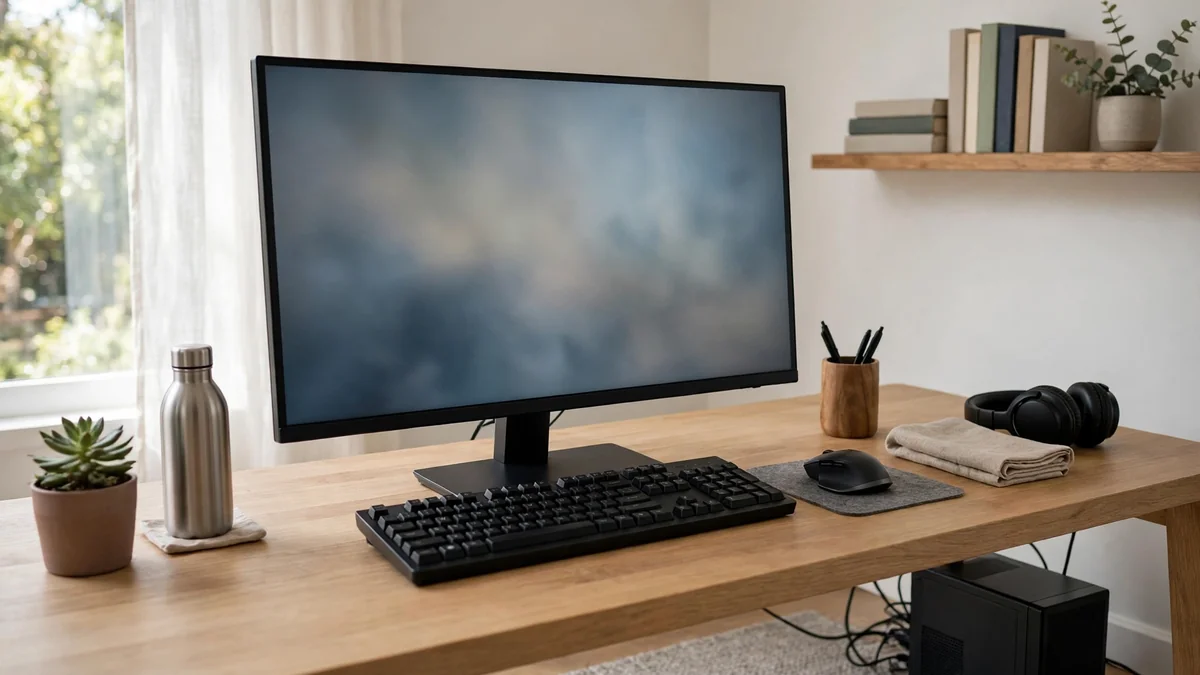
A desktop computer is a personal computer built to stay in one place, with its main parts in a separate case, connected to a monitor, keyboard, and mouse. Unlike a laptop, it has no built-in screen or battery, and it only works when plugged into wall power. That fixed design is what lets a desktop deliver more power for less money.
Desktop computers have been around since the first personal computers of the 1970s and 1980s, and they remain the standard machine for offices, schools, and anyone who works at a fixed desk. They run the same operating systems and software as laptops, and they are often the machine that does the heaviest work in a home or workplace.
The case, monitor, and peripherals each do a distinct job, and each can be replaced or upgraded on its own. This guide explains what a desktop computer is, how it works, the main types, and when it is the better choice over a laptop.
Key takeaways
- A desktop computer is a fixed, mains-powered personal computer with its parts in a separate case, plus a monitor, keyboard, and mouse.
- Its larger case holds standard parts that run cooler and cost less than a laptop’s compact parts.
- Desktops come in several forms, from full towers and compact minis to all-in-ones and workstations.
- The main benefits are more power for the money, easy upgrades, and easy repairs; the main cost is that it cannot move with you.
- Before buying, match the processor, graphics, memory, and storage to the work you will do at your desk.
At a glance: what makes a desktop computer
| Part | What it does |
|---|---|
| Case (tower) | Holds the processor, memory, storage, and power supply |
| Monitor | Shows the picture; sizes usually run from 21 to 32 inches |
| Keyboard and mouse | Separate peripherals for typing and pointing |
| Processor (CPU) | Runs programs and carries out instructions |
| Graphics card (GPU) | Draws images, video, and 3D graphics on the screen |
| Memory (RAM) | Holds open apps and data the processor needs right now |
| Storage (SSD) | Keeps the operating system, apps, and files permanently |
What a desktop computer is
A desktop computer, often just called a desktop, is a personal computer designed to sit on or under a desk and stay there. It is made of separate pieces: the case that holds the computing parts, the monitor that shows the picture, and the keyboard and mouse you use to control it. Those pieces connect with cables or wireless links, and each one can be swapped without replacing the others.
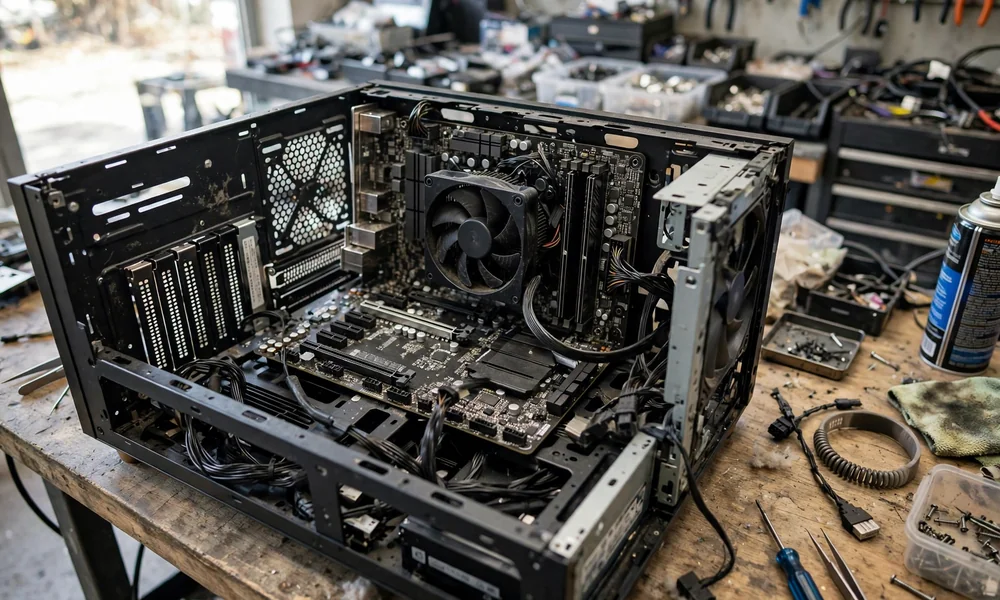
The case, usually a tower that stands upright, is the heart of the machine. Inside it sit the motherboard, processor, memory, storage drives, and the power supply that converts wall power into the low voltages the parts need. Fans or liquid cooling keep those parts at safe temperatures. The monitor, keyboard, and mouse are peripherals: they are not part of the computer itself, but it is hard to use without them.
Desktops run full operating systems, most commonly Windows, macOS, or Linux, and the same software as laptops. Because the parts are full-sized and standard, a desktop can be more powerful, cooler, and cheaper to repair than a laptop with the same specification.
The parts that matter most
Four parts decide how a desktop feels in everyday use. The processor, or CPU, carries out the instructions of every program you run, and a desktop processor can run faster than a laptop one because it has room to cool. Memory, or RAM, holds the apps and files you have open, and more of it lets you keep more things open at once.
The graphics card, or GPU, draws everything on the screen, and it matters most for games, video editing, and 3D work. The GPU in a desktop is a separate card that can be replaced when a faster one is needed. Memory matters too, and the RAM in a desktop decides how many apps can run at once without slowing down. Storage is where files live when the computer is off, and the SSD in a desktop loads the system and apps quickly and can be added to or replaced in minutes.
How a desktop computer works
When you press the power button, the power supply sends electricity to every part, and the firmware runs a short start-up check before handing control to the operating system. The operating system loads from the SSD into memory, the desktop appears on the monitor, and the processor begins running your programs.
Cooling is where a desktop has its biggest practical edge. A tower case has room for large fans, wide air vents, and even liquid cooling, so hot air leaves the case instead of building up around the parts. That means the processor and graphics card can run at full speed for hours without slowing down, which is why desktops are the usual choice for rendering, gaming, and other sustained heavy work.
Power is simpler on a desktop because there is no battery to manage. The power supply draws from the wall socket and delivers steady power to every part. That simplicity is also a weakness: a power cut shuts the machine down immediately, so work that is not saved can be lost unless it is connected to a backup battery unit.
Input and output work through ports and wireless connections. The keyboard and mouse connect by USB or Bluetooth, the monitor by HDMI or DisplayPort, and the internet by Ethernet cable or Wi-Fi. Because a desktop has room for many ports, it can connect to several monitors, external drives, and printers at once, which is why it suits a fixed workstation so well.
Types of desktop computer
Desktop computers come in several forms, differing mostly in size and power. A tower desktop is the classic form: a tall case that stands on the floor or desk, with room for full-sized parts, extra drives, and strong cooling. It is the easiest to upgrade and repair, and it suits gaming and creative work.
A small-form-factor desktop, sometimes called a mini PC, shrinks the same idea into a box small enough to sit behind a monitor or on a shelf. It is quieter and tidier, but it has less room for upgrades and weaker cooling. It suits offices and home media centres.
An all-in-one desktop builds the computer into the back of the monitor, so the whole machine is a single unit with a separate keyboard and mouse. It looks clean and saves space, but it is harder to upgrade and repair than a tower. Workstations are a fourth type: high-end desktops built for professional work such as engineering and video production, with powerful processors, large amounts of memory, and professional graphics cards.
Benefits and risks of a desktop computer
The main benefit is value. For the same money, a desktop usually gives more performance than a laptop, because its parts are standard, mass-produced, and easier to cool. A desktop is also easy to upgrade: memory, storage, graphics, and even the processor can often be replaced without buying a whole new machine.
Repairs are cheaper and simpler for the same reason. A failed drive, a broken fan, or a faulty power supply can be replaced with a standard part, often in under an hour. Monitors, keyboards, and mice are separate too, so a broken keyboard costs little to replace, and a better monitor can be added at any time.
The risks follow from the fixed design. A desktop cannot move with you, so work stops when you leave the desk. It needs a permanent spot with power, space for the case and monitor, and cables that are easy to trip over. It also draws more power than a laptop, and it stops immediately in a power cut, so unsaved work is at risk unless you use a backup battery unit.
Where desktop computers are used
Desktop computers are used wherever a fixed workstation makes sense. In offices they are the standard machine for data entry, design, and programming. In schools they fill computer labs, where they are harder to steal or damage than laptops and easy to maintain in large numbers.
At home, desktops are common in home offices and gaming setups, where a large screen matters more than portability. Creative professionals use them for video editing and 3D rendering, because the work needs sustained power. Desktops also run point-of-sale systems in shops and reception desks, where the machine never needs to leave its spot.
Desktop computer vs laptop
A desktop computer and a laptop do the same work, but they are built for different priorities. A desktop prioritises power, value, and longevity: its parts are bigger, cheaper, and easier to cool and replace, so it gives more performance for the same money. A laptop prioritises portability: everything is built in, it runs on a battery, and it fits in a bag.
The practical differences follow from that. A desktop needs a separate monitor, keyboard, and a permanent spot, while a laptop needs none of those. A desktop can be upgraded part by part, while a laptop is mostly fixed at purchase. For someone who works in one place, a desktop is often the better buy; for someone who moves between places, a laptop is the only sensible choice.
Checklist: choosing a desktop computer
- List what you will actually do at your desk, and buy for that work rather than the fastest parts available.
- Choose at least 16 GB of memory if you keep many apps open or edit photos and video.
- Pick an SSD of at least 512 GB so storage does not fill up within a year.
- Check that the case has room for the upgrades you may want later, such as a bigger graphics card.
- Budget for a good monitor, keyboard, and mouse, since you will use them every day.
- Consider a backup battery unit if power cuts are common where you live.
Frequently asked questions
What is a desktop computer used for?
A desktop computer is used for the same work as any personal computer: office work, browsing, study, gaming, and creative work. It suits work done at a fixed desk, where a large screen matters more than portability.
How long does a desktop computer last?
Most desktops last six to eight years, longer than most laptops, because parts can be replaced as they wear out. A memory or graphics upgrade halfway through its life can keep one useful even longer.
What is the difference between a desktop and a tower?
A tower is the case that holds the main parts of a desktop computer. The word desktop describes the whole system, including the monitor, keyboard, and mouse, while the tower is just the box that does the computing.
Can a desktop computer connect to Wi-Fi?
Yes. Most modern desktops have Wi-Fi built in, and those that do not can use a small USB adapter or a wired Ethernet connection.
Is a desktop computer better than a laptop?
It depends on how you work. A desktop gives more power for the money and is easier to upgrade and repair. A laptop wins when you need to work in more than one place.
Do desktop computers need a monitor?
Yes, a desktop needs a monitor, keyboard, and mouse to be usable, since none of them are built into the case. The exception is an all-in-one desktop, where the computer is built into the monitor itself.
The bottom line
A desktop computer is a fixed, mains-powered personal computer made of separate parts: a case that does the computing, a monitor that shows the picture, and a keyboard and mouse to control it. That separation is its strength, giving more power for the money, easy upgrades, and cheap repairs.
Choose a desktop when your work happens in one place and you want the best performance for your budget. Get enough memory and storage, a monitor you can look at all day, and a case with room to grow. Bought that way, a desktop is the most practical computer for a fixed desk.


