
Quick Answer: Which gaming chairs are best for competitive gaming?
The best chair for competitive gaming is an adjustable ergonomic chair, not necessarily one branded as “gaming.” Look at task chairs and gaming chairs alike and judge them on seat height range, lumbar support, armrest adjustability, and breathable materials, because those features decide how you sit during four-hour sessions. (Best handheld gaming consoles 2026 which one actually fits)
Racing-style gaming chairs can work well if they fit your body and offer real adjustment, but open, task-style designs usually give shoulders and arms more freedom. No official ergonomics standard exists specifically for gaming chairs, so the label itself proves little. (Twitch vs kick vs youtube gaming which platform wins your)
Before buying, compare seat height range, lumbar support, armrest movement, backrest material, weight capacity, warranty length, return policy, and assembly effort.
Why the “Gaming” Label Tells You Less Than You Think
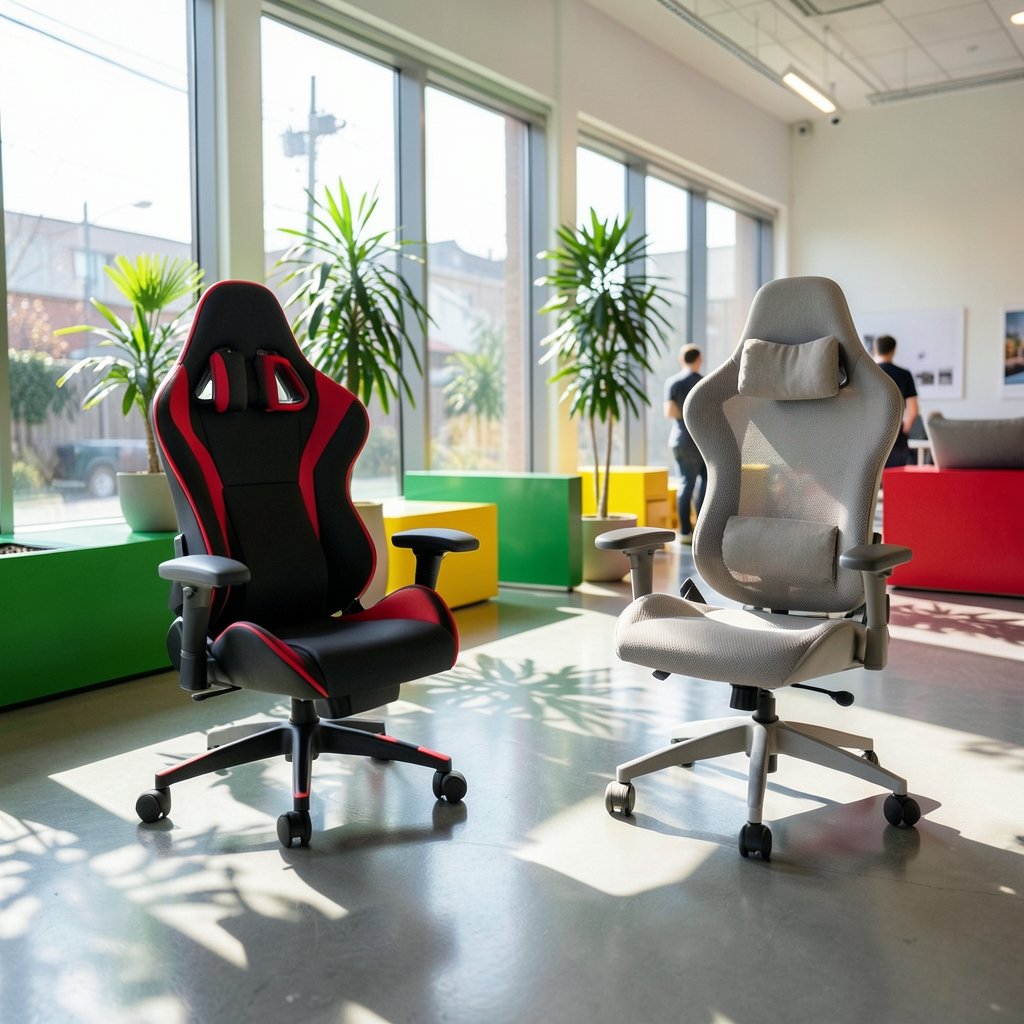
Walk into any gaming setup photo thread and you will see a wall of racing-bucket chairs in black and red. It looks like the standard. It is not the standard. It is marketing.
Here is the uncomfortable truth: gaming chairs are not covered by a dedicated performance standard the way general-purpose office chairs are. The office furniture industry has a recognized testing standard for general office chairs, but “gaming chair” is a category invented by retailers, not a certification. When a box says “esports grade,” that phrase has no defined meaning behind it.
That does not make every gaming chair bad. Plenty are solid. But it means the buyer has to do the evaluating, because nobody else is doing it for them. The useful question is never “is this a gaming chair?” It is “does this chair adjust to my body and hold up under daily load?”
The Four Features That Actually Decide Matches
Ergonomics guidance for seated screen work, including widely used occupational safety resources, keeps circling the same short list. Seat height, lumbar support, and armrest positioning come up again and again. For competitive gaming, add material breathability, because heat and sweat change how you sit after hour two.
Seat height and depth
Your feet should rest flat and your knees should sit roughly level with your hips. If the seat pan is too deep, the front edge digs into the back of your knees and cuts circulation. If it is too shallow, you perch. A height range of roughly 45 to 55 cm covers most adults, but shorter and taller players need to check the actual numbers, not the marketing photos.
Lumbar support that adjusts
Fixed lumbar pillows slide out of place. Adjustable lumbar support, whether built into the backrest or movable, lets you put pressure where your lower back actually curves. This is the single most cited practical criterion in chair-buying guidance from ergonomics sources, and it is the feature cheapest chairs cut first.
Armrests
For competitive play, armrests should move up and down at minimum, and ideally in and out. Your elbows should rest near 90 degrees with shoulders relaxed. Fixed armrests force you to choose between hunched shoulders and floating arms, and neither is good for a long session.
Material and breathability
Mesh backs breathe. PU leather and vinyl do not. In a warm room, a non-breathable back turns into a heat trap within an hour. General ergonomics advice favors mesh in warm environments, and anyone who has played through a summer without air conditioning knows exactly why.
Gaming Chairs vs Office Chairs: An Honest Comparison
| Factor | Racing-style gaming chair | Ergonomic task or office chair |
|---|---|---|
| Lumbar support | Often a loose pillow | Usually built in and adjustable |
| Armrests | Sometimes fixed or 2D | Often 3D or 4D |
| Shoulder room | Side bolsters can restrict movement | Open back, free shoulder movement |
| Breathability | PU leather traps heat | Mesh backs common |
| Look | Fits a gaming room | Fits an office |
| Price range | Wide, from budget to premium | Wide, from budget to premium |
| Recline | Often deep, good for lounging | Usually modest |
The racing-bucket shape comes from car seats, where side bolsters hold a driver in place during cornering. At a desk, you are not cornering. Those bolsters can push your shoulders forward and limit how far your arms can move, which matters in games that need wide mouse sweeps.
That said, many competitive players do use branded gaming chairs, and many others use ergonomic office chairs. Community discussion leans toward office chairs among pros, but there is no rigorous survey backing that up, so treat it as anecdote rather than data. The point is not that one category wins. The point is that shape and adjustment matter more than the label on the box.
If you are building out a full competitive setup, chair choice is one piece of a bigger puzzle. Monitor response time and refresh rate often matter more to your results than the seat under you, and the right pick there depends on what you play. The same logic applies across the desk: every part should earn its place.
What Serious Players Actually Sit In
Spend time in competitive communities and a pattern shows up. Players who log five or more hours a day tend to migrate toward chairs with deep adjustability, whatever the brand. The chair that survives is the one that lets them change position through the session, not the one that looks best on stream.
A practical observation from setup threads: people rarely regret buying adjustability, and they frequently regret buying shape. A chair with a dramatic fixed silhouette feels great for twenty minutes and annoying by hour three. A chair you can tune feels unremarkable on day one and invisible by month six, which is exactly what you want. The best chair is the one you stop noticing. (Ps5 pro vs gaming pc which one actually fits your setup)
That invisibility test is worth applying to every purchase in a gaming room. The gear that disappears into the background is usually the gear that was chosen well, whether it is a chair, a console, or a connection. The option you never think about mid-match is the one doing its job.
Practical Buying Tips That Save Regret Later
Sit in it if you can. Ten minutes in a store beats ten hours of reviews. If you cannot, buy from a retailer with a real return window and read the fine print before checkout.
Check weight capacity against your own weight plus margin. Many gaming chairs list capacities in the 120 to 150 kg range, but specs vary by model and year, so verify the number on the specific product page rather than trusting a category average. A chair rated well above your weight will usually feel sturdier.
Read the warranty length, not the warranty badge. Warranties on gaming chairs commonly run from one to five years depending on the model. The length tells you something about how much the maker trusts the frame.
Budget assembly time. Most chairs ship flat and take 30 to 60 minutes to build. Check whether the tools are included and whether the instructions are legible. A chair that arrives with missing bolts is a return, not a project.
Measure your desk height first. A chair that cannot drop low enough to sit under your desk is a chair you will use wrong. Measure the gap between floor and desk underside before you order anything.
Do not buy for the colorway. The red stitching does not make you faster. If two chairs are equal on adjustment and one costs less because it is plain black, take the plain black one.
Common Mistakes People Make
The biggest mistake is buying the silhouette instead of the fit. People see a streamer in a bucket seat and assume the seat made the player. It did not.
The second mistake is skipping the armrest check. Fixed armrests are the most common regret in budget gaming chairs, and they are hard to fix after purchase.
The third is ignoring heat. A chair that runs hot shortens sessions and encourages slouching as you shift away from the backrest. If your room gets warm, mesh is not a luxury.
The fourth is overbuying recline. A 180-degree recline looks impressive in the spec sheet and gets used approximately never during actual play. Spend that budget on lumbar adjustment instead.
Where the Chair Fits in a Competitive Setup
A chair is a support item, not a performance item. It will not improve your aim. What it can do is remove a source of distraction, and in competitive play, removing distractions is most of the battle. A chair that keeps your shoulders relaxed and your lower back supported lets you stay in the same posture through a long session, which is the whole job.
It also pays to think about the whole room. If you split time between console and PC, the seating decision interacts with how far you sit from the screen. And if you are outfitting a space from scratch, it helps to compare the broader landscape of gaming chairs before locking in a model, since durability reports from long-term owners are worth more than launch-week reviews.
Conclusion
The best gaming chair for competitive play is not the one with the most aggressive styling or the loudest esports branding. It is the one that adjusts to your body, keeps your shoulders free, breathes well enough for a long session, and comes with a warranty and return policy that protect you if it does not work out.
Judge chairs on seat height range, lumbar support, armrest movement, material, weight capacity, and warranty. Treat the “gaming” label as decoration. If a racing-style chair fits those criteria and fits your body, buy it with confidence. If an ergonomic task chair does the job better for less, buy that instead. Your back does not care what the chair is called, and neither should you.
FAQ
Do pro esports players use gaming chairs?
Some do, and some use ergonomic office chairs from brands like Herman Miller or Steelcase. Community discussion suggests office chairs are common among pros, but no rigorous survey confirms the split, so treat any claim about “what pros use” as anecdotal. What matters more is that most serious players prioritize adjustability over branding.
Is a racing-style gaming chair bad for your posture?
Not automatically, but the side bolsters can restrict shoulder movement and encourage a rounded position if the chair does not fit you well. Ergonomics guidance generally favors open, adjustable designs. If you buy a racing-style chair, make sure the lumbar support adjusts and the armrests move, because those features do more for posture than the shell shape.
How much should I spend on a gaming chair?
There is no magic number, but the useful rule is to spend where adjustment lives. A mid-priced chair with adjustable lumbar support and 3D armrests will usually serve a competitive player better than a premium chair with fixed features. Set a budget, then check which chairs in that range offer real adjustability, a warranty of at least two years, and a return window.
Are mesh chairs better than leather for long gaming sessions?
For most people in warm rooms, yes. Mesh backs breathe, and breathability matters once sessions pass the two-hour mark. Leather and PU leather trap heat and can make you shift position constantly. If your room stays cool and you prefer the feel of leather, it can work, but check whether the back has any ventilation channels.
How long should a gaming chair last?
A reasonable expectation is three to five years of daily use, though it depends on build quality, your weight relative to the chair’s capacity, and how often you adjust it. Check the warranty length as a signal: chairs with one-year warranties are usually built to a lower standard than chairs with five-year coverage. Inspect the gas lift and armrest mechanisms first, since those fail before the frame does.
Does chair height really matter for gaming performance?
It matters for comfort, which affects how long you can play without fidgeting. Your feet should sit flat and your knees should be roughly level with your hips. If the chair cannot reach that position at your desk, you will compensate with your shoulders and lower back, and that catches up with you over a long session. Measure your desk before buying.



