
Passwords are the part of security that fails most often. People reuse them, forget them, and type them into fake login pages. The best passwordless authentication tools in 2027 remove that weak point, letting staff sign in with a fingerprint, a face scan, a passkey, or a tap on a hardware key instead.
Going passwordless is no longer a project for large companies only. The tools below work for small teams and growing businesses: identity platforms, passkey managers, and one physical key for your keyring.
This roundup compares seven tools on what they do best, who they suit, and what they cost. Prices are approximate starting prices, so check current pricing before you decide. If you are still weighing the method itself, our comparison of passwordless vs MFA for small business explains when each approach fits.
Key takeaways
- Microsoft Entra ID is the strongest pick for teams already using Microsoft 365.
- Okta and Auth0 suit businesses that need one sign-in across many apps.
- YubiKey hardware keys give the strongest protection for admin and finance accounts.
- 1Password is the easiest way for a small team to start using passkeys.
- Every tool here needs a recovery plan for lost devices, or staff will get locked out.
At a glance: the shortlist
| Tool | Best for | Starting price | Standout limit |
|---|---|---|---|
| Microsoft Entra ID | Microsoft 365 teams | From around $6/user a month | Best inside Microsoft |
| Okta | Many apps, one sign-in | From around $2/user a month | Costs grow with features |
| Auth0 | Customer sign-in for apps | Free tier; paid from ~$35/month | Needs a developer |
| Cisco Duo | Simple team rollout | From around $3/user a month | Passwordless on higher plans only |
| 1Password | Small teams starting fast | From around $7.99/user a month | Not a full identity platform |
| YubiKey | High-value accounts | From around $50 per key | A lost key needs a backup plan |
| Ping Identity | Larger, mixed systems | From around $3/user a month | Setup takes time and skill |
Microsoft Entra ID — Best overall
Microsoft Entra ID, formerly Azure Active Directory, is the identity system behind Microsoft 365, and the simplest passwordless route for any team already paying for Microsoft tools. Passkeys, Windows Hello, and FIDO2 security keys all work inside it.
The strength here is how little extra work it takes. Staff already have Microsoft accounts, so there is no new app to learn and no second directory to keep in sync. Conditional access rules can ask for a stronger check only when something looks risky. The P1 plan starts from around $6/user a month.
Pros: passkeys built in, no new directory to manage, strong admin controls.
Cons: best inside Microsoft 365, some features need higher plans.
Okta — Best for many apps, one sign-in
Okta is a workforce identity platform that connects one sign-in to thousands of apps. Staff sign in once with a passkey or a push approval, then reach email, cloud storage, and accounting tools without typing another password. For a business with many apps, that single front door is the main selling point.
Its passwordless options cover passkeys, biometrics on managed devices, and push sign-in through the Okta Verify app. Admins can set rules per app, so finance can demand a security key while team chat accepts a fingerprint. Basic single sign-on starts from around $2/user a month.
Pros: one sign-in for thousands of apps, per-app security rules.
Cons: passwordless features cost more, admin console is deep.
Auth0 — Best for customer sign-in
Auth0, now part of Okta, is built for a different job: letting your customers sign in to your own app or website without passwords. Instead of building passkey support from scratch, a developer adds Auth0 and gets passkeys, magic links, and biometric login.
For a customer-facing app, this matters because sign-up friction loses customers. A passkey sign-in that takes one fingerprint tap converts better than a password form with reset emails. Auth0 also handles account recovery and bot protection. The trade-off is that it is a developer tool, and the free tier covers only a limited number of users.
Pros: passkeys and magic links for customers, free tier to start.
Cons: needs a developer, aimed at customer apps rather than staff.
Cisco Duo — Best for a simple team rollout
Cisco Duo is known for two-factor authentication, and in 2027 its passwordless features make it a gentle first step for teams not ready for a full identity platform. Staff install the Duo app, approve sign-ins with a tap, and can move to passwordless sign-in on the higher plans.
Duo’s appeal is how little it asks of staff. Enrolment takes minutes, the app is familiar to many people, and admins can see which devices are healthy before they are allowed in. It plugs into Microsoft, Google, and common VPN and cloud tools without a big migration. Pricing starts from around $3/user a month.
Pros: very easy enrolment, familiar app, device health checks.
Cons: full passwordless only on higher plans, aimed at staff not customers.
1Password — Best for small teams starting fast
1Password is a password manager first, but in 2027 it is also one of the easiest ways for a small team to start using passkeys. It stores passkeys alongside passwords, creates them with one click, and syncs them across phone, laptop, and browser, so staff can go passwordless without any admin project.
The advantage is speed: a team can be up and running in an afternoon, with shared vaults for company accounts. 1Password is not a full identity platform, though: it cannot force company-wide sign-in rules the way Entra ID or Okta can. Business plans start from around $7.99/user a month. Our guide to passkeys vs two-factor authentication explains how passkeys in a manager compare with code-based second factors.
Pros: passkeys in an afternoon, works across devices, shared vaults for teams.
Cons: not a full identity platform, cannot enforce company-wide rules.
YubiKey — Best for high-value accounts
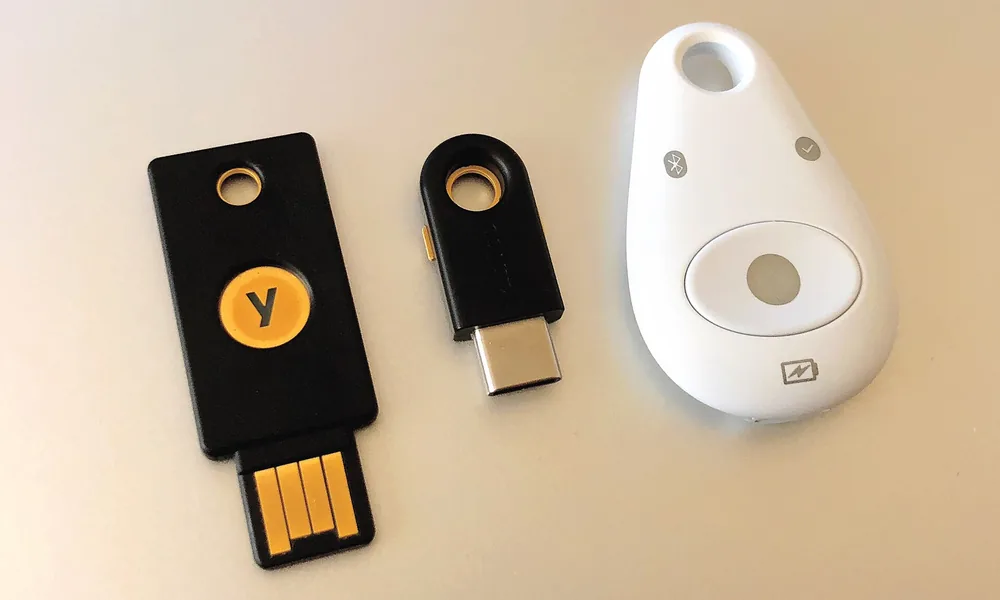
YubiKey is a small hardware key from Yubico that plugs into a USB port or taps over NFC. Touch it, and it proves who you are to the service you are signing in to. Because the key checks the real site address, a fake login page cannot use it, which makes it the strongest option here.
The sensible use is selective: give keys to owners, admins, and anyone with access to money, email, or customer data. A YubiKey 5 starts from around $50 per key, with no monthly fee, and one key can protect many accounts. Keep a second key as a backup somewhere safe, so a lost key is an inconvenience rather than a lockout. Keys are not for everyone, since staff can lose them and some older services do not support them yet, but for the accounts where a breach would be a disaster, nothing else here is as hard to phish.
Pros: strongest phishing resistance here, no monthly fee.
Cons: can be lost, needs a backup key.
Ping Identity — Best for larger, mixed systems
Ping Identity, through its PingOne platform, is built for organisations with a mix of old and new systems: cloud apps, on-site software, and partner portals that all need one sign-in. Its passwordless options include passkeys, biometrics, and mobile push, with rules that differ by user group and device.
Ping’s strength is flexibility. It handles complex setups that simpler tools struggle with, such as staff who need different access levels across several companies, or a business merging two directories. That power comes with setup effort: PingOne is not a quick afternoon install. Pricing starts from around $3/user a month, but the real cost is the time to configure it well.
Pros: handles complex mixed systems, staff and customer identity in one platform.
Cons: setup takes time and skill, heavy for small teams.
How to choose
Start from the tools you already pay for. If your team lives in Microsoft 365, Entra ID is the obvious first look, because passkeys are already there. If your apps are spread across many vendors, Okta or Ping Identity will bring them under one sign-in. If the people signing in are your customers, Auth0 is built for that.
Next, decide how far to go in one step. A small team can start with 1Password passkeys and a few YubiKeys for admin accounts, then move to a platform later. A larger team should pick the platform first and roll passkeys out app by app, beginning with email and cloud storage, where a stolen password does the most damage. Whatever you choose, plan recovery first: a second registered device, a backup key in a safe place, or an admin reset process. Our roundup of the best AI security platforms for business shows how identity fits into a broader security setup.
Checklist: before you pay
- Check that the tool supports passkeys on the apps your team uses every day.
- Test the free trial with five real staff accounts before rolling it out.
- Write down the recovery plan for a lost phone or key, and test it once.
- Confirm the starting price covers passwordless features, not just sign-in.
- Make sure staff can still sign in when travelling or on a new device.
- Check how you export your data and leave.
Frequently asked questions
What is passwordless authentication?
Passwordless authentication proves who you are without a typed password. Common methods are passkeys unlocked by a fingerprint or face scan, magic links sent to your email, and physical security keys you tap. Nothing secret is typed or stored, so a phishing page has nothing to steal.
Are passkeys safer than passwords?
Yes, in most cases. A passkey is bound to the real service it was created for, so it will not work on a fake login page. Passwords can be reused, guessed, leaked in breaches, and typed into lookalike sites, while passkeys remove those risks. They still depend on keeping the device safe.
Do I still need two-factor authentication with passwordless tools?
Often, no, because a passkey or a security key already proves two things: something you have, the device or key, and something you are, your fingerprint or face. Some businesses still add a second check for their most sensitive systems, such as finance tools.
What happens if I lose my phone or security key?
You use your recovery method. Passkeys usually sync to another device signed into the same platform account, so you can sign in from a laptop and remove the lost phone. With a hardware key, you use the backup key you registered in advance. That is why setting up recovery early matters.
Can a small business afford passwordless tools?
Yes. Passkeys are built into tools many small businesses already pay for, such as Microsoft and Google accounts, and password managers like 1Password start from around $8 per user a month. A few hardware keys for admin accounts cost around $50 each with no monthly fee.
Which passwordless tool should a small team start with?
Start with what you already have. If you use Microsoft 365, turn on passkeys in Entra ID. If you want the fastest start with no platform change, use 1Password for passkeys and buy YubiKeys for the accounts that matter most. Move to Okta when the number of apps makes one sign-in worth the effort.
The bottom line
For most teams in 2027, Microsoft Entra ID is the best overall passwordless tool, because it is already inside Microsoft 365 and needs no extra system. Teams with many apps should look at Okta, customer-facing apps should look at Auth0, and small teams should look at 1Password with a few YubiKeys for the accounts that matter most.
Whichever tool you pick, the win is the same: no more passwords to steal, reset, or forget. Roll it out one app at a time and set up recovery first.