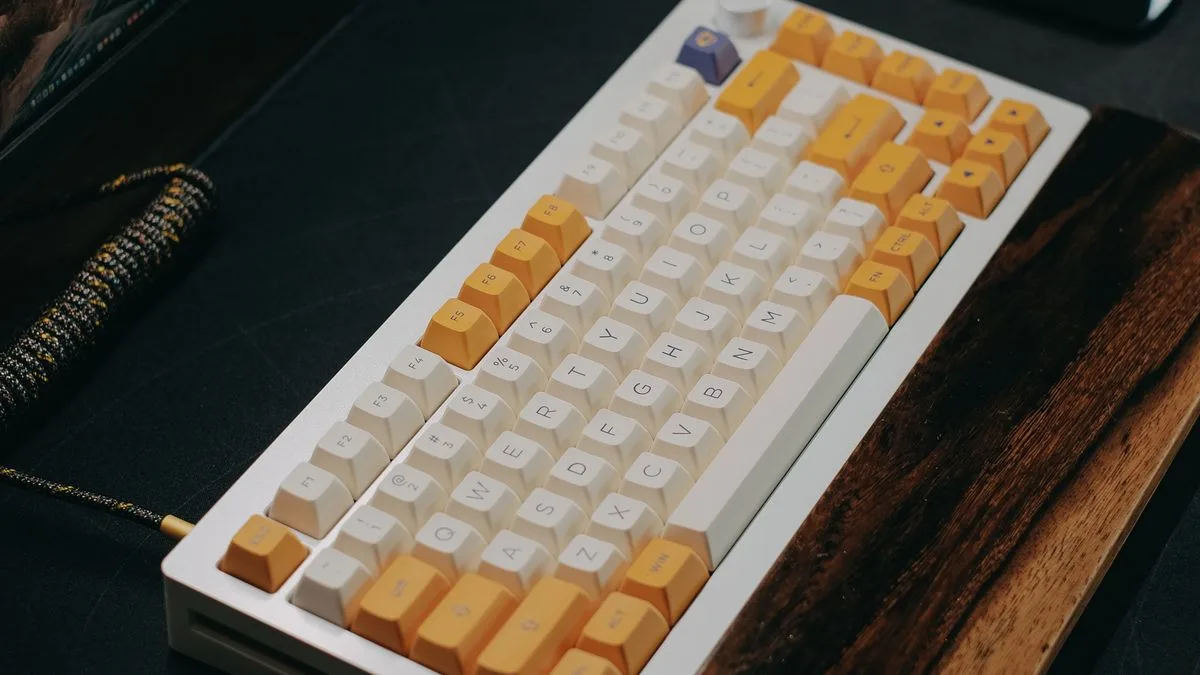
Every office worker types thousands of words a day, yet the keyboard is often an afterthought: it arrived with the computer, or it is whatever the office ordered in bulk years ago. But the switch under each key shapes how typing feels, how much noise you make, and how tired your hands are by five o’clock.
The choice comes down to two designs. Mechanical keyboards use a separate switch under every key, giving a crisp press with a click or bump. Membrane keyboards use a rubber sheet under the keys, making them quieter, flatter and far cheaper. Both type a report, but they feel very different after eight hours.
This comparison looks at the two designs the way an office typist experiences them: feel, noise, durability, price and the unwritten rules of a shared workspace. There is no single winner, but by the end you will know which one belongs on your desk.
Key takeaways
- Mechanical keyboards feel more precise and last longer, with switches rated for tens of millions of presses.
- Membrane keyboards are quieter, slimmer and much cheaper, which makes them the safe default for shared offices.
- Noise is the deciding factor in open-plan offices: a clicky mechanical board can annoy colleagues within a few desks.
- Quiet linear mechanical switches close much of the noise gap, but they cost more than a membrane board.
- Try before you buy when you can; switch feel is personal, and a five-minute test beats any review.
Mechanical vs membrane keyboards at a glance
| Feature | Mechanical | Membrane |
|---|---|---|
| Typing feel | Crisp, distinct press per key | Soft, mushy press |
| Noise | Loud to moderate, depending on switch | Quiet |
| Durability | 50 to 100 million presses per key | 5 to 10 million presses per key |
| Price | From around $40; good boards $80 to $150 | From around $15; most under $40 |
| Size and weight | Thicker and heavier | Slim and light |
| Repairs | Switches and keycaps often replaceable | Usually replaced whole |
| Best for | Heavy typists who want feedback | Shared offices and tight budgets |
Prices are approximate starting prices; check current pricing before buying, because keyboard prices change often and sales are frequent.
Mechanical keyboards: how they feel and sound

A mechanical keyboard has a separate switch under each key, usually a spring-loaded mechanism that clicks or bumps at a precise point in the press. That feedback tells your fingers the key registered without pushing it all the way down. The result is a lighter, more confident rhythm, and many heavy typists make fewer mistakes because each press is deliberate.
Switches come in three families. Clicky switches click with every press and are the loudest. Tactile switches give a small bump you can feel but stay quieter. Linear switches press smoothly with no bump and no click, and are the quietest mechanical option. Choosing the switch matters more than choosing the brand.
The trade-off is size and sound. Mechanical boards are thicker and heavier, and even the quietest switch is louder than a rubber dome. In a private office that hardly matters; in an open-plan room, your colleagues will hear you, and that is the main reason people switch back.
Membrane keyboards: quiet, low and cheap
A membrane keyboard has no individual switches. Under the keys sits a rubber sheet, and pressing a key pushes a small dome onto a circuit board. The press feels soft and uniform, with no click and no bump. It is the design in almost every keyboard that ships with an office computer.
The strengths are practical. Membrane boards are quiet, making them the polite choice for shared spaces. They are slim and light, fitting easily in a bag and leaving more desk room. And they are cheap: a decent one costs less than a lunch, so an office can equip a whole floor for the price of two or three mechanical boards.
The weakness is feel and lifespan. The rubber domes wear out, and after a year or two of heavy use the keys feel uneven. The rated lifespan is around five to ten million presses per key, a fraction of a mechanical switch. For light typing that is fine; for someone writing all day, the difference shows up in the second year.
Typing feel, head to head
Feel is where mechanical keyboards win most clearly. The distinct actuation point means you know exactly when a key has registered, and you can press just past that point instead of hammering each key down. Over a long document that adds up: less force per key, less fatigue, and a steadier rhythm. Anyone who types for a living notices the difference within a day.
Membrane boards are not bad for typing, just less informative. Every key feels roughly the same, and the only feedback is the key hitting the bottom. Short emails feel identical on either design. The gap opens on long sessions, where the mechanical board’s feedback keeps your fingers honest and the membrane board starts to feel vague.
Ergonomics matter too. Mechanical boards sit higher, so a wrist rest helps. Membrane boards are lower and flatter, suiting people who type with wrists flat on the desk. Neither design is automatically better for your wrists; the right height, a good chair and regular breaks matter more than the switch. Our roundup of the best office chairs in 2027 covers the seating side of a comfortable setup.
Noise and office etiquette
Noise is the question that decides most office purchases. A clicky mechanical keyboard can be heard several desks away, and in a quiet open-plan office that sound becomes everyone’s problem. The sharp, repeated clicking is hard to ignore, and colleagues will notice it even if they are too polite to say so.
That does not mean mechanical keyboards are banned from offices. Linear switches with rubber O-rings under the keycaps cut the noise substantially, and tactile switches sit in the middle: audible up close, but not disruptive at a distance. If you work from home or in a private office, noise is a non-issue and the mechanical board’s feel wins outright.
Membrane keyboards sidestep the whole debate. They are quiet enough that nobody will ever comment on your typing, which is exactly what you want in a shared space. If you sit in open plan and cannot test a quiet mechanical board first, membrane is the safe, polite default.
Durability and value over time
A mechanical switch is typically rated for fifty to one hundred million presses, and the keycaps and switches on many boards can be replaced individually. A good mechanical keyboard can last a decade of daily office use, and a worn keycap is a five-minute fix. Over ten years, one $120 mechanical board can cost less than replacing a $25 membrane board every eighteen months.
Membrane boards lose that long-term maths. The rubber domes degrade with use, and once a few keys feel dead, the whole board is finished because the domes cannot be replaced. Spills are worse too: liquid under a membrane sheet is hard to clean, while a mechanical board can often be dried out key by key.
Value also depends on the rest of your desk. A standing desk changes how your arms meet the keyboard, and our guide to the best standing desks in 2027 explains how to set the height so your wrists stay neutral. Spending a little more on the whole setup usually beats spending everything on one component.
The verdict: which one for office typing
For most office typists, the answer splits by workplace. In a shared or open-plan office, a quiet mechanical keyboard with linear switches is the best typing experience you can buy, but only with the quiet switches and O-rings. If you cannot be sure about noise, or your budget is tight, a membrane keyboard is the sensible choice.
If you work from home or in a private office, the mechanical keyboard wins outright. The feel, the durability and the repairability justify the price, and noise is nobody else’s problem. Pick a tactile or linear switch, skip the clicky ones unless you love the sound, and give yourself a week to adjust before judging it.
Either way, pair the keyboard with a machine that suits office work. A light, quiet laptop keeps the whole desk calm, and our roundup of the best ultrabooks in 2027 is a good place to start if your laptop is due for replacement.
Checklist: choosing an office keyboard
Use these checks before you spend money on a keyboard you will use for years.
- Test the switch type first: clicky, tactile or linear feel very different, and a short test beats any review.
- Match the noise to your office: quiet switches or membrane for open plan, any switch for a private room.
- Check the layout: full-size, tenkeyless or compact, and whether you actually use a number pad.
- Think about height: a tall mechanical board often needs a wrist rest to stay comfortable.
- Count the cost over years, not just the price tag: a durable board can be cheaper long-term.
- Confirm the connection: wired is simplest for a desk, wireless needs charging or batteries.
Frequently asked questions
Are mechanical keyboards better for typing?
For most heavy typists, yes. The distinct actuation point gives clearer feedback, which usually means fewer mistakes and less finger fatigue over long sessions. For short emails and light typing, the difference is small and a membrane keyboard is perfectly fine.
Are mechanical keyboards too loud for an office?
Clicky switches usually are, but linear and tactile switches are much quieter, especially with O-rings fitted under the keycaps. In a private office or at home, noise is not an issue at all. In open plan, test a quiet switch first or stick with membrane.
How long does a mechanical keyboard last?
Switches are typically rated for fifty to one hundred million presses, so a good board can last a decade of daily office use. Keycaps and individual switches can usually be replaced, which extends the life further. Membrane boards typically last one to three years of heavy use.
Why are membrane keyboards so cheap?
They use a single rubber sheet instead of dozens of individual switches, which is far cheaper to manufacture. The simple design also makes them slim and light. The trade-off is a shorter lifespan and a softer, less precise feel.
Can I make a mechanical keyboard quieter?
Yes. Fitting rubber O-rings under the keycaps softens the bottom-out sound, choosing linear switches avoids the click entirely, and a desk mat absorbs some vibration. A quiet switch plus O-rings can bring a mechanical board close to membrane noise levels.
Which keyboard is best for a shared office?
A membrane keyboard is the safest default because it is quiet and cheap. If you prefer mechanical, choose a linear-switch board with O-rings and test it at your desk for a week; if nobody notices the sound, you have found your answer.
The bottom line
Mechanical keyboards are the better typing tool: clearer feedback, longer life and repairable parts. Membrane keyboards are the better office citizen: quiet, slim and cheap enough to replace without thinking. The right choice depends on where you sit and how much you type, not on which design wins a specification sheet.
If you type for a living and your workspace allows it, buy a quiet mechanical keyboard and give it a week. If you share a quiet room or you just need something that works, buy a membrane keyboard and spend the money you saved on a better chair or a good desk setup. Either way, the best keyboard is the one you stop thinking about while you work.