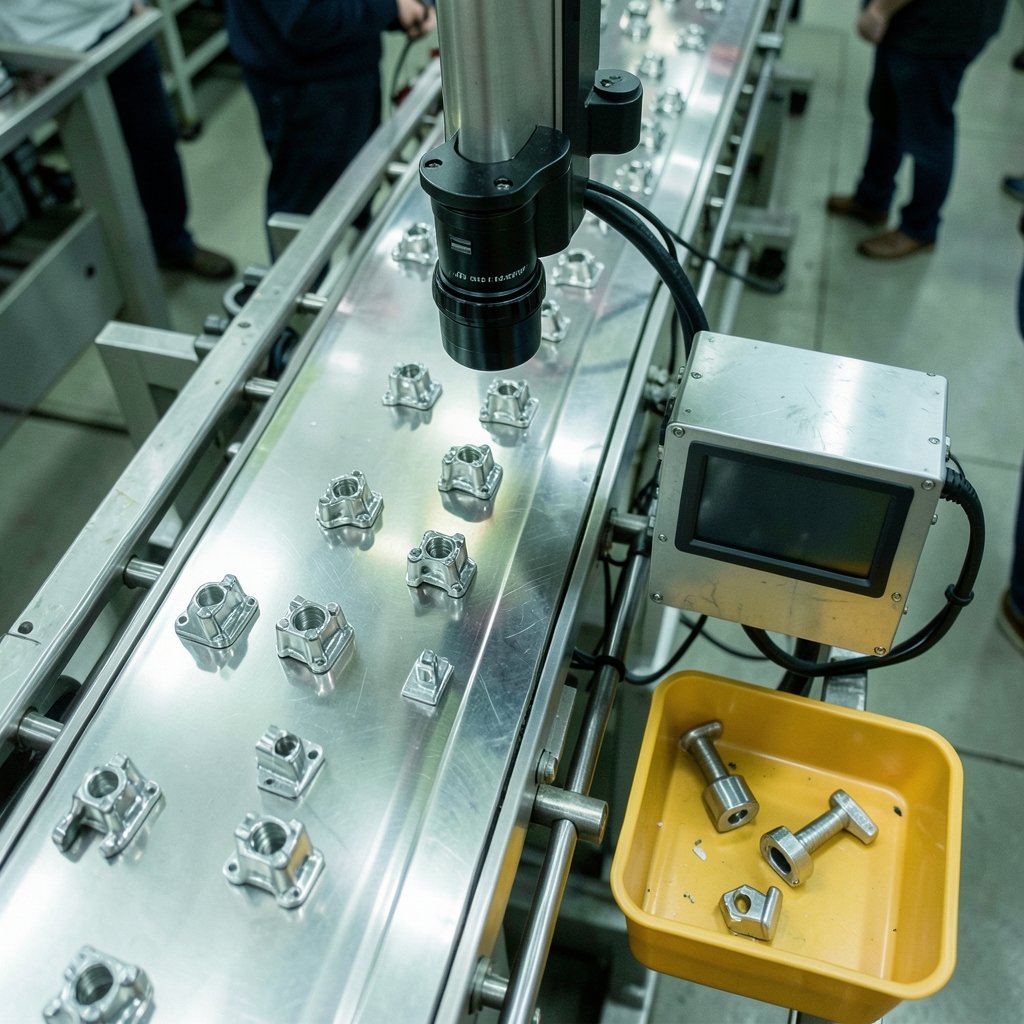
When engineers at a factory in Germany needed to catch defective parts on an assembly line, they had roughly 40 milliseconds to react before the part moved on. A round trip to a distant data center could eat most of that window. So they put the computing power on the factory floor instead. That single decision captures the whole edge-versus-cloud debate in miniature: it isn’t about which model is better, it’s about which one fits the physics of the problem.
The cloud has dominated enterprise computing for over a decade, and for good reason. But as more devices generate more data faster than ever, a second layer of computing has grown up around it. Understanding where each one belongs is now a core skill for anyone building or buying technology.
The Cloud, Defined Without the Marketing Fog
The U.S. National Institute of Standards and Technology gave the world its most durable definition of cloud computing in 2011. The cloud, per NIST, has five essential traits: on-demand self-service, broad network access, resource pooling, rapid elasticity, and measured service. It comes in three service models (software, platform, and infrastructure as a service) and four deployment models (private, community, public, and hybrid).
In plain terms, the cloud is a set of large, centralized facilities packed with servers, storage, and networking. You rent capacity by the minute or the gigabyte, and someone else handles the hardware. It’s brilliant for workloads that tolerate a bit of network delay: data warehousing, machine learning training, web hosting, backups, and business applications. If you want a deeper comparison of the major providers, this breakdown of AWS vs Azure vs Google Cloud covers the trade-offs well.
The catch is distance. Every request has to travel from the user or device to a data center and back. That journey is usually fast, but it’s never free.
What Edge Computing Really Means

Edge computing moves processing power closer to where data is created, whether that’s a sensor on a wind turbine, a camera in a retail store, a local network device in a hospital, or a cell tower in a city. Instead of shipping every byte to a central cloud, the edge handles part of the work locally and sends only what matters upstream.
One caveat: there is no single agreed definition of “edge.” Telecom engineers mean something different from cloud providers, who mean something different again from IoT device makers. The term gets stretched constantly. A useful mental model is a spectrum: device edge (the sensor itself), near edge (a local network device or on-premises server), and far edge (a regional data center or telecom node). The further out you go, the more latency you cut but the less computing muscle you have. (Edge computing)
This matters practically. When someone says “we’re going edge,” the first question worth asking is which edge, and how much compute actually lives there.
The Core Trade-Offs, Side by Side
Here’s where the two models diverge in ways that affect real decisions:
| Factor | Cloud Computing | Edge Computing |
|---|---|---|
| Latency | Tens to hundreds of milliseconds, depending on distance | Single-digit to low double-digit milliseconds |
| Bandwidth use | Sends all data to a central location | Filters and aggregates locally, cutting backhaul traffic |
| Scalability | Near-limitless, elastic on demand | Limited by local hardware at each site |
| Cost model | Pay-as-you-go, predictable at scale | Higher upfront hardware and maintenance costs |
| Data sovereignty | Data leaves the site | Data can stay on-premises |
| Best for | Analytics, training, storage, long-running apps | Real-time control, safety systems, local automation |
The bandwidth point deserves emphasis. A single connected car or industrial machine can generate gigabytes per hour. Pushing all of that to the cloud is technically possible but economically painful. Processing locally and transmitting only summaries or exceptions is often the difference between a viable deployment and an unaffordable one.
Why Latency Isn’t the Only Reason to Go Edge
Most discussions stop at speed. That’s a mistake. Three other forces push workloads toward the edge:
Connectivity gaps. Factories, mines, ships, and remote farms don’t always have reliable internet. An edge node keeps operating when the link drops; a cloud-only system stops dead.
Regulation and privacy. Health records and industrial control data sometimes legally or contractually can’t leave a site. Local processing sidesteps the problem.
Cost of data transfer. Cloud egress fees are a recurring complaint among engineering teams. Filtering data at the edge before transmission can shrink those bills substantially.
There’s also a practical wrinkle many teams learn the hard way: edge deployments multiply your operational surface area. Managing 200 remote sites with their own hardware, power, and physical security is genuinely harder than managing one cloud region. Teams that underestimate this end up with a fleet of unpatched boxes, which is a security problem waiting to happen.
How the Cloud Fits Into an Edge Strategy
The framing of “edge versus cloud” is slightly misleading, because in practice almost every serious deployment uses both. The edge handles what must happen now; the cloud handles what must happen at scale.
A typical pattern looks like this:
- Devices at the site generate raw data continuously.
- An edge node runs inference or rule-based logic in real time, acting within milliseconds.
- The edge filters, compresses, and forwards only relevant data upstream.
- The cloud stores the full history, trains and retrains models, and coordinates thousands of sites.
- Updated models get pushed back down to the edge fleet.
This split is why cloud providers have spent years building out their own edge offerings, from regional zones to on-premises racks that sit in customer facilities. The two tiers are designed to work together. For a closer look at how cloud giants are extending their reach into private infrastructure, this piece on Apple’s private cloud compute and Google Cloud is a useful case study. (NIST Cloud Computing Program)
The same logic applies to storage decisions. Teams often assume everything belongs in the cloud, but local storage still wins for latency-sensitive caching and offline resilience. A clear comparison of cloud storage vs local storage helps sort out which data belongs where.
Where Edge AI Changes the Calculus
The rise of edge AI has accelerated this shift considerably. Running trained models directly on devices or local gateways means a camera can detect a safety hazard without ever contacting a server. It also means sensitive footage never leaves the building.
The trade-off is real: edge hardware is constrained. Models often need to be pruned, quantized, or otherwise slimmed down to run within tight memory and power budgets. That’s an engineering discipline of its own. If you want the mechanics, this explanation of what edge AI is and how it works walks through the pipeline from model compression to on-device inference.
The practical lesson from teams doing this: prototype on the cloud, deploy on the edge, and always test with the actual hardware and actual network conditions. A model that runs beautifully on a development machine can crawl on a device with a fraction of the memory.
Common Mistakes Worth Avoiding
Having watched many organizations stumble through this transition, a few patterns repeat:
Over-engineering the edge. Not every workload needs local compute. If a 100-millisecond response is fine, the cloud is simpler and cheaper. Moving things to the edge “because it’s modern” adds cost without benefit.
Ignoring the operational burden. Edge sites need remote management, over-the-air updates, monitoring, and a plan for when hardware fails in a location nobody visits. Budget for this from day one.
Forgetting security at the perimeter. Every edge node is a potential entry point. Physical access, unpatched firmware, and default credentials are recurring weak spots.
Assuming latency numbers from a datasheet. Real-world latency depends on the whole path; the compute location is one part. Measure it end to end.
Skipping the data pipeline design. Deciding what the edge sends upstream is as important as deciding what it computes. Get this wrong and you either drown the network or starve the cloud of useful data.
When to Choose Which
A rough decision guide that holds up in practice:
Choose cloud-first when the workload is analytical, batch-oriented, or needs elastic scale, and when users can tolerate network delay. Training models, running business software, hosting websites, and storing archives all fit here.
Choose edge-first when the workload is real-time, safety-critical, bandwidth-heavy, or constrained by connectivity or regulation. Machine control, video analytics, autonomous systems, and remote monitoring all fit here.
Choose hybrid for almost everything else, which is most things. The edge does the urgent work, the cloud does the heavy lifting, and a well-designed pipeline connects them.
Conclusion
The edge versus cloud question dissolves once you stop treating them as rivals. The cloud remains the best place to store, train, and coordinate at scale. The edge is the best place to act fast, stay resilient, and keep sensitive data close. The organizations that get this right don’t pick a side; they design a pipeline where each layer does what it’s genuinely good at. The real skill isn’t choosing between them. It’s knowing where the boundary belongs for your specific workload, and building the plumbing that makes the handoff invisible.
Frequently Asked Questions
Is edge computing replacing cloud computing?
No. Edge computing complements the cloud rather than replacing it. Most real deployments use both: the edge handles time-sensitive processing locally, while the cloud manages storage, model training, and coordination across many sites. Treating them as competitors usually leads to worse architecture and higher costs.
What is the main difference between edge and cloud computing?
The main difference is where processing happens. Cloud computing runs workloads in large centralized data centers accessed over a network, while edge computing runs them close to the data source, such as on a device, a local network appliance, or a local server. That placement changes latency, bandwidth use, cost structure, and how much data leaves the site.
How much latency does edge computing actually save?
It depends heavily on distance and network conditions. Cloud round trips can add tens to hundreds of milliseconds, while local edge processing can respond in single-digit to low double-digit milliseconds. The only reliable way to know your savings is to measure the full path end to end in your own environment rather than trusting vendor figures.
Do small businesses need edge computing?
Usually not, unless they run real-time systems, operate in locations with poor connectivity, or face strict data residency rules. For most small businesses, cloud services are simpler, cheaper, and easier to maintain. Edge makes sense when a specific technical constraint forces it, not as a default.
What kinds of workloads benefit most from edge computing?
Real-time control systems, video and image analytics, industrial automation, autonomous vehicles, remote monitoring, and any application where data volume or regulation makes central processing impractical. Workloads that tolerate delay and need elastic scale are usually better served by the cloud.
Is edge computing more secure than cloud computing?
Not automatically. Edge can improve privacy by keeping sensitive data on-site, but it also expands the attack surface with many physically accessible devices that need patching and monitoring. Cloud providers invest heavily in centralized security. The right answer depends on how well each environment is actually operated.
The practical takeaway is to document your latency budget, data volumes, and regulatory constraints before committing to an architecture. Those three inputs usually make the boundary obvious. From there, invest in remote fleet management and observability early, because an edge deployment you can’t see into is one you can’t trust. Start small with a single pilot site, measure real performance against the cloud baseline, and expand only once the operational model holds up.