

Can a robot vacuum really be scared of the dark? In a weird way, yes. If you own a dark rug, you may have watched your robot stop dead in the middle of the floor, spin in place, or refuse to cross a perfectly flat carpet like it’s standing at the edge of a cliff. Nothing is wrong with the machine. Its cliff sensors are simply misreading the surface, and the result looks a lot like stage fright.
This is one of the most common and least understood robot vacuum quirks. It is also fixable in most cases, once you know what the sensors are doing and why dark fibers confuse them. Below is a practical breakdown of the mechanism, the workarounds that actually help, and the ones that quietly void your warranty. (Businessperson’s Guide to Federal Warranty Law)
What Cliff Sensors Actually Do
Most robot vacuums use small infrared (IR) emitter and receiver pairs mounted near the front edge of the chassis. The emitter fires a beam of invisible light downward. If the floor is there, some of that light bounces back to the receiver, and the robot concludes the ground is solid. If the beam hits a staircase or a ledge, no light returns, and the robot stops or backs away.
It is a simple, cheap, and remarkably effective design. It is also fragile in one specific way: it depends on the floor reflecting light back. Anything that swallows the beam instead of bouncing it can trick the sensor into thinking there is nothing underneath.
Why Black Carpet Fools the Sensor
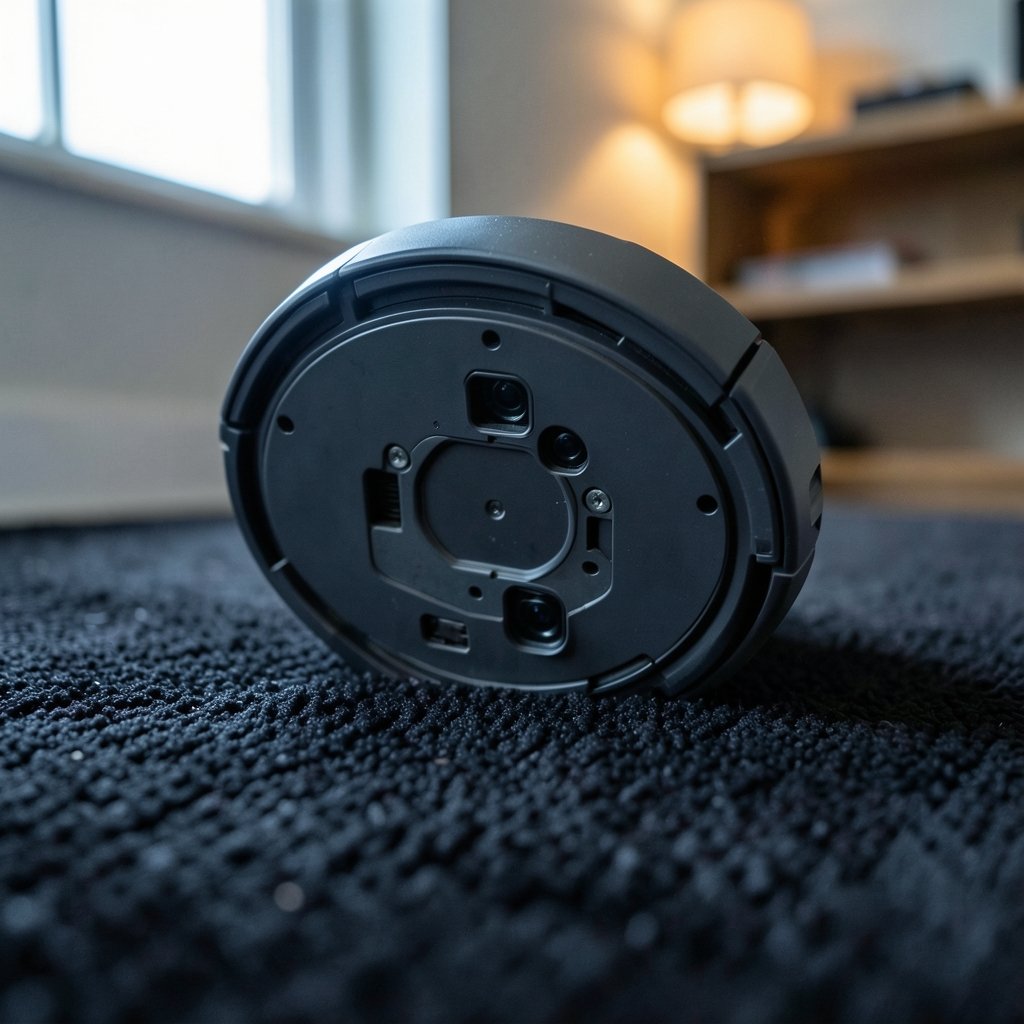
Dark, matte surfaces absorb infrared light rather than reflecting it. A black carpet is close to a worst-case scenario for a reflective sensor. The beam goes down, the pile soaks it up, almost nothing comes back, and the robot registers a drop-off that is not there.
Carpet makes this worse than a black hard floor. Carpet pile scatters light in many directions and traps it between fibers, so even a surface that looks slightly glossy to your eye can read as a void to the sensor. This is an inference from how the sensor physics work rather than a formally tested figure, but it matches the pattern users report again and again: black hard floors sometimes work fine, black rugs often do not.
A few variables change how badly a given robot struggles:
| Factor | Effect on Cliff Sensor Behavior |
|---|---|
| Carpet color | Black and very dark navy absorb the most IR light |
| Carpet finish | Matte and high-pile absorb more than low-pile or slightly shiny fibers |
| Lighting in the room | Usually minor, but bright direct sun can add its own IR noise |
| Sensor cleanliness | Dust and hair film reduce signal strength and worsen false stops |
| Model and firmware | Sensor fusion and thresholds vary widely between brands |
The last row matters most. Two robots with identical-looking sensors can behave completely differently on the same rug because one uses sensor fusion (bump sensors, wheel-drop detection, and motion data) to second-guess a suspicious cliff reading, while the other trusts the IR beam alone.
The Symptoms You Will Recognize
False cliff detection rarely looks like an error message. It looks like odd behavior:
- The robot stops at the edge of a dark rug and refuses to move forward.
- It stutters, backs up, and approaches the same spot from a different angle over and over.
- It spins in place on the rug as if trapped.
- It avoids an entire room that contains a dark carpet.
- It cleans the light flooring perfectly and skips the dark area completely.
If any of that sounds familiar, you are not dealing with a broken robot. You are dealing with a sensor that is doing its job a little too well on a surface it was never tuned for.
Start With the Boring Fixes
Before assuming the worst, rule out the simple stuff. A surprising number of “black carpet problems” are actually dirty-sensor problems.
- Clean the cliff sensors. Wipe the small windows underneath the front edge with a dry microfiber cloth. Check your manual for exact locations, since some models hide them behind small clear covers.
- Remove hair and dust film. A thin layer of dust on the emitter or receiver weakens the signal and makes dark surfaces fail sooner.
- Update the firmware. Sensor thresholds and fusion logic are sometimes adjusted in updates. Check the app before you buy anything.
- Test with a light-colored mat. Lay a pale towel over part of the black rug. If the robot crosses the towel happily but stops on the carpet, you have confirmed the diagnosis.
That last test is the single most useful five-minute check you can do. It separates a sensor-reflectivity problem from a navigation, mapping, or wheel problem.
Workarounds That Actually Help
Once you know the cause, you have a few realistic options. None of them are perfect, and each has trade-offs.
Add a Lighter Border or Mat
The simplest fix is to change what the sensor sees. A light-colored runner along the leading edge of a dark rug, or a pale mat at the doorway, gives the robot a reflective surface to read as it approaches. It is not elegant, but it works, and it does not touch the hardware.
Use Virtual Walls or No-Go Zones
If the black carpet is in a room the robot keeps avoiding, stop fighting it. Map the area and set a no-go zone so the robot skips the rug cleanly instead of stalling on it. You lose carpet cleaning but gain a robot that finishes the rest of the house without drama. For homes with a lot of dark flooring, this is often the sanest long-term answer.
Choose a Model With Better Sensor Fusion
Some robots handle dark surfaces noticeably better than others because they cross-check the IR reading against wheel-drop sensors and bump data. If you are shopping and dark carpet is a priority, this is worth researching before you buy. A good starting point is a roundup of the best vacuum for carpet, where carpet performance and sensor behavior get tested together rather than in isolation.
Consider a Different Cleaning Tool for That Room
Sometimes the right answer is a different machine. A corded upright does not care what color your carpet is. If the dark rug is the main event, a dedicated carpet vacuum sidesteps the entire sensor problem. The same logic applies if you are weighing robot versus manual options for pet hair, where best robot vacuums for pet hair covers which models cope with dense, dark fibers without stalling.
The Workarounds That Backfire
Search forums long enough and you will find people covering cliff sensors with translucent tape, foil, or tape over the windows entirely, or disabling the sensors in software. It is worth being blunt about this: those tricks defeat a safety feature designed to stop the robot from tumbling down stairs.
Covering or disabling cliff sensors can:
- Let the robot drive off a staircase or ledge.
- Void the warranty on many models.
- Cause erratic navigation as the robot loses a key input.
- Create a fall hazard in multi-level homes.
Manufacturers generally warn against it, and the trade is bad. You are trading a minor annoyance on one rug for a genuine risk to the machine and anything below it. If a robot cannot handle your dark carpet safely, zone it out or use a different vacuum. Do not blind it.
What to Check Before Buying
If dark carpet is a known issue in your home, a little homework saves a lot of frustration. Ask these questions before you commit:
- Does the model use wheel-drop sensors in addition to IR cliff sensors?
- Do reviews or owner threads mention dark-floor or black-carpet behavior?
- Does the app support no-go zones and per-room scheduling?
- Is the firmware actively maintained?
There is no single spec sheet line that says “handles black carpet,” which is exactly why owner reports and hands-on testing matter more than marketing copy. The same principle applies across categories: real-world behavior on tricky surfaces beats a feature list every time, whether you are comparing a best vacuum mop combo or a best car vacuum for a messy trunk. (Robotic vacuum cleaner)
A Note on How Common This Is
Black-carpet cliff sensor trouble is widely reported in owner forums and appears in manufacturer support discussions about dark flooring, though it is rarely quantified in official testing. That gap matters. It means you should treat claims of a universal fix with suspicion. Behavior varies by model, firmware version, carpet color and gloss, and even room lighting. What rescues one robot may do nothing for another.
The practical takeaway is to test your own setup rather than trust a blanket claim. The towel test above takes five minutes and tells you more than any spec sheet.
When It Is Not the Carpet
Not every stall on a dark rug is a cliff sensor issue. Rule out these before you blame the sensors:
- Tangled brushes or wheels causing the robot to stop mid-clean.
- A stuck or dirty wheel-drop sensor giving false lift errors.
- Mapping errors where the robot thinks a wall exists where none does.
- Low battery behavior that looks like hesitation near the end of a run.
If the robot stops in the same place every time and only on the dark rug, sensors are the likely culprit. If it stops randomly, look elsewhere first.
Conclusion
Robot vacuum cliff sensors are simple devices with one blind spot, and black carpet sits right in it. Dark, matte fibers absorb the infrared beam, the robot reads “no floor,” and it refuses to cross a surface that is perfectly safe. The fix is rarely dramatic: clean the sensors, update the firmware, run the towel test, and then choose between a lighter border, a no-go zone, or a model with smarter sensor fusion. Skip the tape-and-foil tricks, which trade a small annoyance for a real safety risk. Understand what the sensor is seeing, and the mystery of the robot that fears your rug turns into a solvable problem.
Frequently Asked Questions
Why does my robot vacuum stop on black carpet?
Dark, matte carpet absorbs the infrared light that cliff sensors use to detect the floor. With little light bouncing back, the robot interprets the carpet as a drop-off and stops or backs away to avoid falling.
Is a black carpet dangerous for my robot vacuum?
No. The carpet itself is harmless. The risk comes from workarounds that disable or cover the cliff sensors, which can let the robot drive off stairs or ledges. Keep the sensors working and manage the carpet with zones or a lighter mat instead.
Will a firmware update fix black carpet detection?
Sometimes. Some manufacturers adjust sensor thresholds and fusion logic in updates, which can reduce false cliff stops. It is worth checking the app before buying new hardware, but results vary by model and are not guaranteed.
Can I just cover the cliff sensors with tape?
It is strongly discouraged. Covering or disabling cliff sensors defeats a safety feature, can void your warranty, and creates a genuine fall hazard in homes with stairs. Use no-go zones or a different vacuum instead.
Do all robot vacuums struggle with dark floors?
No. Behavior varies widely by brand, model, firmware, and the specific carpet. Models that combine IR cliff sensors with wheel-drop detection and bump sensors tend to handle dark surfaces better than those relying on the IR beam alone.
What is the quickest way to confirm the carpet is the problem?
Lay a light-colored towel or mat over part of the dark rug and run the robot. If it crosses the pale surface without stopping but stalls on the dark carpet, the cliff sensors are misreading the floor.



